Why flat-fee UGC breaks at volume, and how to combine a low base fee with performance bonuses, caps, and eligibility rules so every creator is paid for reach and your budget stays protected.
Reading time6 min read
Written by
UpdatedSeptember 2026
This is the first chapter of the brand course because pay structure decides everything that follows: how many videos you can afford, which creators stay, and how hard they work on each hook. The model here is the one behind high-volume organic programs, also called Canvas UGC: many creators, many videos, paid for the reach they generate.
Why modern feeds demand high volume
You can't post two or three "perfect" videos and expect them to carry organic distribution for months. Organic algorithms are hungry for content for two reasons:
Creative fatigue happens in days, not months. Social algorithms optimize for immediate engagement. When the platform shows your audience the same angle or style several times, people swipe away faster and your distribution collapses. Organic channels need a constant supply of fresh variations.
The organic feed is a free testing ground. Instead of guessing what your audience wants, you let the algorithm find buyers for you. It reads the hooks, text, and visual angles in your videos. With 3 videos you test 3 concepts. With a high-volume content canvas of 30 videos, you give the algorithm 30 chances to find different pockets of buyers without spending a dollar on ad placement.
The problem with flat-fee UGC
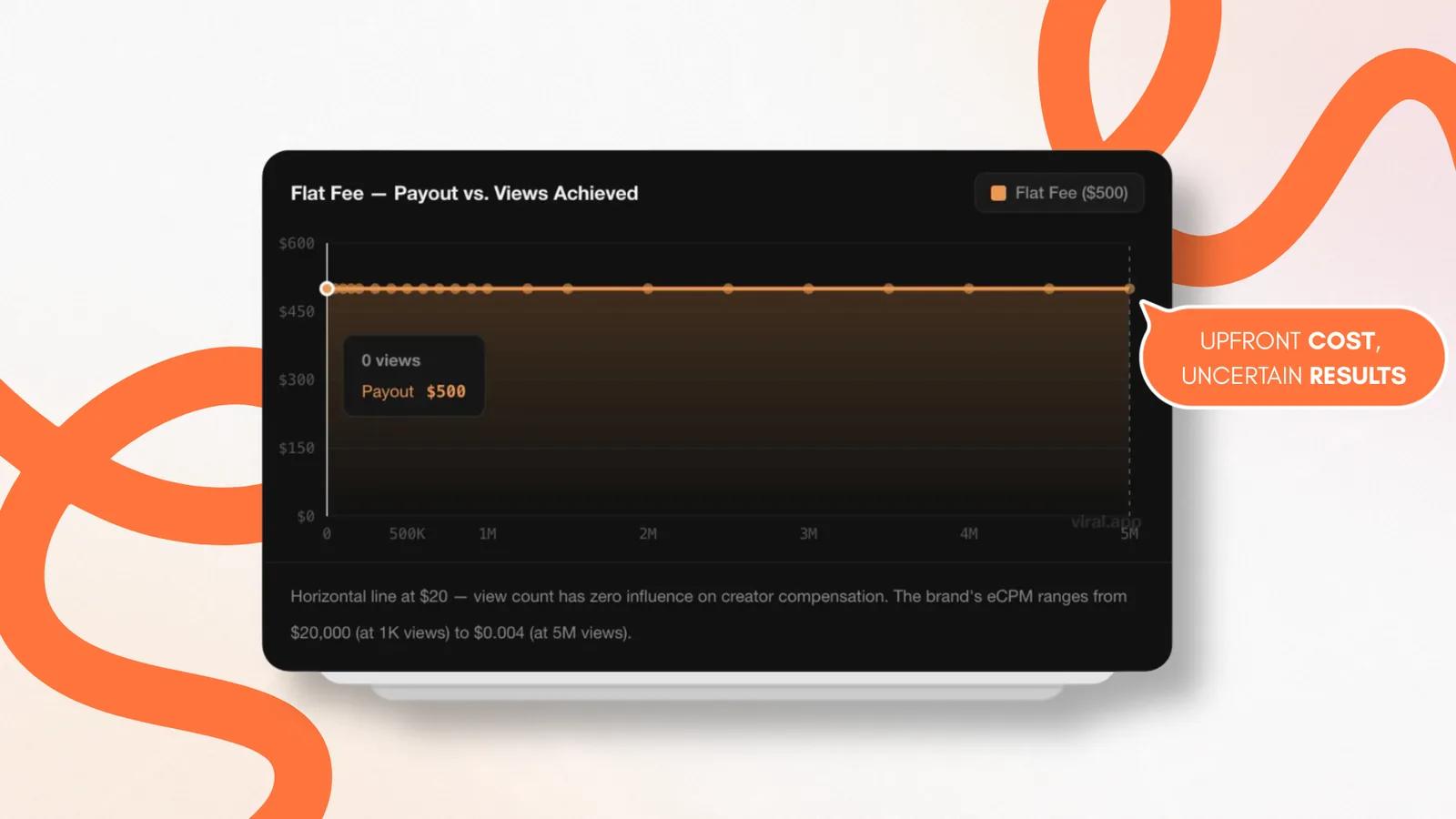
Traditional UGC means buying a video from a creator for a flat upfront fee, often at least $500 per video. The video is posted once and maybe used as an ad later. At volume, that model has two flaws:
High financial risk on unproven creative. You pay hundreds of dollars for a video and its usage rights before you know whether it works. If the platform limits it to 10,000 organic views, your cost per thousand views passes $50. Failed videos eat the budget, which makes the model hard to scale: most growing brands can't spend $15,000 to $25,000 upfront every month just to test organic concepts.
No creator motivation. Creators earn the same whether the video gets 10,000 views or 10 million. With guaranteed pay upfront, there is little reason to work on structure, pacing, or conversion.
A lower-risk model for organic testing at scale
The alternative is to stop buying static, flat-fee files and treat social media as a wide organic canvas: pay for performance-driven distribution at an effective CPM (eCPM) of roughly $0.20 to $1.50. No single video is a precious gamble. Once a video breaks through and proves itself organically, you can move it into paid ad accounts with confidence. The model rests on two changes to compensation.
Lower the upfront cost per video
Programs that run UGC at scale remove most of the randomness by giving creators detailed briefs based on historical performance data.
That takes the guesswork out of each video and cuts production time from hours to minutes.
Because production is fast, the upfront payment can shrink to a small base asset fee (for example, $20 per video) that covers the labor.
The budget that used to buy one marketplace video now buys dozens.
Pay for performance, not just production
The rest of your creative budget goes into performance-based bonuses, calculated from tracked views.
That ties the creator's income to your organic reach: the better a video performs in the feed, the more the creator earns.
For a wider comparison of flat-fee, CPM, and hybrid models, read UGC pricing models.
Setting up the campaign
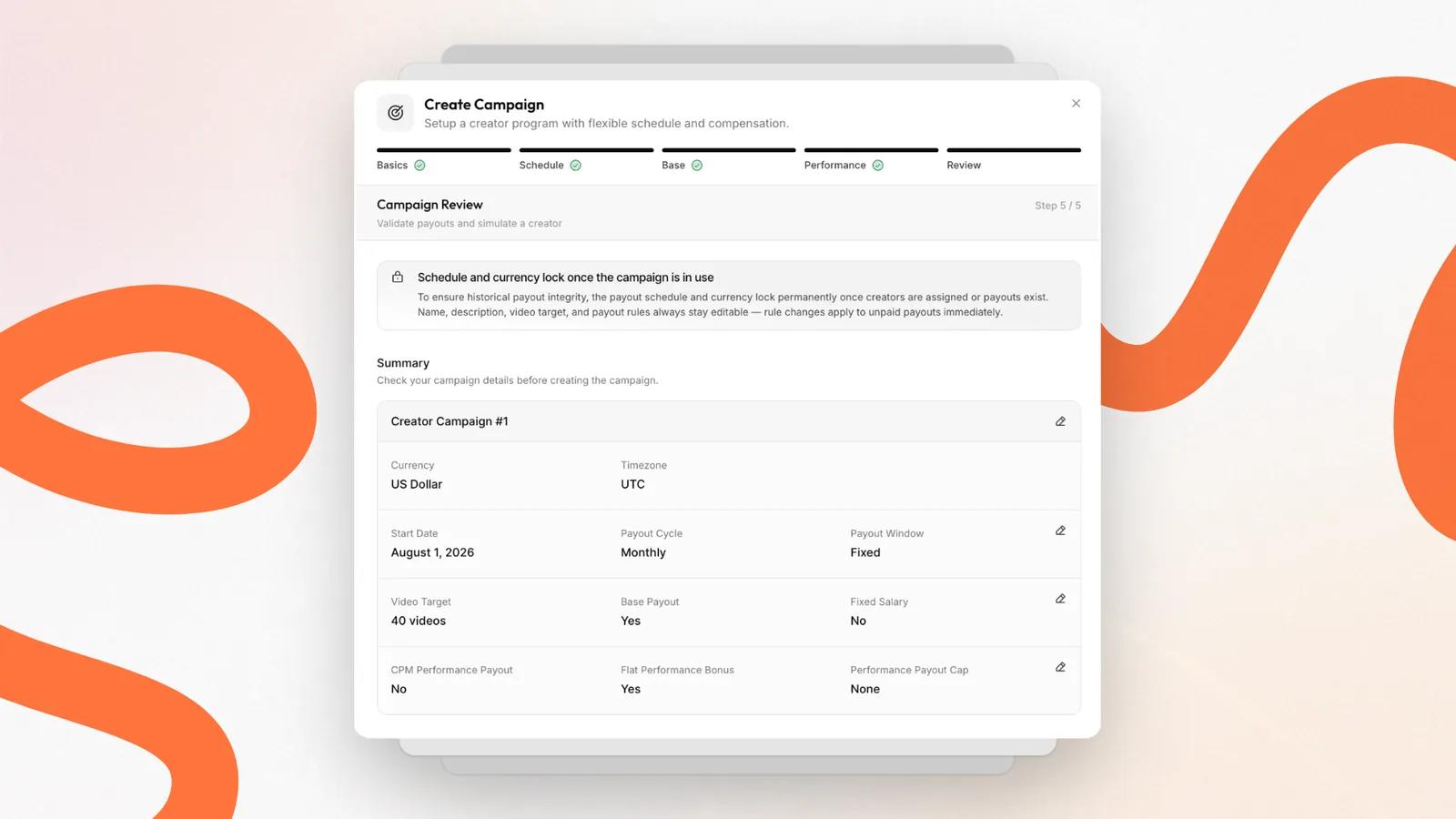
The steps below follow the five-step campaign builder in viral.app. The decisions are the same in any tool or spreadsheet; the builder just forces you to make each of them before creators start posting. The campaigns documentation covers every field in detail.
Step 1: Campaign basics
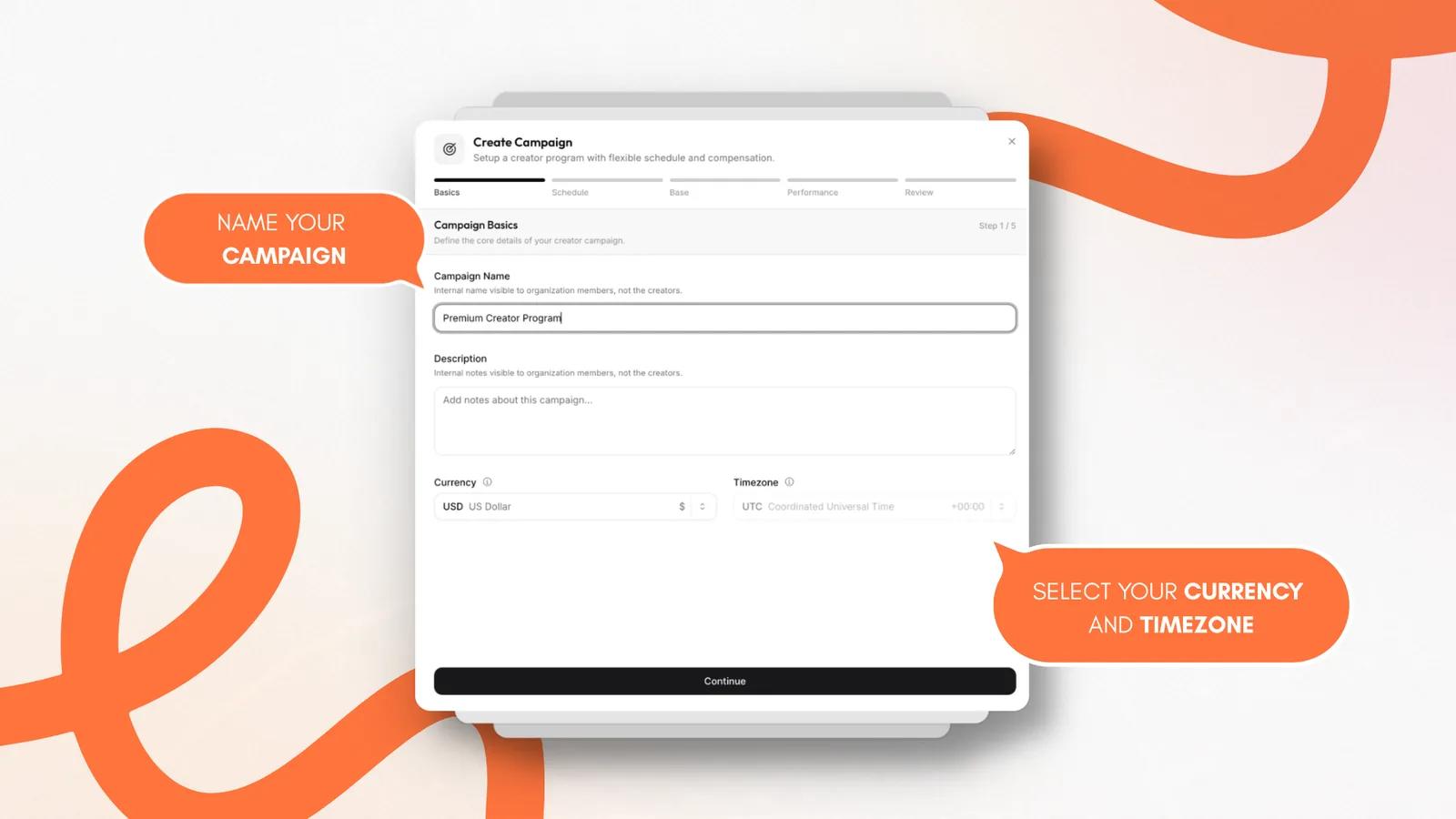
Campaign name. A clear internal name, such as High-volume creator canvas - launch, so you can separate programs by product, launch, market, or pay model.
Description. Internal notes on goals and operating expectations, so your review team knows what the program needs.
Currency and timezone. Your accounting currency and operating timezone. Ledger entries and performance data use UTC, so aligning this up front keeps the numbers clean for finance.
Step 2: Payout schedule
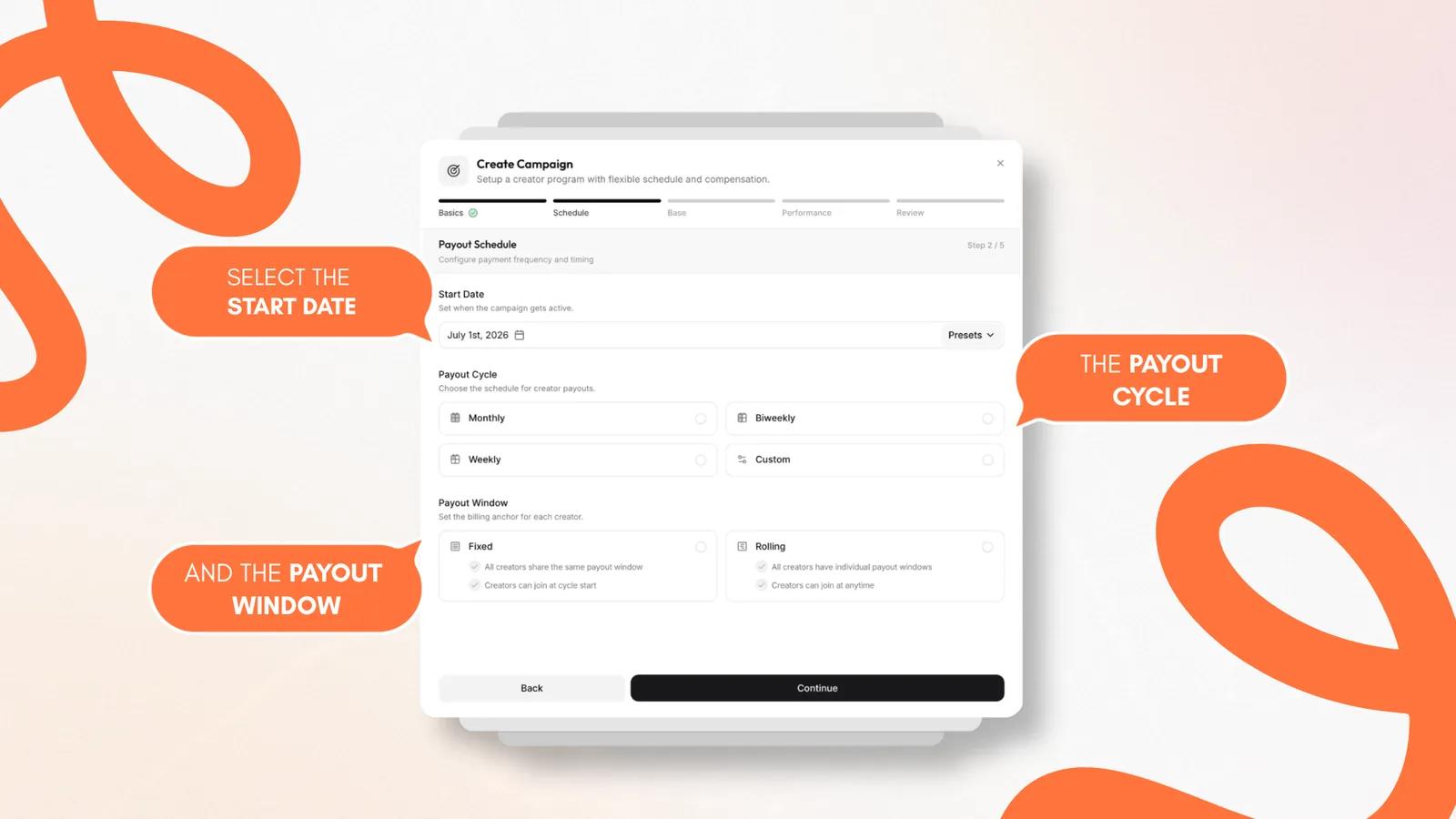
Start date. The day the campaign goes live and tracking begins.
Payout cycle. How often earnings are compiled for review: monthly, biweekly, weekly, or custom. This sets when eligible content is grouped for your review, which gives you a predictable rhythm for a high volume of videos.
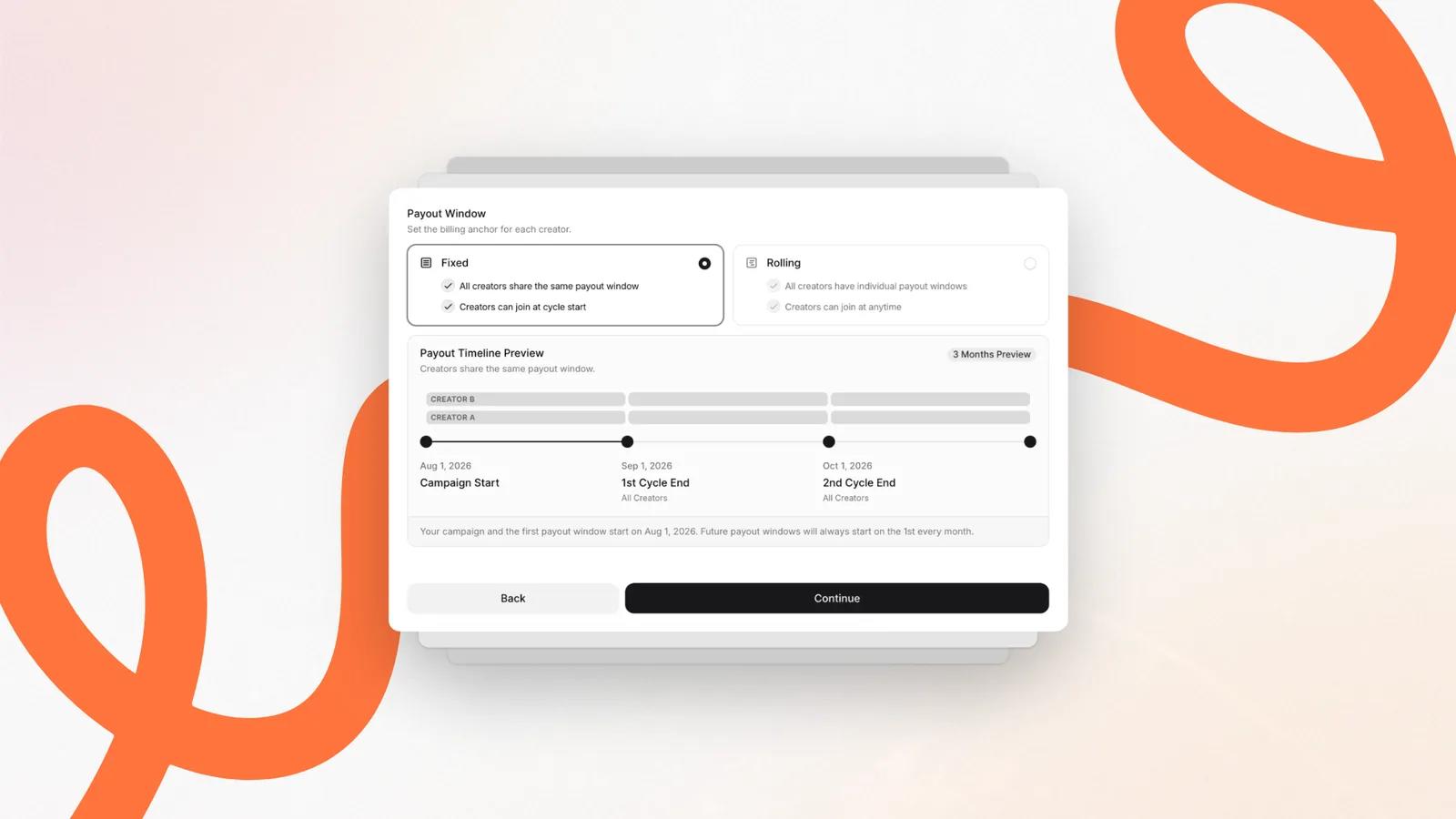
Payout window.
Fixed: every creator shares the same window and timeline. Best for monthly sprints or batch-testing cohorts where a group of creators launches at the same time.
Rolling: each creator gets an individual window based on their onboarding date. Best for evergreen ambassador programs where creators join over time.
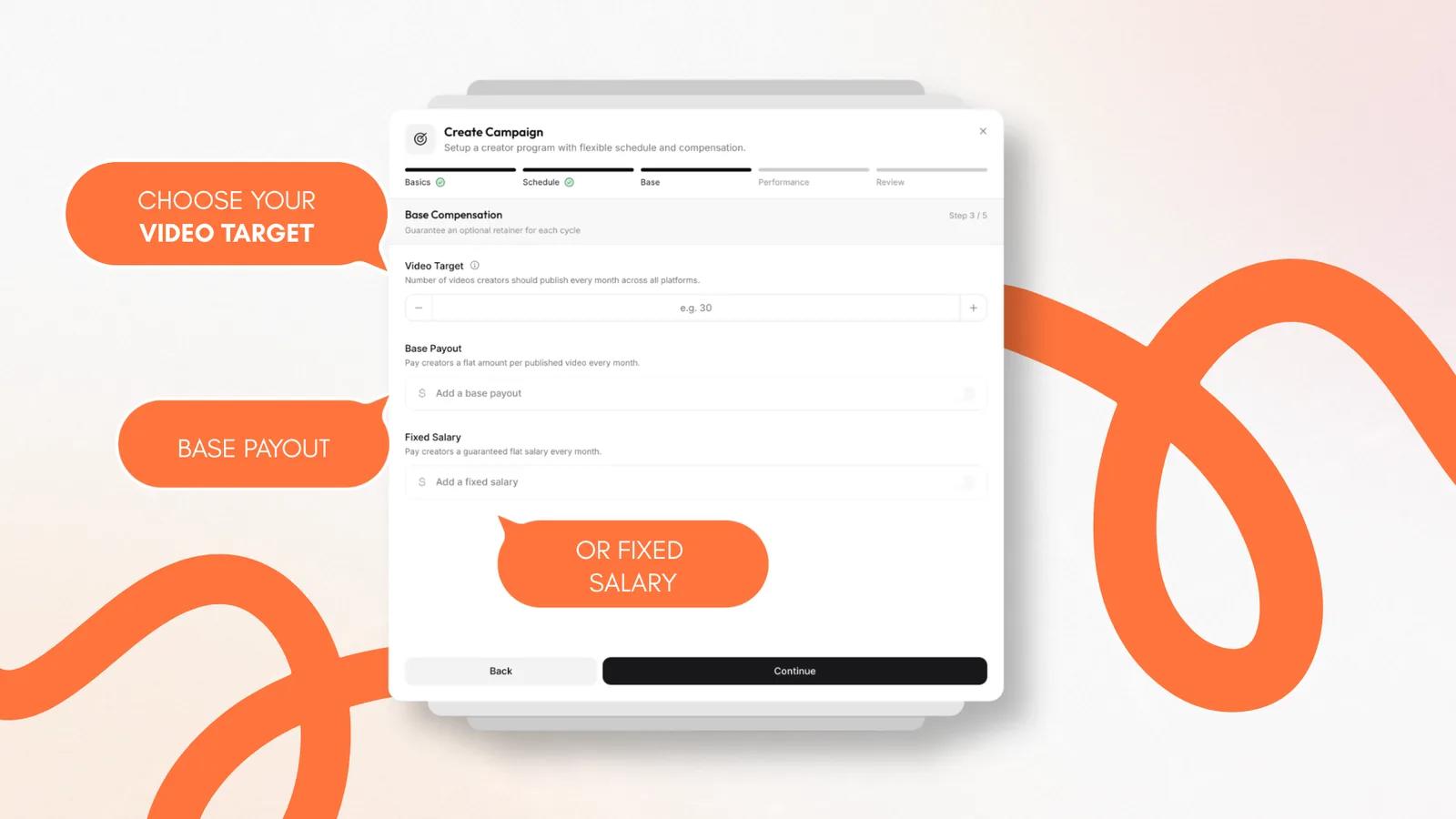
Step 3: Base compensation and volume targets
Video target. The number of compliant videos each creator should publish per cycle. It builds a volume baseline into tracking, so you get a steady flow of creative tests.
Base payout. A flat amount for every published video that meets your compliance criteria: a simple pay-per-eligible-post structure.
Fixed salary. A guaranteed amount for the period. Reserve it for anchor creators and long-term partners who need a stable monthly income regardless of individual video results.
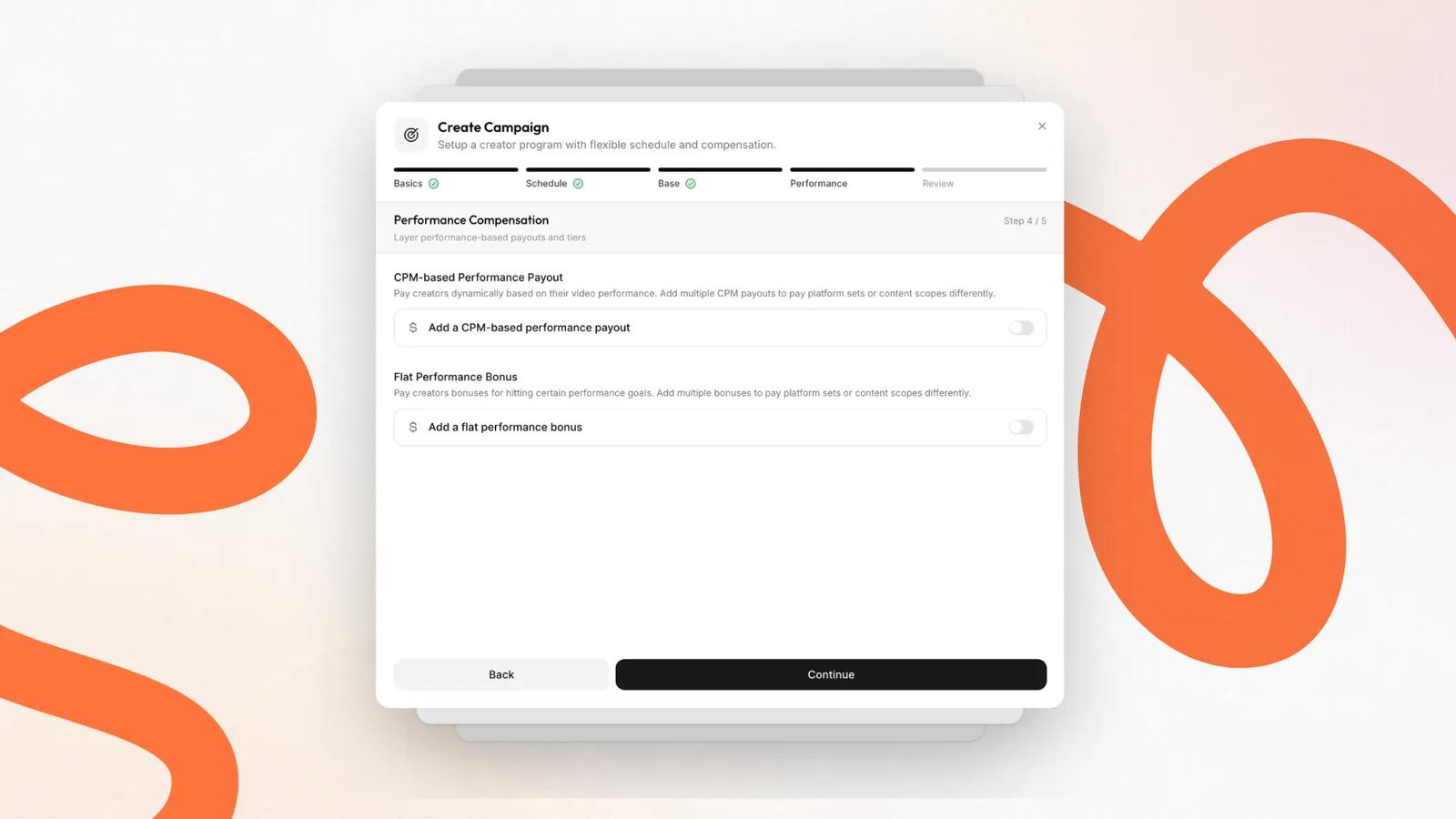
Step 4: Performance incentives
Performance pay ties compensation to the organic reach of each video. There are two main styles, and you can combine them.
CPM-based performance payout
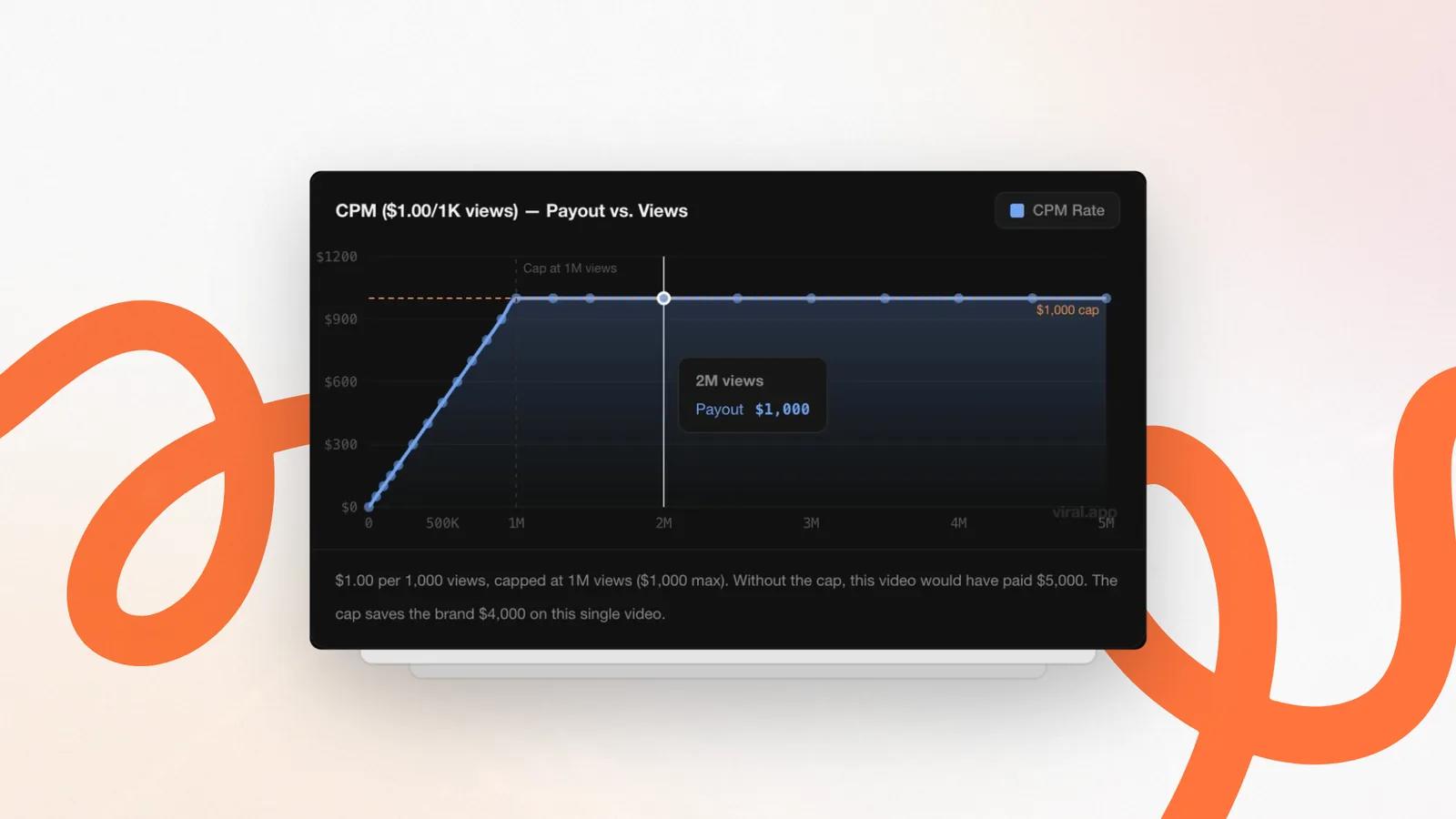
CPM pay gives the creator a fixed rate for every 1,000 views, tracked continuously. There are no dead zones between thresholds: every view is worth something. At a $1 CPM, a creator who pushes a video from 800,000 to 1 million views knows in advance that it earns them another $200, which is strong motivation.
Always cap CPM pay per video
With pure CPM, set a per-video cap with the max views field. Without one, a single 5-million-view video costs $5,000 at a $1 CPM. A cap at 1 million views limits it to $1,000 and saves $4,000 on one runaway video, which keeps your effective CPM low. Tiered bonuses sometimes land a lower eCPM at specific view counts, but both models undercut traditional CPM benchmarks.
Flat performance bonus
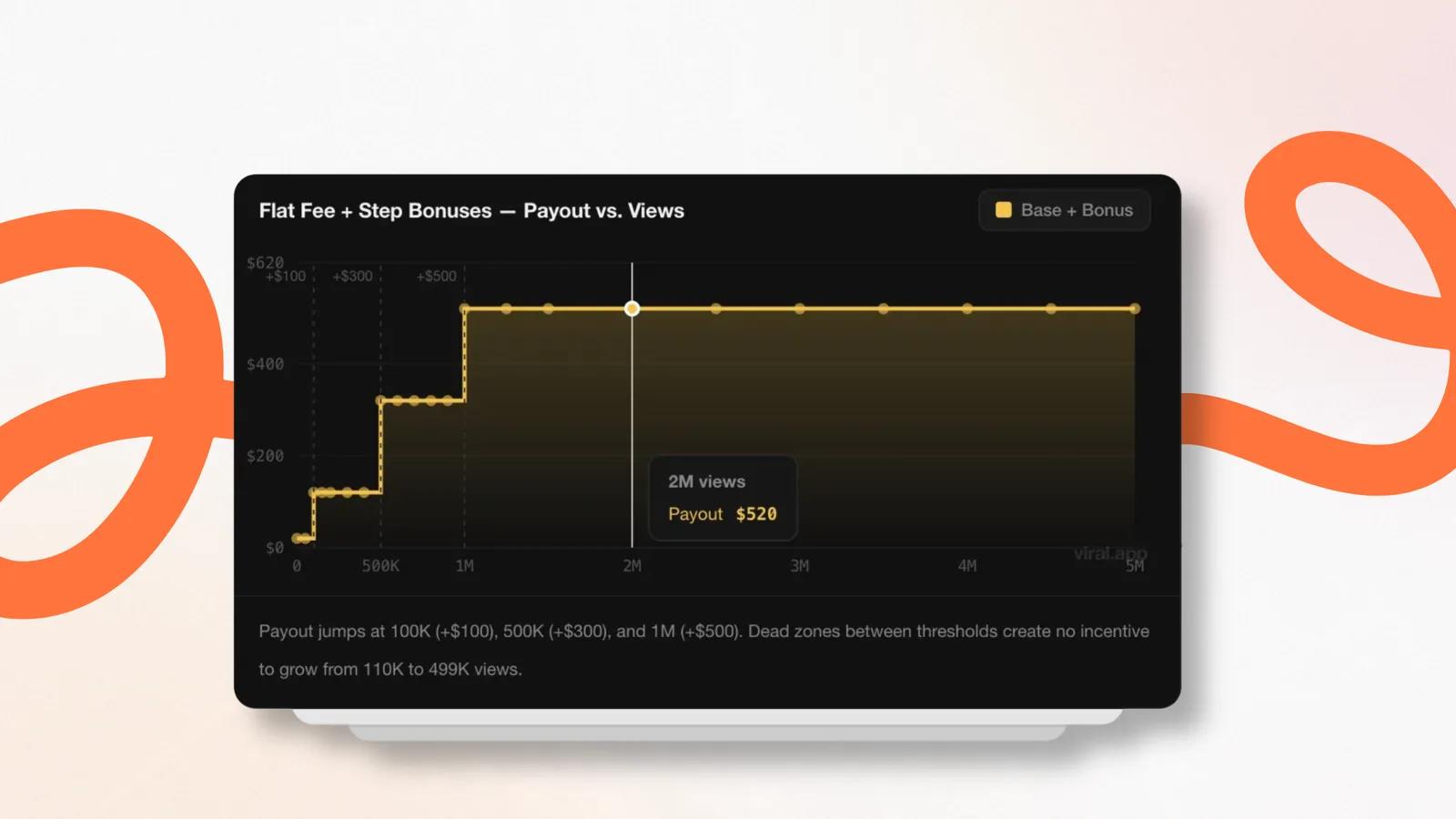
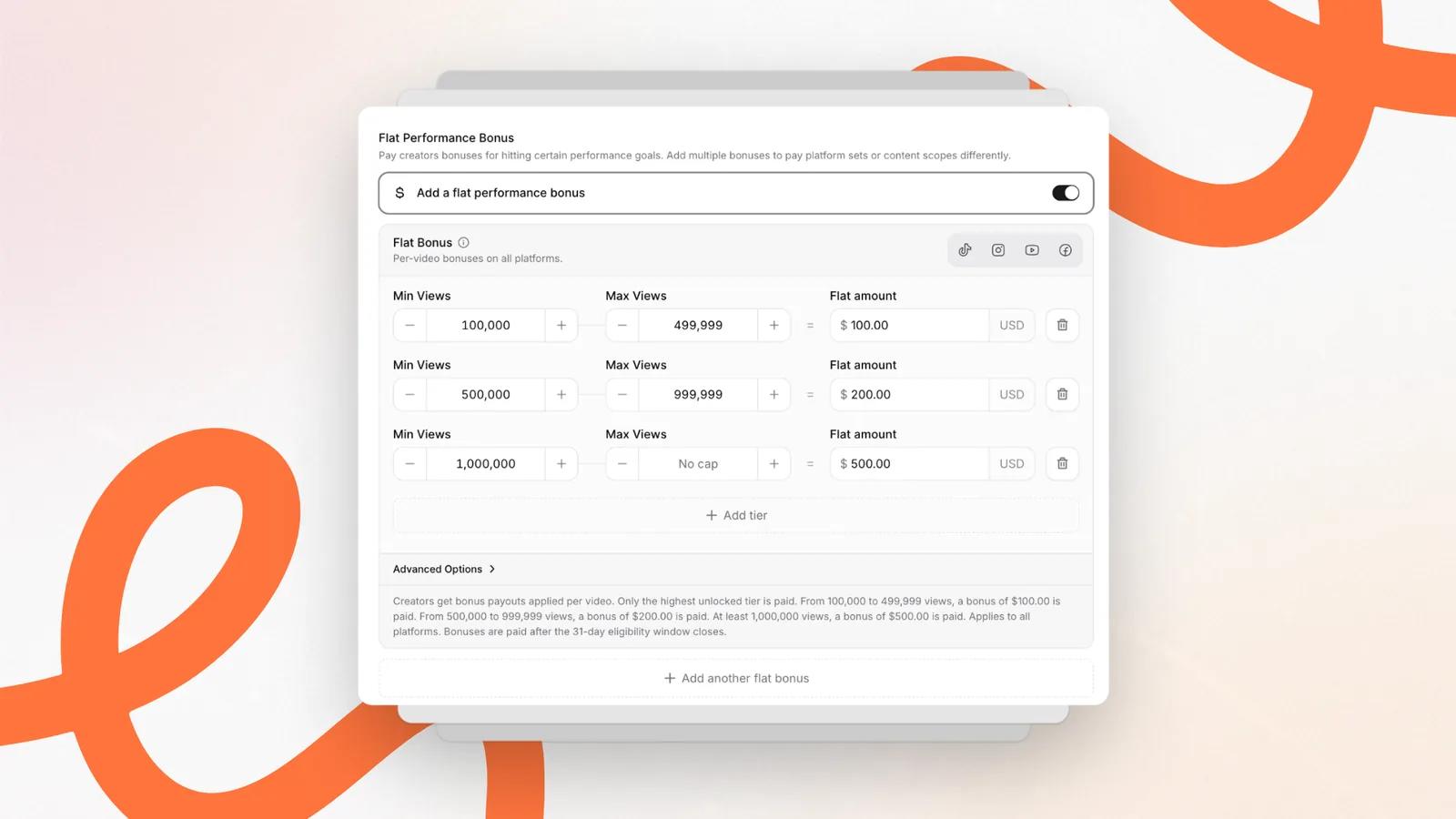
A flat bonus pays a set amount when a video reaches a view milestone, for example $100 at 50,000 views. It gives creators clear targets to aim for. There are dead zones between thresholds, but creators stay focused on performance, and capping the top tier gives you a large eCPM advantage on videos that go far past it.
Content scope: per video or all content
Once an incentive is on, choose how performance is calculated:
Per video. The rules apply to each video's own metrics. This is the standard for high-volume programs because it rewards every individual hook.
All content. Views from all of a creator's videos in the period are added up and the tiers apply to the total. Use it to reward steady performance across many posts rather than one lucky hit.
Guardrails before you launch
Before the campaign goes live, set the rules that decide which videos count, then check the financial exposure.
Eligibility window
The eligibility window is the period after posting during which views count toward pay. Get it wrong in either direction and the program breaks.
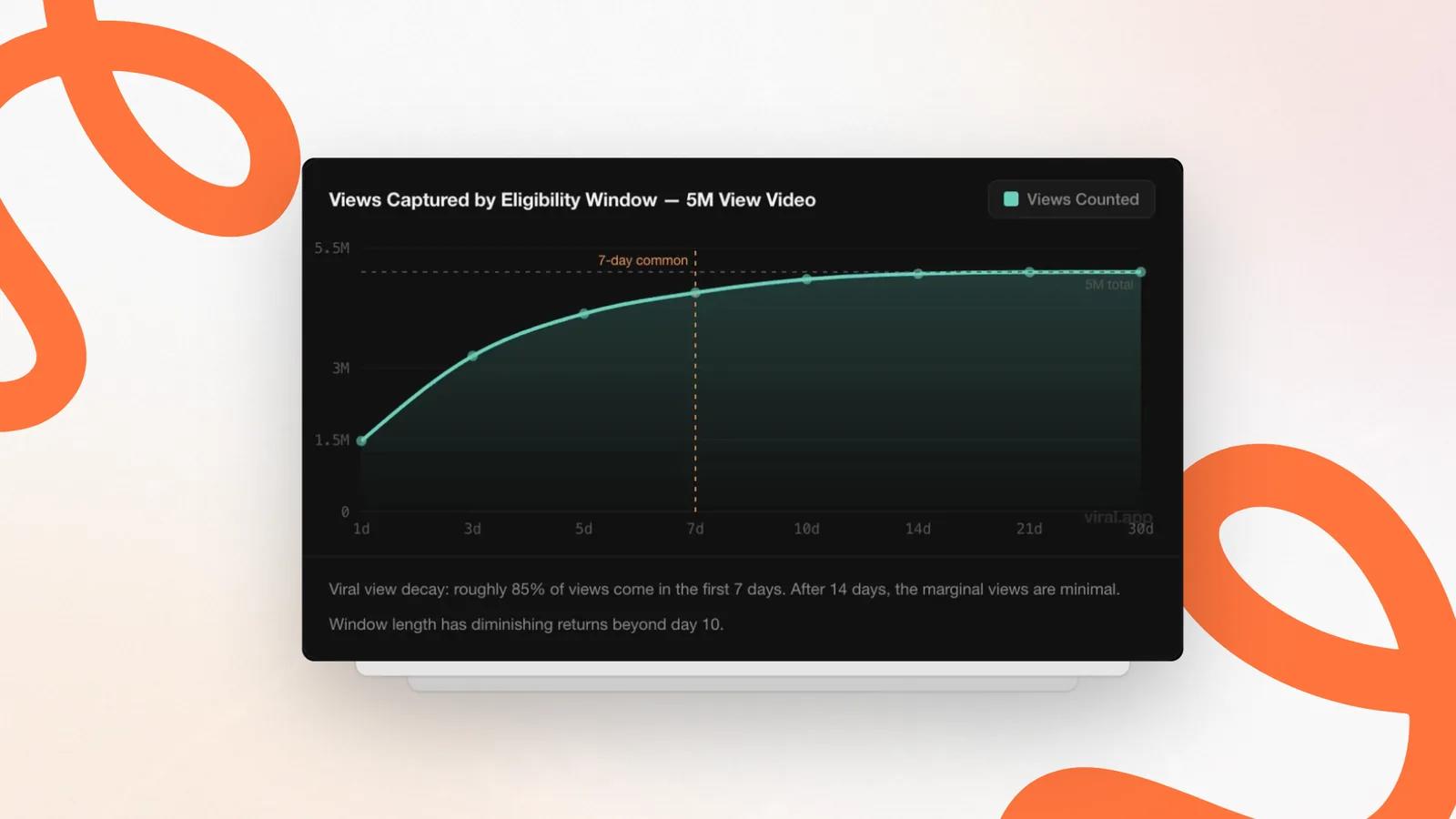
Roughly 85% of an average video's lifetime views arrive in the first 7 days. After day 14 the extra views are minimal, and after day 30 you are counting noise. A 7-day window is the right default for most programs:
It creates urgency. Creators focus on a strong start when the video goes live.
It protects your budget. Old videos can't suddenly take off months later and trigger surprise bonuses.
It keeps accounting clean. You close the numbers at the end of the week and pay creators quickly.
Extend to 14 or 30 days only when creator retention becomes your main goal.
Publication scope
Decide whether tracking considers all historical content or only videos published within the active cycle. Limiting it to the cycle stops creators from double-claiming views or attaching old content to a new campaign.
Platform exclusions
Exclude networks that shouldn't count toward base or performance pay, so you don't pay for platforms that aren't a marketing priority.
Step 5: Review and the per-cycle cap
At least one payout type. A campaign needs a base payout, fixed salary, flat bonus, or CPM payout. viral.app blocks launching a campaign with no pay rules at all.
A per-cycle cap. Per-video caps protect you from one exploding video. A per-cycle cap protects you when several creators go viral in the same month. Leaving it unlimited is where most scaling UGC programs blow up. A cap of $2,500 to $5,000 per cycle is a good range: creators can still earn well from several hits, and you have a hard ceiling on exposure.
In a high-volume program, pay a small base fee per video (for example $20) and put the rest of the budget into performance bonuses from tracked views. Flat-fee UGC often costs $500 or more per video before you know whether it works.
Pay tied to the reach each video earns: a CPM rate per 1,000 views, flat bonuses at view milestones, or both, on top of a small base fee. The better a video performs in the feed, the more the creator earns.
Yes. Cap each video with a maximum view count, for example 1 million views at a $1 CPM, and set a per-cycle cap of $2,500 to $5,000 so several viral videos in one month can't blow the budget.
Seven days is the right default. About 85% of a video's lifetime views arrive in the first week, so a longer window mostly pays for noise. Extend to 14 or 30 days only when creator retention is the main goal.
CPM pays for every view with no dead zones, so creators always gain from more reach. Flat bonuses give clear milestone targets. Many programs combine both, and either one needs a cap.
When these rules are set, tracked views do the math for every creator and every video. See how that works in practice on the creator payments page, or continue with chapter 2 to decide what your creators should make.