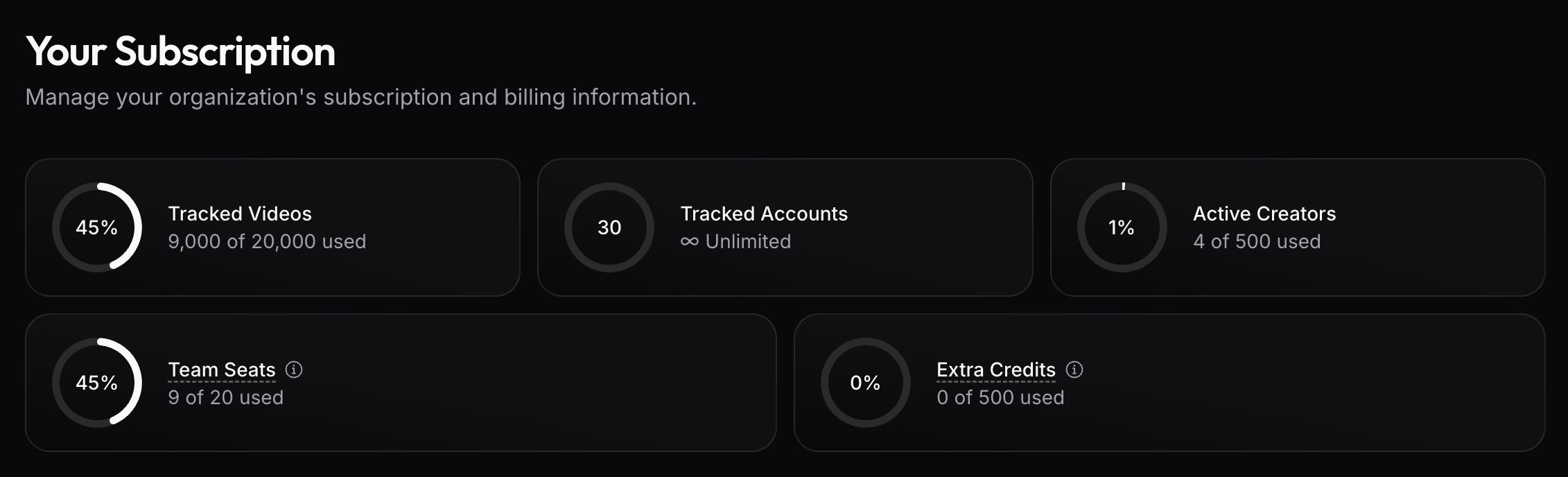
Understand what each plan limit means, which add-on features your plan includes, and when to contact support.
Your plan controls the usage and product capabilities available to your workspace. Open Subscription to review your current plan limits. For tracking setup, refresh cadence, and account controls, see Account tracking.
Add-on features are plan-gated capabilities. Contact support to enable any of them.
API access
API access controls whether your workspace can use API-enabled endpoints. Our API is included with all Ultra plans and above.
Historical data
Historical data controls whether older creator and content performance data remains available beyond the standard recent sync window.
This matters when you need longer reporting windows, before-and-after comparisons, campaign history that goes back beyond recent posts, or stopped tracked accounts whose existing videos should remain available.
Unlimited video tracking
Unlimited video tracking controls whether videos discovered through tracked accounts stay outside the Tracked videos meter.
This matters when your team tracks many creator accounts and wants account-level tracking limits to decide how much content stays active. See Unlimited video tracking for how it behaves inside Tracking Options.
Custom sync schedules
Custom sync schedules control whether your workspace can choose tailored sync hours instead of using the default schedule.
Use them when a team needs data to refresh before recurring reporting, creator reviews, payout checks, or client updates.
Hourly sync slots
Hourly sync slots let your workspace add more scheduled sync slots than your plan includes, up to one sync every hour.
Use them when daily or twice-daily refreshes are not enough for launch days, fast-moving campaigns, payout checks, or client reporting. See Refresh data for the tracking cadence.
Plan limits
Plan limits are numeric meters. They define what is included before usage becomes unavailable, capped, or billed as extra usage.
The Subscription page shows plan-limit usage for tracked videos, tracked accounts, active creators, team seats, and extra credits.
Tracked accounts
Tracked accounts are creator or brand accounts that viral.app follows over time.
This limit matters most when unlimited video tracking is enabled. In that setup, account-discovered videos stay outside the Tracked videos meter, so the number of tracked accounts controls how many accounts can feed that unlimited tracking flow.
Tracked videos
Tracked videos are the billing meter for active tracked-video capacity.
Without unlimited video tracking, account tracking limits reserve capacity and individually tracked videos also count. See How tracking limits use plan capacity for the detailed behavior. When unlimited video tracking is enabled, this meter only counts individually tracked videos.
Active creators
Active creators are creator records used in Creator Hub workflows. This limit controls how many creators your team can actively manage for campaigns, analytics, and payouts.
Archive creators you no longer work with when you want to keep their history without counting them as active campaign participants.
Team seats
Team seats control how many people can be members of the workspace.
Invite teammates who need access to tracking, analytics, Creator Hub, billing, or API settings. Remove unused seats when people no longer need access.
Extra credits
Extra credits cover usage that sits outside regular scheduled tracking. Extra credit usage occurs when you:
Manually refresh tracked videos (1 credit per video)
Manually refresh tracked accounts (1 credit per 30 tracked videos, rounded up per account)
Download a video file (1 credit per download)
Call the MCP Server (1 credit per call)
Use the /live API endpoints
If your plan supports billed extra usage, the Subscription page shows how much usage has moved beyond the included amount.
See Refresh data for scheduled and manual refresh behavior.