| Filter | App Revenue | New Customers, New Trials, New Paid Subs |
|---|---|---|
| Date range | Applied | Applied |
| Project tags | Applied | Applied |
| Country and continent tags | Applied, by store country | Not applied |
| Custom tags | Not applied | Not applied |
| Platform, account, and content type | Not applied | Not applied |
Tracking analytics
Review performance across tracked accounts, videos, tags, projects, platforms, and app outcomes.
Analytics show the performance of the accounts and videos you track in viral.app. Start with Tracking Options if your analytics pages do not show data yet.
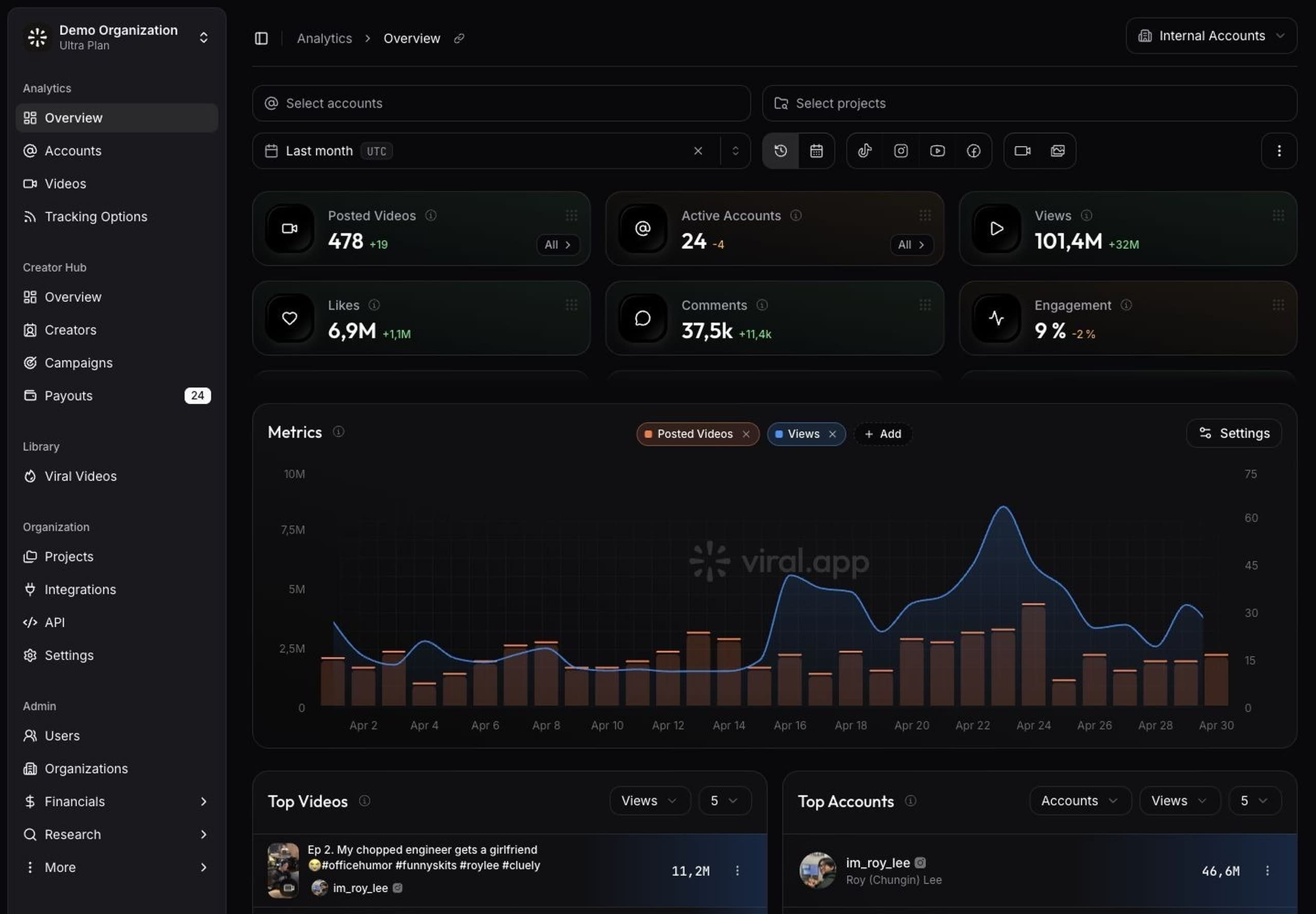
The Analytics Overview gives you a workspace-level view of performance.
Use the overview
The overview summarizes your tracked content with key metrics, including posted videos, active accounts, views, likes, comments, engagement, app revenue, app installs, shares, and bookmarks.
Use the overview when you need a quick read on campaign momentum, creator output, and which content deserves a deeper review. Apply tag filters when you need to focus the page on a campaign, market, product line, creative angle, or project. The UGC analytics overview explains how the same data layer connects to campaign reporting, payouts, and API workflows.
The top videos and top accounts sections help you find the strongest performers without opening separate tables first. If the page is empty, follow the setup steps in the empty state: track an account or video, add creators, set up tags, create a campaign, and issue payouts when you run creator campaigns.
Review account analytics
Accounts compares tracked accounts by platform, creator, project, tags, and performance. Account analytics help you answer questions such as:
- Which creator accounts drive the most views?
- Which platforms perform best for your tracked content?
- Which accounts need refreshed data or tracking changes?
Use View Tracking Options when you need to adjust the account's tracking setup.
Review video analytics
Videos lets you inspect individual posts. Use date, platform, content-type, and tag filters to narrow the table to the videos you need.
The videos table is useful for campaign reviews, creator feedback, and troubleshooting missing or failed syncs. Use the Tags column to add or remove tags while you review posts. If a video shows a failed or missing status, retry the sync after you confirm that the post is public and the URL is correct.
Export data
Every table exports to CSV with the filters you applied: accounts and videos from their tables, and the day-by-day view, like, comment and share gains of your videos from the Overview. A single video's page exports its full metric history, and a paid payout exports its per-video breakdown from the Paid tab. Large exports ask you to narrow the filters first.
Use tags
Tags organize videos across analytics. Custom tags, project tags, country tags, and exclusions all work through the same analytics filter.
Use tag rules when the same tagging decision should happen automatically. Metric rules tag videos from repeatable conditions such as platform, content type, hashtags, captions, views, or engagement rate. See Tags for setup details.
Use projects
Projects group tracked accounts and videos around a product, launch, market, or reporting goal. Open Projects when you need clean reporting boundaries across multiple campaigns or teams.
A project can connect to tracked accounts, tracked videos, and App Store data. Use one project for each product or major initiative so analytics stay easy to compare.
Connect app outcomes
Connect RevenueCat or Superwall when you want analytics to include app revenue, new customers, trials, and paid subscriptions next to creator performance. Each project takes app data from one of the two. The older Apple App Store integration is deprecated.
If you boost videos as TikTok Spark Ads, the Spark Ads integration splits organic from paid views across these pages.
Analytics update after the next sync completes. If you just added tracking or integrations, wait for the refresh to finish before using the numbers for a report.
How filters apply to app metrics
App revenue, new customers, trials, and paid subscriptions belong to an app, not to a single video. They follow the filters that say which app or market you are looking at:
- Several project tags add up: the app metrics cover every selected project.
- Country tags describe where a creator posts, while app revenue is split by the store country of the purchase. Read a country filter as a market view, not as revenue attributed to those creators.
- With a country filter, App Revenue counts RevenueCat and Superwall proceeds only, because Apple App Store revenue has no country split.
- When a selected tag cannot be applied, the app card and the chart show a warning icon that names the tags it left out.