TikTok Spark Ads integration
Connect your TikTok Ads account to separate paid from organic views, pay creators for organic reach only, and boost videos from inside viral.app.
Once a video is boosted as a Spark Ad, its public view count stops telling you what the creator earned. The TikTok Spark Ads integration connects your TikTok for Business account and pulls the delivery numbers for every Spark Ad, so viral.app can split each boosted video into organic and paid views.
With the integration connected:
- Analytics show organic and paid views separately for boosted videos.
- Campaign payouts that depend on views count organic views only.
- Every Spark Ad is listed with its spend, status, and performance.
- You can boost a creator's video as a Spark Ad without opening Ads Manager.
Connect TikTok Ads
Open Spark Ads under Integrations and click Connect Spark Ads. You sign in to TikTok, choose which advertiser accounts to grant, and land back in viral.app. The first sync starts right away, and syncs run once a day after that.
The Connections tab lists each connection with its status:
Active: syncing daily.Error: the last sync failed and retries with the next daily sync.Access revoked: TikTok revoked access. Click Reconnect TikTok Ads in the banner, then remove the old connection once the new one has synced.
All granted advertiser accounts sync by default. Use Manage Advertisers to pause the ones you do not need; paused accounts keep the data already loaded. Sync Now and Sync History are in the row menu as well.
Review your ads
The Ads tab lists every Spark Ad across your connected accounts with the video, whether that video is tracked in your workspace, the ad status, spend, paid views, impressions, and when it last delivered. Filter by status, such as Active, In Review, Rejected, or Out of Budget, and switch between tracked and untracked videos. Each row links to the ad in TikTok Ads Manager.
The tiles above the table sum up your connected accounts: Ad Spend (converted to your workspace currency), Paid Views, Impressions, CPM, CTR, CPC, and Active Ads.
Paid versus organic views
As soon as a connection exists, the Analytics Overview adds Organic Views and Paid Views beside the total, the videos table gets both columns, and a video's detail page adds its Ad Spend. Videos that were never boosted simply have no paid views.
Creator payouts follow the same split. While your connections are Active and have synced, view-based campaign rules count organic views only, so paid views earn no creator CPM. If a connection shows Error or Access revoked, payouts count total views until it syncs again.
Boost a video from viral.app
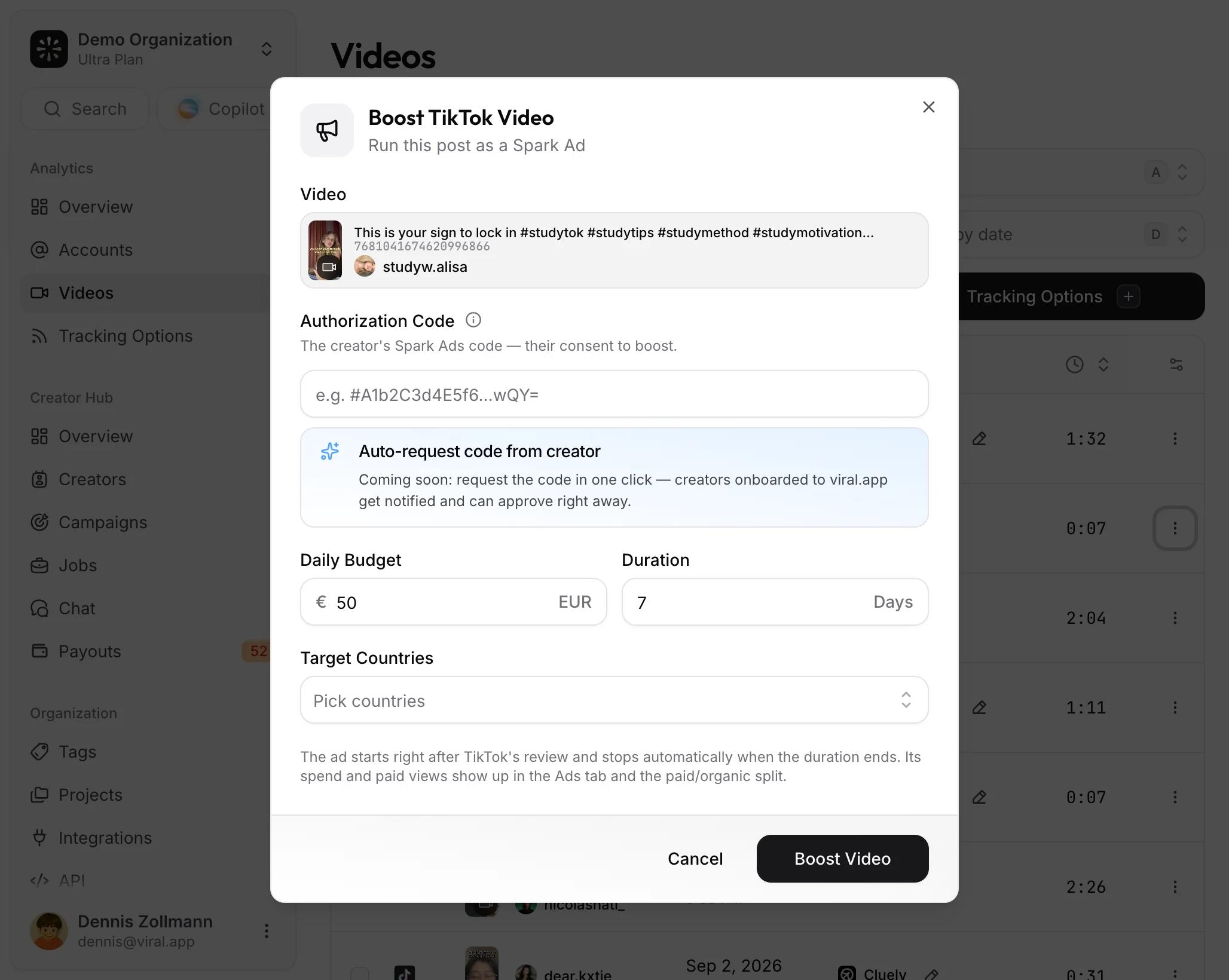
Open the menu of any tracked TikTok video and choose Boost as Spark Ad, or click Boost Video on the Ads tab. Members and above can boost. To pick which videos to boost, see turning organic UGC into paid winners.
The dialog asks for:
- The advertiser account, if you have more than one.
- The creator's authorization code. The creator generates it in TikTok under the video's Ad settings (Ad authorization, then Generate code) and can set it to be valid for 7 to 365 days.
- A daily budget, a duration between 1 and 30 days, and up to 50 target countries.
viral.app creates the campaign, ad group, and Spark Ad for you. TikTok reviews the ad, delivery starts shortly after approval, and the ad stops on its own when the duration ends. Until the first sync returns, the ad shows as Syncing in the Ads tab; if no sync confirms it within about an hour, it shows as Not confirmed, which usually means TikTok rejected it in review. Spend is billed by TikTok to the advertiser account you chose.
If the boost dialog asks you to reconnect first, the connection was made before boosting existed and lacks the permission. An owner or admin removes that connection and connects again; syncing keeps working in the meantime.
Superwall
Connect Superwall to attribute app revenue, new users, trials, and paid subscriptions to your projects.
Meta Ads
Connect your Meta ad accounts to separate paid from organic views on Instagram and Facebook, pay creators for organic reach only, and boost posts as Partnership Ads from inside viral.app.