
viral.app

Billing and plan limits

Understand what each plan limit means, which add-on features your plan includes, and when to contact support.

Your plan controls the usage and product capabilities available to your workspace. Open Subscription to review your current plan limits. For tracking setup, refresh cadence, and account controls, see Account tracking.

Add-on features

Learn which plan-gated capabilities control API access, historical data, unlimited video tracking, custom sync schedules, and hourly sync slots.

Review features

Plan limits

Understand numeric limits for tracked accounts, tracked videos, active creators, seats, and extra credits.
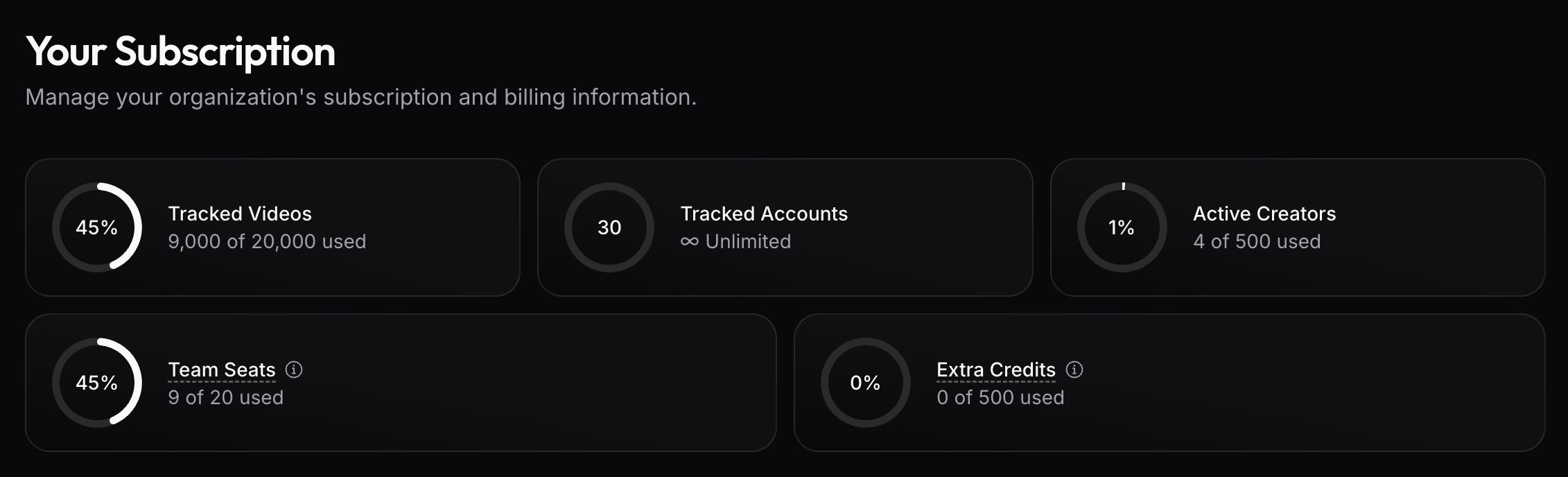
Check limits

Add-on features

Add-on features are plan-gated capabilities. Contact support to enable any of them.

API access

API access controls whether your workspace can use API-enabled endpoints. Our API is included with all Ultra plans and above.

Historical data

Historical data controls whether older creator and content performance data remains available beyond the standard recent sync window.

This matters when you need longer reporting windows, before-and-after comparisons, campaign history that goes back beyond recent posts, or paused tracked accounts whose existing videos should remain available.

Unlimited video tracking

Unlimited video tracking controls whether videos discovered through tracked accounts stay outside the Tracked videos meter.

This matters when your team tracks many creator accounts and wants account-level tracking limits to decide how much content stays active. See Unlimited video tracking for how it behaves inside Tracking Options.

Custom sync schedules

Custom sync schedules control whether your workspace can choose tailored sync hours instead of using the default schedule.

Use them when a team needs data to refresh before recurring reporting, creator reviews, payout checks, or client updates.

Hourly sync slots

Hourly sync slots let your workspace add more scheduled sync slots than your plan includes, up to one sync every hour.

Use them when daily or twice-daily refreshes are not enough for launch days, fast-moving campaigns, payout checks, or client reporting. See Refresh schedule for the tracking cadence.

Plan limits

Plan limits are numeric meters. They define what is included before usage becomes unavailable, capped, or billed as extra usage.

The Subscription page shows plan-limit usage for tracked videos, tracked accounts, active creators, team seats, and extra credits.

Tracked accounts

Tracked accounts are creator or brand accounts that viral.app follows over time.

This limit matters most when unlimited video tracking is enabled. In that setup, account-discovered videos stay outside the Tracked videos meter, so the number of tracked accounts controls how many accounts can feed that unlimited tracking flow.

Tracked videos

Tracked videos are the billing meter for active tracked-video capacity.

Without unlimited video tracking, account tracking limits reserve capacity and individually tracked videos also count. See How tracking limits use plan capacity for the detailed behavior. When unlimited video tracking is enabled, this meter only counts individually tracked videos.

Active creators

Active creators are creator records used in Creator Hub workflows. This limit controls how many creators your team can actively manage for campaigns, analytics, and payouts.

Archive creators you no longer work with when you want to keep their history without counting them as active campaign participants.

Team seats

Team seats control how many people can be members of the workspace.

Invite teammates who need access to tracking, analytics, Creator Hub, billing, or API settings. Remove unused seats when people no longer need access.

Extra credits

Extra credits cover usage that sits outside regular scheduled tracking. Every feature listed below draws from the same credit balance:

FeatureCredit usage
Manual video refresh3 credits per refreshed video
Manual account refresh3 credits per tracked video, rounded up per account
Video download3 credits per download (cached downloads are free)
AI tagging (AI rules)35 credits per evaluated video (cached evaluations are free)
/api/v1/live API + MCP live lookups3 credits per request (see the API reference)
Assistant video analysis35 credits per analyzed video
Assistant chatMetered per turn from model usage

The Subscription page shows how much of your included credits the current billing period has used, and the credit usage chart breaks consumption down by feature over time. Usage beyond the included credits requires enabling overage billing there; without it, credit-consuming features pause once the included credits are spent, until the next billing period.

See Refresh schedule for scheduled and manual refresh behavior.

Need a different limit or add-on?

For plan questions, add-ons, or upgrades, email support@viral.app.

On this page