| Feature | Instagram Reels | TikTok | Strategic Advantage |
|---|---|---|---|
| Monetization | Robust, integrated with existing Instagram advertising | Developing, less mature for established brands | Instagram Reels for brands seeking immediate monetization opportunities |
| Algorithm | Favors consistent engagement within existing network | Prioritizes viral reach | Instagram Reels for building stronger communities, TikTok for rapid growth |
| E-commerce Integration | Seamless integration with shopping features and brand profiles | Limited shopping features | Instagram Reels for direct sales conversions |
| Content Ecosystem | Integrated with Instagram's broader platform (Stories, Feed) | Primarily stand-alone app | Instagram Reels for cross-promotion and wider reach within existing audience |
Why TikTok needs a different competitor analysis
TikTok’s arrival has significantly changed social media. It's not just another platform; it's a whole new way users interact with online content. This shift has made many older social media strategies ineffective, pushing brands to rethink their digital marketing. For instance, follower count, once crucial for social media success, is less important on TikTok.
This is mainly due to TikTok's algorithm-focused approach, prioritizing content discovery and going viral over established audience size.
This algorithmic focus creates a creator-focused model, letting individuals gain huge visibility regardless of their existing followers. Traditional platforms rely heavily on existing networks and paid ads to boost content. TikTok's algorithm, however, rewards engaging content, showing videos to a wider audience based on user activity and interests.
This means even small creators with few followers can go viral if their content works with the algorithm. This makes TikTok competitor analysis crucial for businesses trying to succeed in this new setting.
Understanding TikTok Ads
Understanding TikTok ads is key to succeeding on the platform, especially as traditional social media methods become less effective. For more information, see this article on TikTok Ads Bandit Optimization. TikTok's quick growth shows its impact. As of 2025, the platform has over 1.58 billion monthly active users, making it the fifth most popular social media platform globally, behind giants like Facebook, YouTube, WhatsApp, and Instagram. Learn more. This large user base highlights the platform’s influence and the need for brands to understand its unique dynamics.
TikTok’s unique approach to virality presents both opportunities and challenges for competitors. Its content discovery system, combined with short, easy-to-watch videos, allows content to spread rapidly. This makes it very competitive, requiring brands to constantly innovate to keep users' attention. Simply copying TikTok’s features isn’t enough. Understanding what drives user engagement is essential for lasting success. This means digging deeper into TikTok competitor analysis, looking at not just features but also audience behavior, engagement patterns, and the subtle things that make TikTok so engaging.
Instagram Reels: When Meta's Muscle Actually Matters
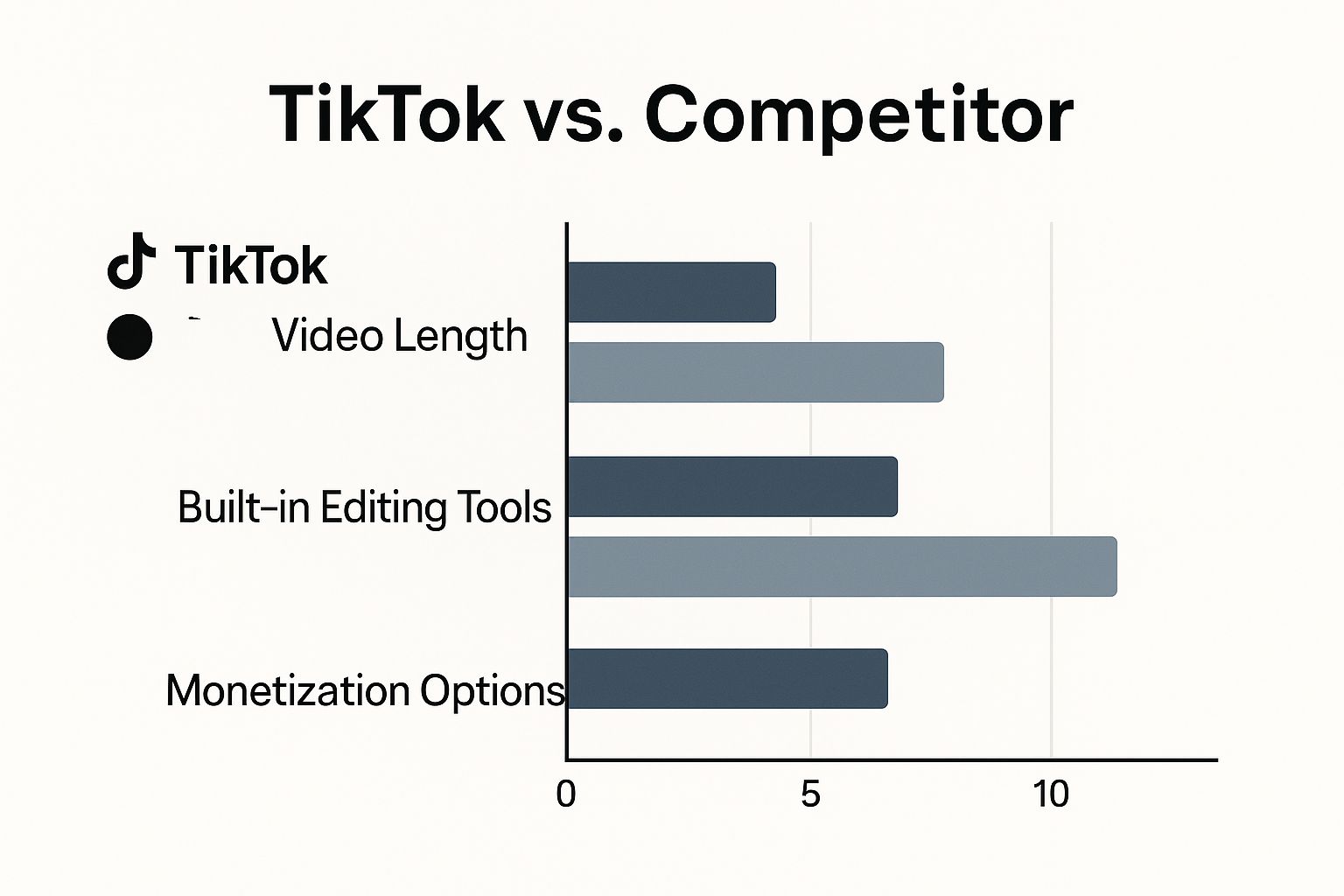
The infographic above highlights key differences between TikTok and Instagram Reels, focusing on video length, editing tools, and monetization. While TikTok currently offers longer videos and a broader range of editing capabilities, Reels provides more robust monetization options, thanks to Instagram's established advertising infrastructure. This is a critical distinction for creators and brands aiming to earn revenue from their short-form video content. This section explores where Instagram Reels truly shines against its formidable competitor, TikTok. Instagram’s existing user base provides a unique advantage.
This pre-existing network allows seamless content sharing across various formats, from Stories to the main feed. This maximizes reach and engagement within a familiar user experience. Brands can use their established Instagram presence for a multi-pronged approach, boosting both visibility and cross-promotion efforts.
Leveraging Existing Infrastructure
Instagram Reels benefits immensely from Instagram’s existing infrastructure, offering integrated shopping features and direct links to established brand profiles. This facilitates an easier path for businesses to convert views into sales, a feature TikTok is still actively developing. Imagine a brand launching a new product: on Reels, they can showcase it through engaging short-form videos and immediately direct viewers to a shoppable link on their profile. This streamlined process, from content to conversion, represents a significant advantage for businesses already operating on Instagram.
Monetization and Algorithm Differences
Reels’ monetization tools are considerably more mature than TikTok’s, particularly for brands already running Instagram advertising campaigns. These tools integrate easily, offering familiar ad formats and in-depth analytics for tracking ROI. While TikTok's algorithm prioritizes rapid viral growth, Instagram's algorithm favors consistent engagement within a user's existing network. This means brands can cultivate stronger, more loyal communities on Reels by regularly delivering high-quality content to their established followers.
For example, a fashion influencer with a dedicated Instagram following can leverage Reels to showcase their latest collaborations and provide exclusive discounts directly through their profile. This focused strategy within a pre-existing community cultivates loyalty and boosts conversions more effectively than relying solely on algorithmic virality. Competitors like Instagram and YouTube are also emphasizing short-form video in response to TikTok's popularity. Despite the competition, TikTok remains the leader in user engagement, with users watching two times longer on TikTok compared to Instagram. Discover more insights. This difference underscores the importance of understanding your audience and adapting your content accordingly.
Cross-Platform Strategy and ROI
While TikTok boasts a larger user base, some brands are achieving a higher ROI on Reels due to the platform's superior monetization tools and integration with existing marketing platforms. Tracking this ROI across platforms can be complex, but cross-platform UGC analytics can simplify the process. If you are comparing TikTok audiences against Reels or Shorts performance, start with the TikTok audience analytics tool and then compare platform-specific creative patterns such as TikTok hooks vs Instagram hooks. This means brands can utilize their current marketing resources, from email lists to CRM platforms, to amplify the reach of their Reels campaigns. This comprehensive approach allows for more targeted advertising and retargeting strategies, maximizing return on investment. Effective cross-platform content is key for maximizing impact. Repurposing existing Instagram content for Reels, or creating Reels-specific content that complements existing posts, can dramatically increase reach and engagement. This synergy across content formats reinforces brand messaging and maximizes visibility across the platform.
To illustrate these key differences, let’s look at a direct feature comparison:
Instagram Reels vs TikTok Feature Comparison
Side-by-side comparison of key features, engagement metrics, and strategic advantages of Instagram Reels versus TikTok
This table highlights how Reels provides a more direct path to monetization and leverages existing Instagram infrastructure. TikTok, on the other hand, excels at fostering rapid viral growth. Choosing the right platform depends on your specific marketing goals.
YouTube Shorts: Where Long-Form Creators Go Short

YouTube Shorts offers a distinct edge in the competitive TikTok landscape: its connection to YouTube's established creator community. This allows creators with existing long-form content to use Shorts as a funnel to their main channels, boosting views and engagement. This presents a clear advantage over TikTok, where monetization and keeping your audience engaged can be tricky.
Leveraging the YouTube Ecosystem
Imagine a cooking channel with a deep library of recipe videos. They can easily create short, engaging Shorts showcasing quick tips or visually appealing food prep. These Shorts act as teasers, leading viewers to the full recipes on their main channel.
This cross-promotion within YouTube maximizes content reach and provides access to established YouTube revenue streams. This connection to a larger platform is a key differentiator in any TikTok competitor analysis, as it builds upon existing communities.
Monetization and Long-Term Growth
YouTube's stronger monetization options, including ad revenue sharing and channel memberships, offer creators greater earning potential than TikTok. This makes YouTube Shorts a more viable platform for long-term growth, particularly for those building a loyal following and generating consistent income.
To expand reach on Meta's platforms, understanding hashtag strategies is vital. Consider insights on hashtags for Facebook Reels. While focused on Reels, the principles apply across platforms like Instagram, and can even inform broader TikTok competitor analysis.
Audience Behavior and Discovery
TikTok prioritizes viral reach and quick content discovery. YouTube Shorts, however, uses a combination of algorithmic recommendations and subscriber-based viewership. This lets creators consistently reach their existing audience while attracting new viewers through suggested videos and search results.
This hybrid approach combines the benefits of organic reach with the stability of a dedicated subscriber base.
Cross-Format Content Strategies
Savvy creators use cross-format content strategies to maximize engagement across both YouTube and Shorts. This can include repurposing long videos into bite-sized Shorts, creating exclusive behind-the-scenes Shorts content, and using Shorts to promote upcoming long-form releases.
This interconnected approach strengthens audience connection and creates a consistent content experience. A gaming creator, for instance, might share gameplay highlights on Shorts, driving viewers to their main channel for the full playthrough and commentary. This builds anticipation and fosters ongoing engagement.
Analyzing audience engagement is crucial for TikTok competitor analysis. Understanding how viewers interact with content on each platform helps creators refine their strategies. TikTok thrives on short, attention-grabbing videos. YouTube Shorts, though, allows for longer, more in-depth content that still benefits from YouTube's discovery mechanisms. This nuance highlights the importance of tailoring content to each platform and its audience for maximum impact.
The Dark Horses: Snapchat, LinkedIn, and Unexpected Winners
While Instagram and YouTube are battling for the TikTok crown, other platforms are quietly building their own short-form video empires. Snapchat's Spotlight, for example, focuses on a younger demographic, often missed by TikTok’s broader approach. Its ephemeral content and augmented reality features create a unique space for reaching Gen Z. This offers a valuable opportunity for brands looking to connect with this audience through authentic, real-time experiences.
Snapchat Spotlight: Reaching Gen Z
Spotlight thrives on user-generated content, fostering a sense of community and encouraging creative expression. This resonates strongly with Gen Z, a demographic that values authenticity and real-time interaction. Snapchat's AR filters and lenses offer unique creative possibilities not readily available on other platforms. Brands can use these tools to build interactive and engaging campaigns that truly resonate with this audience.
Imagine a beauty brand launching a virtual try-on campaign using Snapchat’s AR filters. This lets users experience products in a personalized and engaging way, standing out from traditional advertising and appealing to Gen Z’s desire for experiential content.
LinkedIn Video: B2B Dominance
LinkedIn, known for its professional networking focus, is a surprising contender in the video arena, especially for B2B marketing. LinkedIn video excels at delivering thought leadership content, showcasing company culture, and fostering professional connections. This allows B2B brands to connect with a highly engaged professional audience actively seeking industry insights and career growth.
This contrasts sharply with TikTok's entertainment and consumer-focused approach. LinkedIn's professional context allows for deeper connections between brands, potential clients, and partners.
For creators expanding their reach on YouTube Shorts, understanding how to increase YouTube watch time can be incredibly helpful. While designed for longer videos, these tactics can also apply to Shorts, and even inform TikTok competitor analysis by offering insights into viewer behavior.
Emerging Platforms and Untapped Opportunities
Beyond the established names, new platforms continually emerge in the short-form video landscape. Identifying these dark horses early offers brands a chance to reach new audiences before the market becomes crowded. By studying platform-specific audience behavior and successful campaigns, businesses can find untapped growth opportunities.
These newer platforms often cater to specific niches or demographics, providing highly targeted advertising options. This focused approach can lead to higher engagement and better ROI than broader, less targeted campaigns. For strategies to connect with key individuals on these platforms, consider our guide on influencer relationship management. This knowledge can inform your TikTok competitor analysis by highlighting niches and influencer strategies not effectively used on TikTok.
Each platform has its own monetization model. Brands need to carefully consider which model aligns with their business goals. Some platforms prioritize ad revenue, while others focus on in-app purchases or premium subscriptions. This necessitates a nuanced understanding of each platform’s ecosystem and the opportunities it provides for brand integration and creator partnerships.
Following The Money: Revenue Models That Actually Work

When analyzing TikTok’s competitors, understanding their revenue models is key. This reveals each platform's priorities, shaping opportunities for brands and creators alike. TikTok’s advertising model, while powerful, differs greatly from others. These differences impact creator earnings and how effectively brands can advertise.
TikTok's in-feed ads and sponsored challenges create a more immersive ad experience than, say, YouTube’s banner ads or pre-roll videos. This leads to greater engagement, but demands more creative, platform-specific strategies. Success hinges on understanding audience behavior and content trends.
Monetization's Impact on Organic Reach
How a platform makes money directly impacts organic reach. Platforms focused on ad revenue may restrict organic visibility to encourage paid promotion. Those focused on subscriptions or in-app purchases may prioritize organic reach to boost user engagement and in-platform spending.
This creates a dynamic relationship between organic content, paid promotion, and creator income. Analyzing each platform’s approach is crucial for navigating this complexity. In 2023, TikTok generated roughly $23 billion, a significant increase. Its ad revenue jumped 40% year-over-year, outpacing YouTube’s 25% growth. Discover more insights here. This data underscores TikTok's rapid expansion and focus on attracting advertisers.
Creator Support vs. Advertiser Needs
Revenue models also influence whether a platform favors creators or advertisers. TikTok, with its creator-driven content, invests heavily in creator funds and programs. This must be balanced with the need to keep advertisers happy.
Platforms like YouTube have revenue-sharing models that directly benefit creators. This creates different incentives, potentially changing the content produced and the platform’s overall direction. You might be interested in: ROI of Influencer Marketing. Grasping these dynamics is vital for choosing the right platforms.
Financial Pressures and Long-Term Sustainability
A platform's financial stability greatly affects its long-term health. Those relying heavily on ads are vulnerable to market shifts and changing ad budgets. This can lead to sudden policy changes and algorithm tweaks, impacting both creators and brands.
Platforms with diverse income streams (like subscriptions or in-app purchases) are generally more stable. This stability allows for better long-term planning and a more predictable environment for content creation and monetization. Analyzing TikTok competitors requires looking beyond current revenue models to future growth and diversification. This helps brands and creators make smart, long-term choices.
To illustrate the differences in revenue and growth across platforms, let's examine the following table:
Platform Revenue and Growth Metrics Comparison Comprehensive breakdown of advertising revenue, growth rates, and monetization effectiveness across major social media platforms
Note: This table requires further research to fill in missing data points for a comprehensive comparison.
As this table (once fully populated) will demonstrate, each platform exhibits a unique profile in terms of revenue generation, growth trajectory, and creator monetization opportunities. These differences are crucial considerations when choosing where to invest time and resources.
Reading The Audience: Where Your People Actually Live
Demographics offer a basic snapshot of who uses each platform. But understanding audience behavior reveals where their true engagement lies. This part of our TikTok competitor analysis dives into the subtle but important differences in how audiences interact across TikTok and its rivals. We'll explore generational preferences that go beyond simple age brackets.
For instance, while Gen Z might be prevalent on TikTok, their engagement there differs greatly from how they interact on Instagram Reels or YouTube Shorts. TikTok's short, viral videos create a culture of quick consumption and rapidly changing trends. This contrasts with YouTube Shorts, where viewers may watch longer, more in-depth content from familiar long-form creators. You might find this interesting: How TikTok's Algorithm Really Works.
Beyond Surface Demographics: Understanding Engagement
By analyzing engagement patterns and content consumption, you can understand why certain audiences gravitate toward specific platforms. This is key to tailoring your content strategy. A brand aiming for a younger audience might thrive in TikTok's fast-paced, trend-driven environment. But a brand targeting professionals might find LinkedIn's video features more effective for sharing thought leadership and building industry connections.
This goes beyond simply knowing your audience's age; it's about understanding their preferred content formats and online habits. This lets you place your message where it will resonate most.
Geographic and Cultural Influences
Geography and culture also influence platform choice. Some platforms are more popular in specific regions or resonate more with particular cultural groups. This adds another layer to your TikTok competitor analysis, requiring a nuanced understanding of your target market's location and cultural background.
A platform popular in one country might be completely unknown in another. Even within a single country, cultural nuances can influence platform preference and content consumption. This means tailoring not just your content but your entire platform strategy to your specific target audience.
Branded Content and Audience Migration
How different demographics engage with branded content is another critical factor. Some audiences might be more receptive to sponsored content or influencer marketing on certain platforms. Understanding audience migration between platforms can also provide invaluable insights.
Identifying these shifts helps brands anticipate changes in the competitive landscape and adapt their strategies. Tracking these trends is key to a complete TikTok competitor analysis, helping you stay ahead and position your brand for success. This allows you to target your efforts efficiently and optimize content for platforms where your audience is most open to branded messaging.
Your Strategic Roadmap: Making Platform Decisions That Matter
Building a successful online presence isn't about chasing every new platform. It's about making smart choices that align with your business goals. This means strategically investing your resources where they'll have the biggest impact. This section provides a practical framework for evaluating platforms, allocating resources, and making informed decisions.
Evaluating Platform Suitability
Understanding your business needs, budget, and target audience is crucial. Go beyond basic demographics. Dive deep into user behavior, engagement patterns, and content preferences. For example, a business with a limited budget targeting Gen Z might find Snapchat Spotlight a better fit than a costly YouTube campaign. A B2B company looking to establish thought leadership might prioritize LinkedIn Video over TikTok.
Consider a beauty brand targeting a younger demographic. Instagram Reels, with its integrated shopping features and established influencer network, might be the ideal platform. In contrast, a software company reaching tech-savvy professionals might find LinkedIn more effective for in-depth product demos and industry expert engagement.
Resource Allocation and Multi-Platform Strategies
Effective resource allocation considers both platform suitability and content adaptability. Repurposing content across platforms can maximize reach and efficiency. However, it requires a nuanced understanding of each platform's audience and content format expectations. Simply uploading the same video across all platforms rarely works.
Instead, tailor each piece of content to resonate with each platform's unique audience. A travel vlogger might share stunning visuals on Instagram, post detailed travel guides on YouTube, and upload short, engaging clips on TikTok. This multi-platform approach maximizes engagement by leveraging each platform's strengths.
Measuring Success and Adapting Strategies
A sustainable content strategy requires clear key performance indicators (KPIs) for each platform. Regularly evaluate your results. Success on TikTok might mean viral reach and engagement. On LinkedIn, it might be lead generation and professional connections. Tailor your metrics to each platform's specific goals.
Regularly review your TikTok competitor analysis. Stay informed about changes in platform algorithms, audience behavior, and competitor strategies. This allows for agile adaptation, ensuring your content remains relevant and effective. Adaptability is essential, as platform trends and user behaviors can change quickly.
Recognizing Warning Signs and Making Tough Decisions
Knowing when to pull back from a platform is as important as investing in successful ones. Sticking with a failing platform wastes resources and limits growth. Recognize warning signs like declining engagement, stagnant audience growth, and poor ROI. This allows for informed decisions about shifting resources to more promising channels. Strategic flexibility is key to long-term social media success.
Ready to enhance your short-form video strategy? viral.app, a leading tracking and analytics platform for TikTok, Instagram Reels, and YouTube Shorts, provides the insights you need. Sign up for viral.app today!
Questions & Answers
TikToks algorithm-first approach has changed social media, making traditional strategies less effective. Understanding competitors on TikTok and similar platforms like Instagram Reels and YouTube Shorts is crucial for adapting your content and staying relevant.