Watch Time and Audience from Creators' TikTok 📊
Views show what spread. Your creators' own TikTok numbers now show how long people watched and how they found each video.
What you see
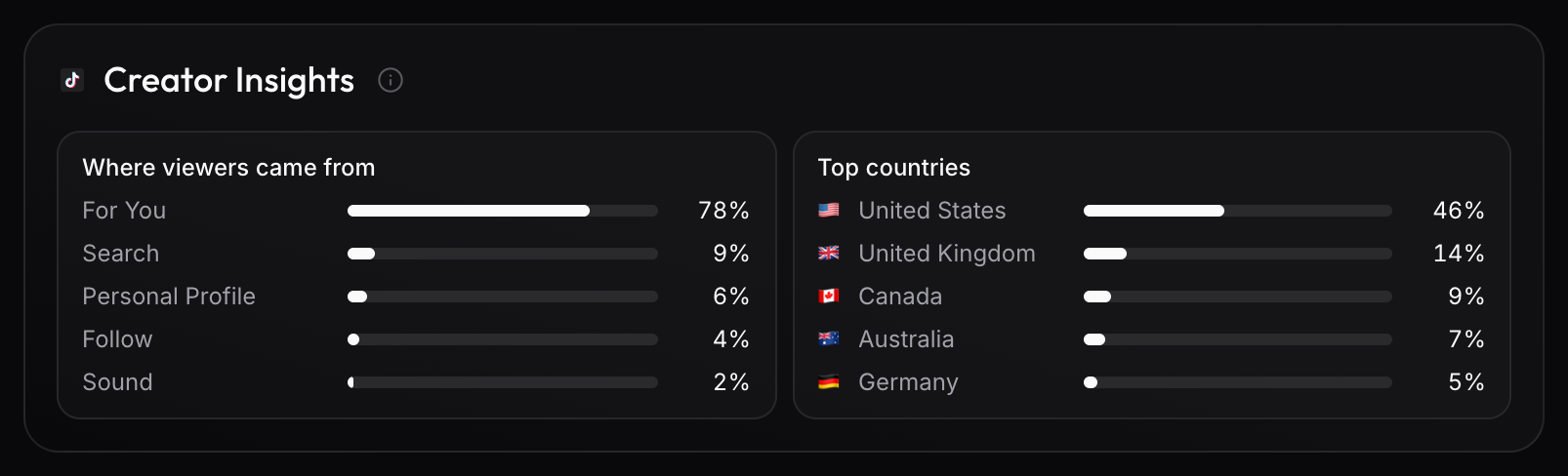
- Videos: watch time and completion rate. The video's Creator Insights shows how viewers found it and where they are.
- Accounts: the audience by country, age and gender, also as columns in Analytics › Accounts.
How to get started
- Invite the creator, so they have their own login.
- Track their TikTok account and assign it to them.
- They click Verify on their Accounts page and log in with TikTok.
Connecting only lets viral.app read their numbers: it can't post or change anything, and it doesn't affect their reach. Numbers show up within minutes, one to three days behind TikTok, and the audience once an account has 100 followers.
Only brands a creator works with see these numbers. Bringing your own creators onto viral.app doesn't mean they'll see marketplace jobs. Read Choose the onboarding mode.