Content Rewards or viral.app? It comes down to how much of your budget reaches the creator.
Both pay creators per 1,000 views on short-form posts. On viral.app you choose the creators, the fee is a flat 3% on your side, and nothing comes out of creator pay. Content Rewards takes 10% from you and 10% from the clipper, on a budget of at least $1,000 funded up front. It has the open crowd of clippers.
Companies from startups to enterprise choose viral.app
Mike SchneiderCo-Founder · · 12 min read
The short version: like Content Rewards, viral.app pays creators per 1,000 views with a minimum and a cap, and nothing is paid until you approve it. Pick viral.app when you want the budget to reach the people who post. The fee is a flat 3% on your side and nothing comes out of creator pay; Content Rewards takes 10% from you and 10% from the clipper, plus Whop's processing fee on every deposit. You choose every creator from applicants and best-fit matches, or add the ones you already work with by URL, with no sign-up on their side. You pay after each period instead of funding $1,000 up front, and one campaign can mix base pay, CPM tiers and bonuses. Pick Content Rewards when you have footage people already want to clip and want an open crowd to post it without hiring anyone.
This page covers Content Rewards, the clipping app run by Content Rewards Inc. It started on Whop, and you still add it to a Whop store and fund campaigns inside Whop. Whop's own fees and terms, and the other ways to pay clippers there, are on our Whop comparison. Are you a clipper or creator looking for paid work? This page is for brands; join the Canvas UGC marketplace, or read how to become a clipper.
We make viral.app, so read this with that in mind. Every Content Rewards fact below comes from its own site, pricing, help center and terms, and Whop's processing rates from Whop's pricing page, checked on October 6, 2026, with links at the end. Where Content Rewards doesn't say something, we write "Not public". Where its own pages disagree, we show both.
At a glance
Who wins each job
Content RewardsJobs won by Content Rewards
2
TieTies
1
viral.appJobs won by viral.app
8
Each of these 12 jobs goes to the tool that does it better, or is a tie when both do it about as well. Where they work differently, the better pick depends on your program.
Pay per 1,000 views, with a minimum and a cap: a tie.
Tie
Both do it, per platform, and neither pays for a video until you approve it. viral.app also puts base pay, tiers and bonuses in the same campaign.
Tie
What the creator keeps: viral.app does this better.
viral.app
viral.app takes nothing from creator pay. Content Rewards takes 10% of every CPM payout from the creator, on top of the 10% it takes from you: at a $1 rate you pay $1.10 and the clipper gets $0.90.
viral.app
Fees on what you pay creators: viral.app does this better.
viral.app
A flat 3% on your side and a plan from $99 a month. Content Rewards takes 10% from each side of a CPM payout, and Whop adds its processing fee to every deposit.
viral.app
Money locked up front: viral.app does this better.
viral.app
Nothing is prepaid: you pay creators after each period you approve. Content Rewards needs a budget of at least $1,000 before launch, and unspent money comes back through a reviewed refund, less a hold of up to 20%.
viral.app
Choosing who posts for you: viral.app does this better.
viral.app
You hire every creator, from applicants and matches ranked by best fit to your job, or bring your own. On Content Rewards anyone can join an open campaign, and its creator pool can't be browsed before launch.
viral.app
Creators you already work with: viral.app does this better.
viral.app
Add any public account by URL: no sign-up or login for the creator, and never shown to other brands. On Content Rewards they need an account, a Whop login and connected socials, and must submit each post.
viral.app
Base pay and views in one deal: viral.app does this better.
viral.app
Base pay per video, CPM tiers, bonuses and caps in the same campaign, tested on a creator's recent videos. Content Rewards runs one model per campaign, fixed at launch.
viral.app
Creators and views by country: viral.app does this better.
viral.app
Each job sets countries of residence and languages, and views by country show per account and video. Content Rewards' help center lists country filters and audience demographics as not available today.
viral.app
API, MCP and revenue data: viral.app does this better.
viral.app
API and MCP server on Ultra and Scale, and RevenueCat revenue next to views. Content Rewards' help center lists an API and conversion tracking as not available today.
viral.app
A crowd of clippers without hiring: Content Rewards does this better.
Content Rewards
Live public campaigns sit on its Discover page, where creators browse and join. Its pricing page puts the pool at 1M+ creators. On viral.app creators apply to your job and you choose.
Content Rewards
A fraud score on every clip: Content Rewards does this better.
Content Rewards
A 0 to 100 Bot Score built with a third-party provider; a flagged clip's payout pauses until a person decides. On viral.app you know each creator, paid ad views stay out of pay, and you can leave any video out before you approve.
Content Rewards
Platforms: they work differently.
Different
Content Rewards campaigns run on TikTok, Instagram, YouTube and X, with Facebook in some. viral.app tracks TikTok, Instagram, YouTube, Facebook and Snapchat, but not X.
Different
Content Rewards pricing vs. viral.app: plans matched up
Content Rewards has no plans, only fees on both sides of each payout. So the fair match is its standard rate against viral.app's entry plan, for a first program.
Shaded side has the edge
Tie
Different: depends on your program
A first programCContent RewardsStandard10%Ahead on 2 linesviral.appPro$99Ahead on 8 linesvs1 line depends on your program1 differs
Content Rewards Standardviral.app Pro
Fee on your side
Content Rewards Standard: 10% of each creator payout, from your budget
viral.app Pro: 3% on each payout
Edge: viral.app
What the creator pays
Content Rewards Standard: 10% of CPM payouts; nothing on per-post or retainer campaigns of $5,000 or more
viral.app Pro: Nothing to viral.app
Edge: viral.app
Money up front
Content Rewards Standard: A budget of at least $1,000, funded before launch
viral.app Pro: None; creator pay is due after each period you approve
Edge: viral.app
Payment processing
Content Rewards Standard: Whop's fee on every deposit; 2.7% + $0.30 on US cards per Whop's pricing
viral.app Pro: Free bank transfer
Edge: viral.app
Monthly price
Content Rewards Standard: None
viral.app Pro: $99, or $79 billed yearly, after a 7‑day free trial
Edge: Content Rewards
Picking creators
Content Rewards Standard: Application-only or private campaigns; the pool can't be browsed first
viral.app Pro: You hire every creator, or bring your own
Edge: viral.app
Who can post
Content Rewards Standard: Anyone who joins an open campaign; no plan limit
viral.app Pro: Up to 10 active creators you chose; 50 on Ultra
Different, depends on your program
How creators are paid
Content Rewards Standard: One model per campaign: CPM, per post or retainer
viral.app Pro: Your deal: base pay, CPM tiers, bonuses and caps
Edge: viral.app
What gets tracked
Content Rewards Standard: Posts creators submit from connected accounts
viral.app Pro: Every public post on any account you add
Edge: viral.app
Checks on each clip
Content Rewards Standard: A Bot Score on every clip; optional draft review
viral.app Pro: You approve each payout and can leave any video out; paid views don't count
Edge: Content Rewards
API and AI agent
Content Rewards Standard: No API today, per its help center
viral.app Pro: Copilot in the app; API and MCP from Ultra
Edge: viral.app
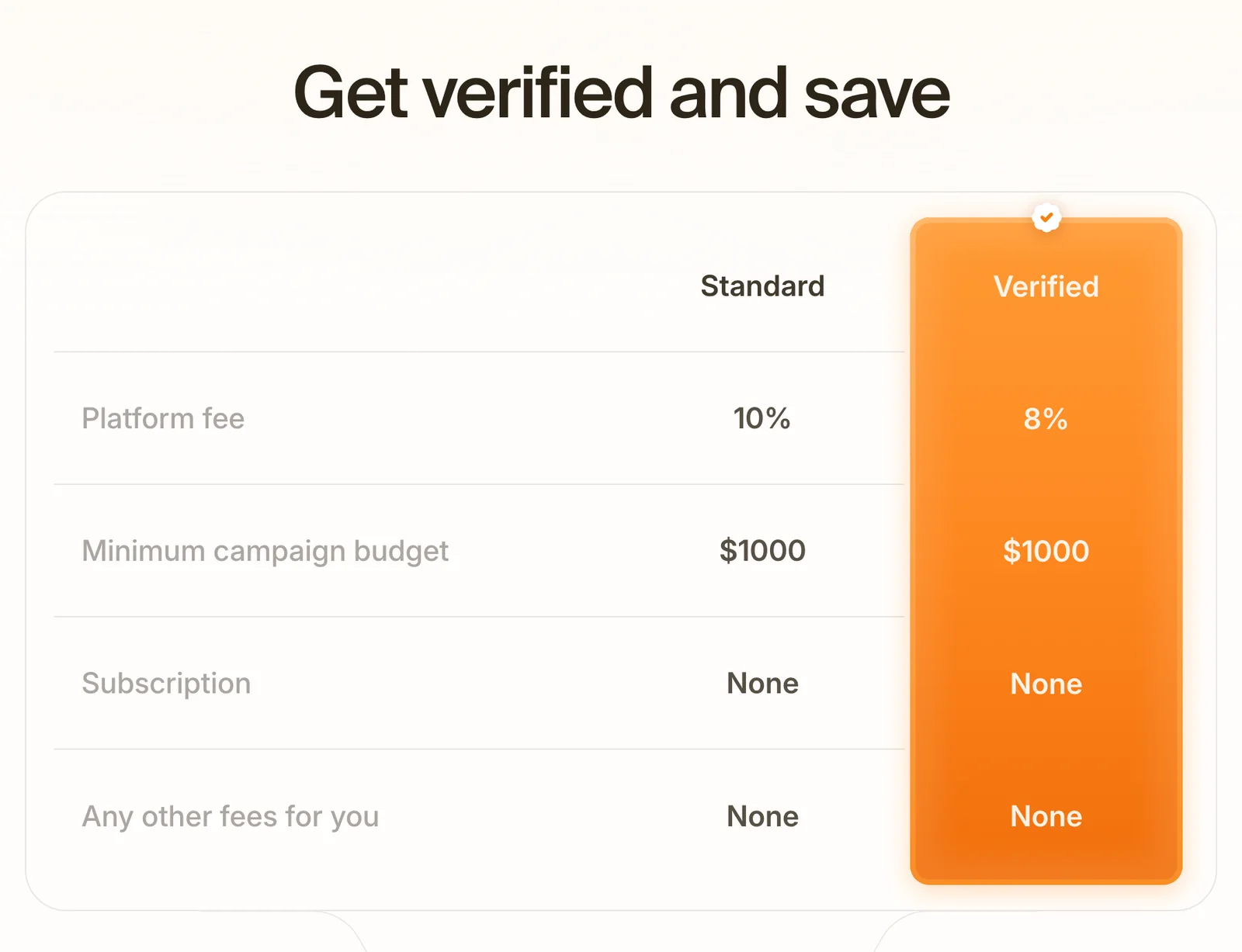
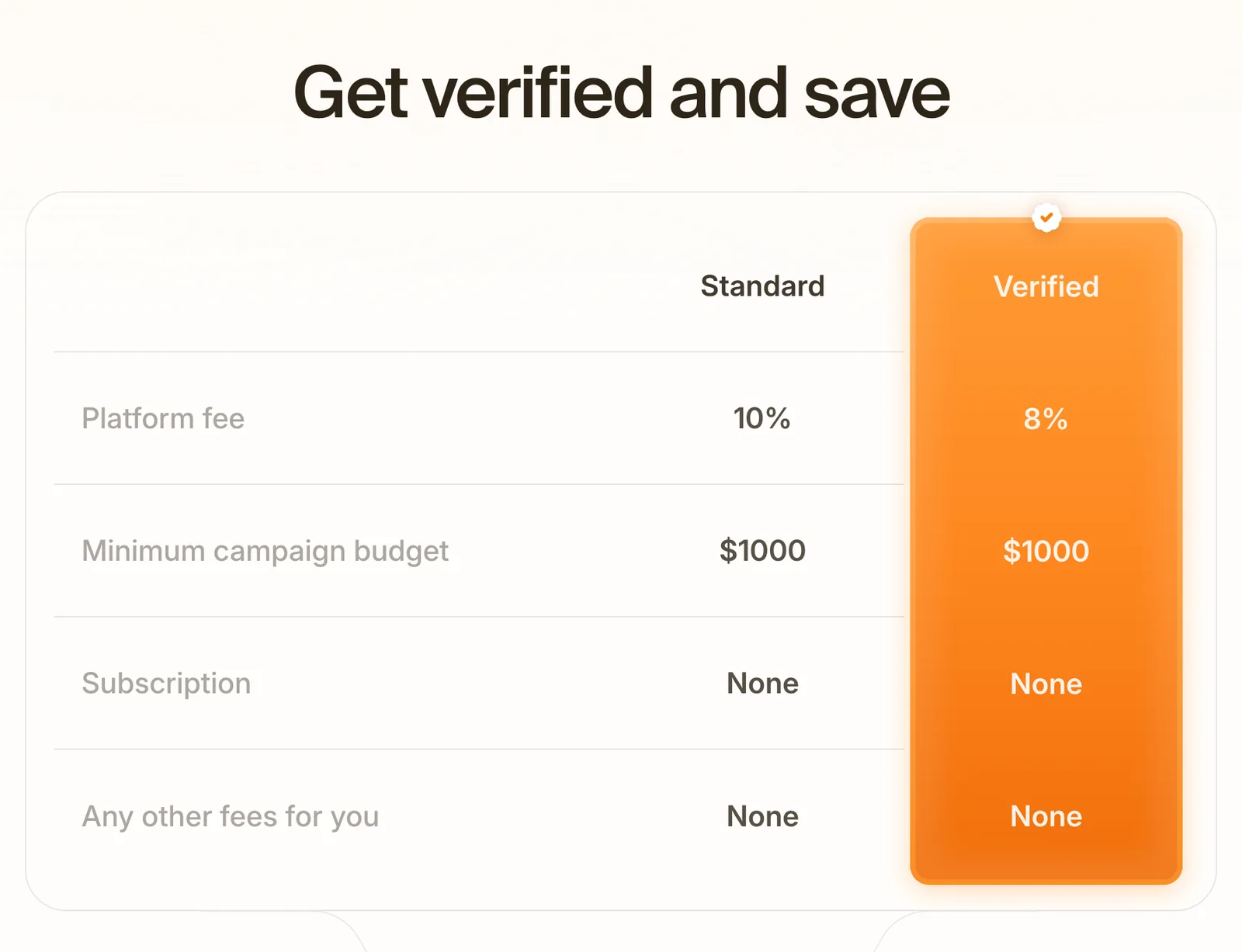
Around these: an organization that Content Rewards has verified pays 8% in place of 10%; how you get verified isn't published beyond a demo booking. viral.app Ultra is $299 a month ($239 yearly) for up to 50 creators, 2 live jobs, 5,000 tracked videos, 10 seats and the API; Scale is $499 ($399 yearly) for 500 creators, 3 jobs, 20,000 videos and 20 seats; Enterprise is custom.
Which one should you pick?
Choose Content Rewards if…
You have footage people already want to clip, and want an open crowd to post it without hiring anyone.
You want every clip scored for bots, and the option to review a draft before it posts.
You want a prepaid budget that stops when it's spent, and a license to each approved clip by default.
Our product
Choose viral.app if…
You want the budget to reach the creators: 3% on your side and nothing out of their pay.
You want to choose every creator, keep the ones who perform, and add the ones you already have by URL.
You pay with base pay, tiers and bonuses, hire by country and language, or need an API and revenue next to views.
Neither fits?
Look at these instead
A clipping agency on Whop, or Bounties at a fixed price per post? Whop.
Views from a creator network with no monthly fee? Noise.
A large creator marketplace with plans? SideShift.
Content Rewards fees: where your budget goes
This is the difference that shapes everything else. On Content Rewards, three charges sit between your budget and the creator: its fee on your side, its fee on the creator's side, and Whop's fee for processing the deposit. The brand tab of its pricing page shows the first one. On viral.app there is one fee, 3%, and it is on your side.
Fee on your side
10% vs 3%
Content Rewards takes 10% of each creator payout from your budget, 8% once verified. viral.app charges 3% on top of each payout, plus a plan.
Fee on the creator's side
10% vs 0%
Content Rewards' creator terms take 10% of every CPM payout. viral.app takes nothing from creator pay.
Locked before the first clip
$1,000 vs $0
Content Rewards needs a funded budget of at least $1,000. On viral.app nothing is prepaid: creator pay is due after each period you approve.
To put $1,000 in clippers' hands on a CPM campaign, about $1,222 leaves your Content Rewards budget, before processing. On viral.app it is $1,030, plus your plan. If your offer has to compete for good creators, they compare what lands in their account, and at the same $1 rate that is $0.90 on Content Rewards and $1.00 on viral.app.
Content Rewards' own pages disagree on the last line of its pricing table. The pricing page answers "Any other fees for you" with "None". Its Organization Terms pass Whop's processing fee through to you (section 4.2) and allow the hold on refunds (section 10.4). The processing fee isn't refunded, and the hold can reach 20% of what you didn't spend.
Creators you choose, and keep
An open Content Rewards campaign is posted by whoever finds it on Discover. Its help center notes that some creators post from accounts built for campaigns, not personal ones, and that country filters aren't available today. On viral.app you decide who posts, and the relationship stays with you.
You choose every creator
Post a job and pick from applicants and matches ranked by best fit to your job. Each application shows portfolio videos, connected accounts, languages and location.
Hire by country and language
Each job sets countries of residence, languages and a minimum age, and matching follows them. Views by country show per account and video.
Bring the creators you have
Paste an account URL and it's tracked. No sign-up or login on the creator's side, and your roster is never shown to other brands.
Creators you add yourself come under no hiring restriction. On Content Rewards, a creator you met there can't be engaged for the same work outside the platform for 6 months after a CPM campaign and 12 after a retainer (Organization Terms, section 15).
If you only want reach on existing footage and don't need to keep the clippers, an open campaign does that job. Noise sells views from its own creator network in a similar way, and our guide to clipping campaigns explains how caps and minimums change what a campaign costs.
Every difference, row by row
Forty-three rows in five groups, starting with fees and creators. "Yes" means the product does it, "Partly" means it covers part of the job, and "Not public" means we couldn't find it on Content Rewards' public pages.
Plain fact
Not public
No
Partly
Yes
5 groups · 43 rows
Content Rewards
viral.app
At a glance · one mark per row, in table order
Every difference between Content Rewards and viral.app, by group
What you need
Content Rewards
viral.app
01Fees and moneyA fee on both sides against 3% on yours
Platform fee on your side
Content Rewards
10% of each creator payout, from the budget, as each approved clip settles. 8% for a verified organization.
viral.app
3% on each payout, paid by you. None of it comes out of creator pay.
What creators pay
Content Rewards
10% of every CPM and pool payout. On per-post and retainer campaigns: 10% under a $5,000 budget, nothing at $5,000 or more. Moving earnings to a Whop balance is free; from there Whop charges for faster payouts, such as next-day ACH ($2.50) or instant bank deposit (4% + $1).
viral.app
Nothing to viral.app. Local bank payouts in EUR, GBP, CHF and USD are free; PayPal, Venmo and wires can carry a method fee.
Money locked before launch
Content Rewards
$1,000 per campaign on every model; top-ups from $100. Its help center adds that campaigns funded under $2,000 often drew no clips at a $1 rate.
viral.app
None. No minimum creator pay, and you top up the payout wallet when a period is due.
Payment processing
Content Rewards
Whop's fee is added to every deposit and shown before you confirm. The rate isn't on Content Rewards' pages; Whop's pricing page lists 2.7% + $0.30 for US cards.
viral.app
Free bank transfer by SEPA, UK Faster Payments, US ACH, wire or SWIFT, with no conversion fee. Cards aren't accepted.
Refund of unspent budget
Content RewardsPartly
On request once every pending clip is decided; reviewed in 5 to 7 business days; a hold of up to 20% of the unspent amount; credited to your Content Rewards balance, not the original payment method.
viral.app
Nothing to refund: no campaign budget is locked, and each period is paid after you approve it.
Invoices and tax
Content RewardsNot public
Brands handle their own taxes, and Content Rewards doesn't collect creator tax documents or withhold (terms, section 17). Invoices for brands aren't described.
viral.appYes
The integrated payout system is merchant of record: invoices for you and in each creator's name, KYC, AML and sanctions checks. DAC7 reporting on request.
Who pays the creators
Content Rewards
Content Rewards credits the creator's balance; withdrawals, KYC and tax processes run through Whop under Whop's terms.
viral.app
The integrated payout system, as merchant of record. Creators claim with one link by bank, PayPal, Venmo, USDC or EURC, without a viral.app account.
When creators get paid
Content Rewards
CPM: rounds of 7 days of earning plus a 3‑day hold, so about 10 days after approval. Per post: shortly after approval. Retainer: after each cycle.
viral.app
After each payout period you set and your approval. USDC arrives in minutes, PayPal and Venmo usually within the hour, bank transfers in 1 to 5 business days.
Monthly cost
Content Rewards
None: no subscription, setup, seat or listing fees.
viral.app
Pro $99, Ultra $299, Scale $499 a month, or $79, $239 and $399 billed yearly. 7‑day free trial on Pro and Ultra.
Folded rows: Payment processing; Refund of unspent budget; Invoices and tax; Who pays the creators; When creators get paid; Monthly cost.
02Creators and accessAn open pool against a roster you choose
Picking who posts
Content RewardsPartly
Open, application-only or private campaigns, fixed at launch. You can't browse the creator pool before you launch; you see creators as they join or apply.
viral.appYes
You hire from applicants and matches ranked by best fit to your job, or add creators you already work with.
Creators you already work with
Content RewardsPartly
Invite them to a private campaign by email, Whop username or link. They need a Content Rewards account with a Whop login and connected socials, and submit each post.
viral.appYes
Tracked from a URL without signing up, paid through us or by you, and never shown to other brands.
Creators by country and language
Content RewardsPartly
No country filters. You write a share into the requirements and can ask creators to attach their audience breakdown at submission.
viral.appYes
Each job sets countries of residence and languages, with location verified before a creator is matched. Views by country show per account and video after posting.
Who the creators are
Content Rewards
Clippers, UGC creators, video editors and influencers. Its help center notes that some post from accounts built for campaigns, not personal ones.
viral.app
The people you hired: Canvas UGC creators on brand accounts, influencers on their own, or your existing roster.
Creators without recruiting
Content RewardsYes
Public campaigns are listed on Discover, where creators browse, join and submit. Its pricing page says 1M+ creators; a May 2026 article of its own says 400,000+ verified creators.
viral.appYes
Canvas UGC marketplace: post a job and creators apply with portfolio, accounts, languages and location. Each live job also gets matches ranked by best fit.
Hiring a creator outside the platform
Content Rewards
Barred for the same work for 6 months after a CPM campaign and 12 after a retainer; damages are the greater of $1,000 or twice the platform fees (terms, section 15).
viral.app
Creators you bring: no restriction. Creators met on the Canvas UGC marketplace: the same kind of rule, 24 months and at least EUR 1,000.
Removing a creator
Content RewardsYes
Ban a creator from all your campaigns, and lift the ban later.
viral.appYes
End the creator's campaign assignment or stop tracking their accounts at any time.
Folded rows: Who the creators are; Creators without recruiting; Hiring a creator outside the platform; Removing a creator.
03Pay rulesOne model per campaign against a deal you write
Base pay and views in one deal
Content RewardsPartly
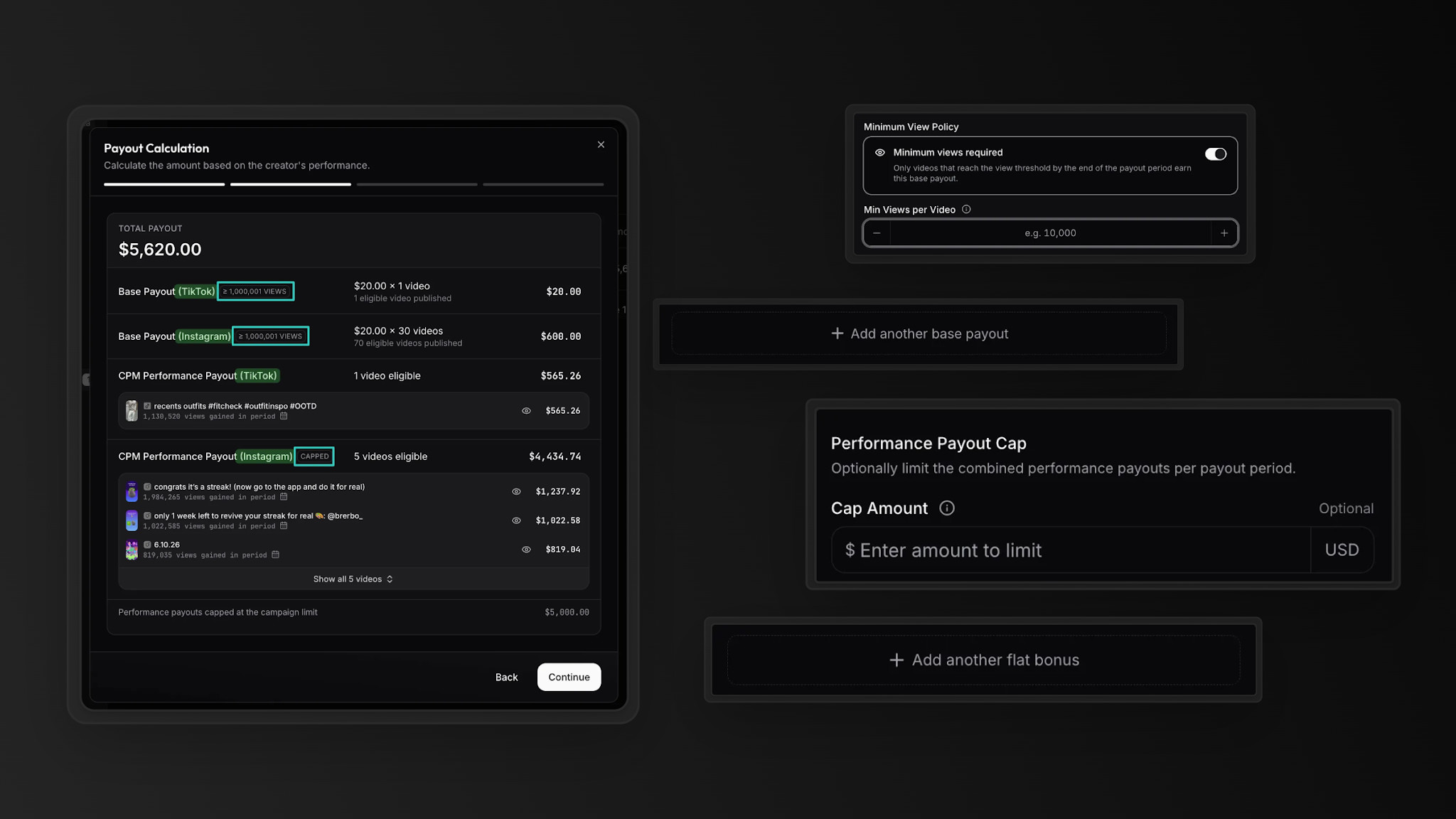
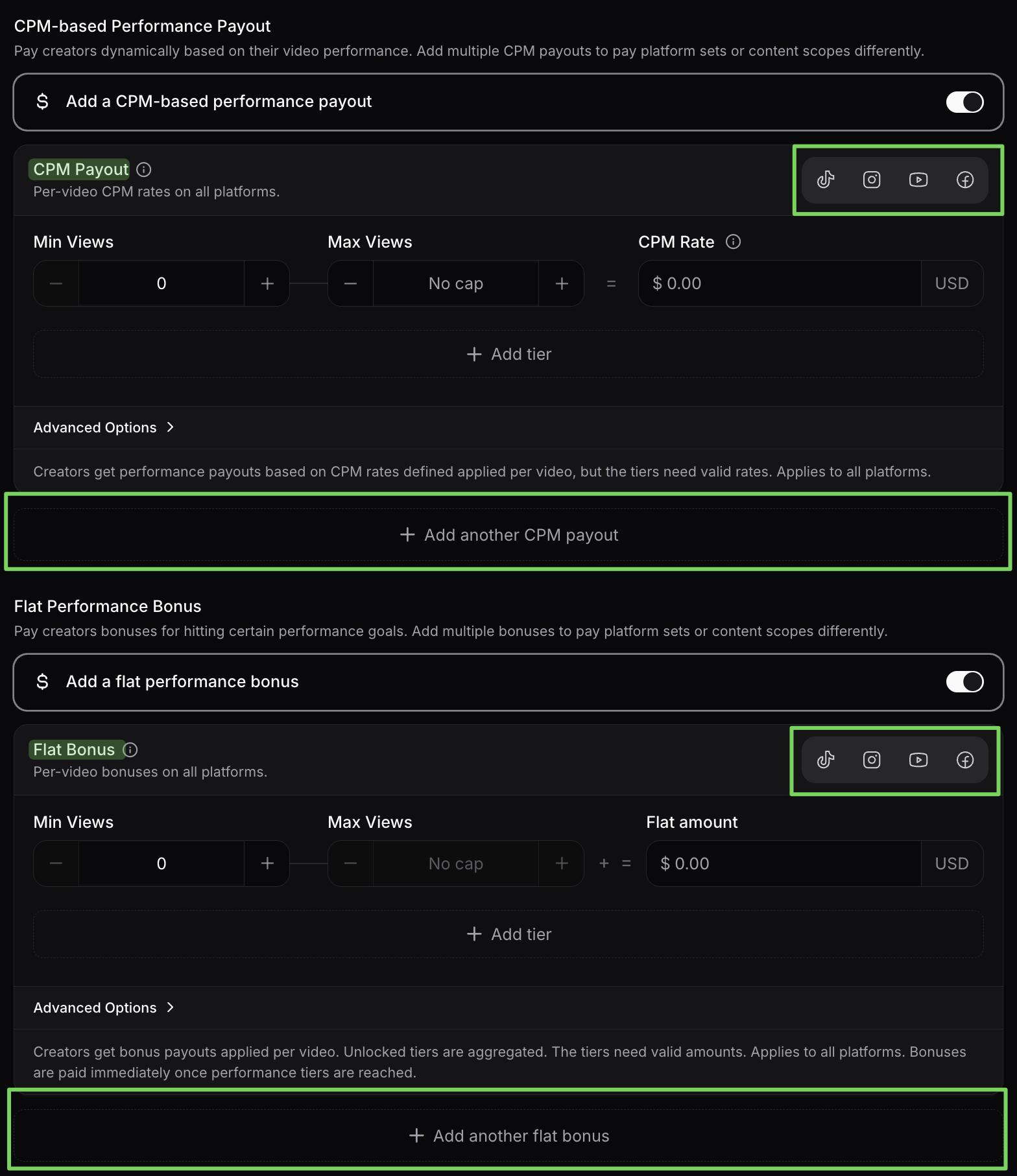
One model per campaign, chosen at creation: CPM, per post or retainer. A flat amount on top of a CPM rate isn't described for the current app.
viral.appYes
Base pay per video by platform, fixed salary, CPM tiers and milestone bonuses, with caps and view windows.
Changing the deal later
Content RewardsPartly
Model, platforms, access type and budget lock at launch; the budget can only grow. Other settings stay editable.
viral.appYes
Payout rules stay editable on a live campaign, and payouts already issued keep the rules they were paid under. Schedule and currency lock once creators are assigned.
Test a deal before launch
Content RewardsNot public
Not described.
viral.appYes
Simulate the payout for one of your creators on their recent videos.
Pay per 1,000 views
Content RewardsYes
A rate per platform. Its help center says campaigns that fill sit between $0.80 and $2.00, with $1.00 the most common.
viral.appYes
A CPM per platform, with tiers per video or across the period.
Minimum and cap per clip
Content RewardsYes
A minimum a clip must earn before it's paid and a maximum it can earn, per platform. $2 and $200 are its usual settings.
viral.appYes
A minimum view count per video, CPM tiers that stop paying above a view count, and a cap on performance pay per creator per period.
Flat pay per video
Content RewardsYes
Per-post campaigns pay a flat amount per approved clip, with an optional minimum view count.
viral.appYes
Base pay per video, set by platform.
Recurring pay
Content RewardsYes
Retainer campaigns with weekly, bi-weekly or monthly cycles, deliverables per cycle, and pro-rated or all-or-nothing pay.
viral.appYes
A fixed salary per period, with a video target.
Spend limits
Content RewardsYes
The budget is funded up front and the campaign pauses when it's spent.
viral.appYes
A video cap or payout cap per period on base pay, a cap on performance pay per creator per period, and nothing is paid until you approve it.
How long views count
Content Rewards
Tracking normally runs 30 days from submission (terms, section 6.7). Its glossary says 7 days unless the campaign shows otherwise.
viral.app
An eligibility window per campaign, and whether only posts from the current period count.
A shared prize pool
Content RewardsPartly
Pool campaigns split a budget by counted views in the terms (section 5.7); the site and help center name only three models.
viral.appNo
Not offered. Milestone bonuses pay each creator on their own videos.
Folded rows: Pay per 1,000 views; Minimum and cap per clip; Flat pay per video; Recurring pay; Spend limits; How long views count; A shared prize pool.
04Tracking, review and fraudviral.app tracks every account; Content Rewards scores each clip
What gets tracked
Content RewardsPartly
Posts a creator submits to your campaign from an account they connected and verified, within 30 minutes of posting per its help center.
viral.appYes
Every public post on any account you add, up to the tracking limit you set. No creator login needed.
Tracking accounts outside a campaign
Content RewardsNot public
Not described on its pages.
viral.appYes
Mark any tracked account as a competitor and see its top videos next to your own.
Paid views kept out of pay
Content RewardsNot public
Not described.
viral.appYes
With TikTok or Meta connected, view-based pay counts organic views only.
Approving what you pay for
Content RewardsYes
Every submission is approved or rejected by hand; there is no automatic approval. A rejection must rest on a requirement written on the campaign.
viral.appYes
A due queue: adjust amounts, leave a video out of one rule or the whole payout, approve, and pay up to 50 at once.
How views are read
Content RewardsYes
Through the platforms' APIs on read-only connections, on a schedule. The interval isn't published.
viral.appYes
From public data, every 24 or 12 hours by plan, up to every hour on Enterprise, and any account or video on demand for 3 credits per video.
Platforms
Content Rewards
TikTok, Instagram, YouTube and X per its help center; its creator terms and some live campaigns add Facebook. Snapchat isn't mentioned.
viral.app
TikTok, Instagram, YouTube, Facebook and Snapchat.
Fake views and bots
Content RewardsYes
A 0 to 100 Bot Score with a third-party provider. Above a threshold you can adjust, the clip is flagged, its payout pauses and a person decides.
viral.appPartly
You know every creator you pay. Paid ad views stay out of pay, Instagram counts stay Instagram-only, each video shows its views, likes, comments and shares, and you can leave any video out before you approve.
Review before a post goes live
Content RewardsYes
Optional pre-post review: creators upload a draft and you approve, reject or request changes in a thread.
viral.appPartly
An application can include a sample video, briefs show who has read them, and creators can send a draft in chat. Posts are tracked once they're live.
Deleted posts
Content Rewards
Deleting a post doesn't by itself cancel earnings on views already recorded (terms, section 6.8); a missing or private post is flagged and its payout frozen.
viral.app
You approve every payout and can exclude a video that was deleted or made private.
Folded rows: Approving what you pay for; How views are read; Platforms; Fake views and bots; Review before a post goes live; Deleted posts.
05Data, ads, rights and teamData you can pull, and ads on your own accounts
API, MCP and webhooks
Content RewardsNo
Its help center lists an API as not available today. An MCP server and webhooks aren't mentioned.
viral.appYes
API and MCP server, included on Ultra and Scale, with signed webhooks. Copilot in the app on every plan.
Sales or installs next to views
Content RewardsNo
Its help center: no conversion tracking in the dashboard; use bio links, promo codes or a landing page.
viral.appYes
RevenueCat revenue, trials and subscribers per project, plus App Store data.
Running posts as ads
Content RewardsPartly
The license covers paid advertising. An ads integration isn't described.
viral.appYes
Create Ad from any tracked post: Spark Ads on TikTok, partnership ads on Instagram and Facebook, on your own ad accounts.
Campaign analytics
Content RewardsYes
Views, likes, comments, shares, approved clips and payouts by day or hour and platform, plus effective CPM and a creators page.
viral.appYes
The same across every tracked account, filterable by creator, campaign, platform and tag.
Sharing and export
Content RewardsYes
A live read-only report link that opens without an account, and a spreadsheet export of every clip.
viral.appYes
CSV export of every table and of each paid payout's per-video breakdown, view-only seats, and the API.
Rights to the clips
Content RewardsYes
On approval, a perpetual, worldwide, non-exclusive license that includes paid ads. You own clips made from content you supplied, and retainer work is work-for-hire (terms, section 12).
viral.app
What you agree with each creator, exclusive if you want. viral.app claims no rights to campaign videos; ad permissions go through TikTok and Meta.
Team and roles
Content Rewards
No seat fees. Owner, admin, moderator and member roles in the terms; its agency help article says there is no view-only role.
viral.app
1 seat on Pro, 10 on Ultra, 20 on Scale, then $15 each. Scoped roles, including view-only.
Where data is hosted
Content RewardsNot public
Not stated on the pages we checked.
viral.appYes
Built in Germany, under GDPR; databases on Hetzner in Germany and Finland, the web app on Vercel.
Folded rows: Campaign analytics; Sharing and export; Rights to the clips; Team and roles; Where data is hosted.
28 more rows in 5 groups, folded to keep the page short. Nothing is left out.
What each one costs for your program
Content Rewards publishes its fees, so the math is simple. On a CPM campaign (pay per 1,000 views) it takes 10% of creator pay from you and 10% from the creators. viral.app charges a plan plus 3%, on your side.
From about $600 a month in creator pay, viral.app Pro takes less out of a program than Content Rewards does. With up to 50 creators on Ultra that point is about $1,800, and with up to 500 on Scale about $2,900. Counting your side only, Content Rewards' 10% is the smaller fee below about $1,400 a month against Pro, $4,300 against Ultra and $7,100 against Scale, or about $2,000, $6,000 and $10,000 at its verified 8% rate. Above those points viral.app costs less on your side too, and the gap grows with the budget. More than 500 active creators needs viral.app Enterprise.
The table leaves out Whop's processing fee on deposits, 2.7% + $0.30 on US cards per Whop's pricing page, and yearly billing, which cuts viral.app's plans by about 20%. On per-post and retainer campaigns with a budget of $5,000 or more, Content Rewards takes nothing from creators.
Your program
Content Rewards$1,000viral.app$599
Cheapest plan that fits
Per month
$0
$250
$500
$750
$1K
Fee
$1,000all in
Ultra
Fee
$599all in
Content RewardsStandard
viral.appProUltraScale
Content Rewards Standard
Standard plan$0
10% platform fee on creator pay$1,000
Total per month$1,000
viral.app Ultra
Ultra plan$299
3% payout fee$300
Total per month$599
Ultra is needed for more than 10 active creators.
From prices checked Oct 6, 2026. Illustrative, not a quote.
The calculator counts your side only: the 10% Content Rewards takes from creators on CPM campaigns and Whop's processing fee are not in its totals.
CContent Rewards
In Content Rewards: The brand tab of its pricing page: 10%, or 8% verified, and a $1,000 minimum. The creator's 10% is on the creator tab, and Whop's processing fee is in the terms.
In viral.app: viral.app works out what each creator is owed from your deal before you approve it. The 3% comes on top, and nothing is taken from the creator.
The same deal in both tools
Here is a plain CPM deal that both tools can run: $1 per 1,000 views, at most 200,000 paid views per clip, and what one creator is owed for a month of nine clips. For how much a cap changes the bill, see where the money goes in a clipping campaign.
The deal's terms, and whether Content Rewards and viral.app can run each one
Deal term
Content Rewards
viral.app
01$1 per 1,000 views
Yes
Yes
02At most 200,000 paid views per clip
Yes
Yes
03Nothing paid under 2,000 views
Yes
Yes
04Only creators you approved
Yes
Yes
05Nothing taken from the creator's pay
No
Yes
06$10 base pay per clip on top
Not public
Yes
07Test the deal on last month's videos first
Not public
Yes
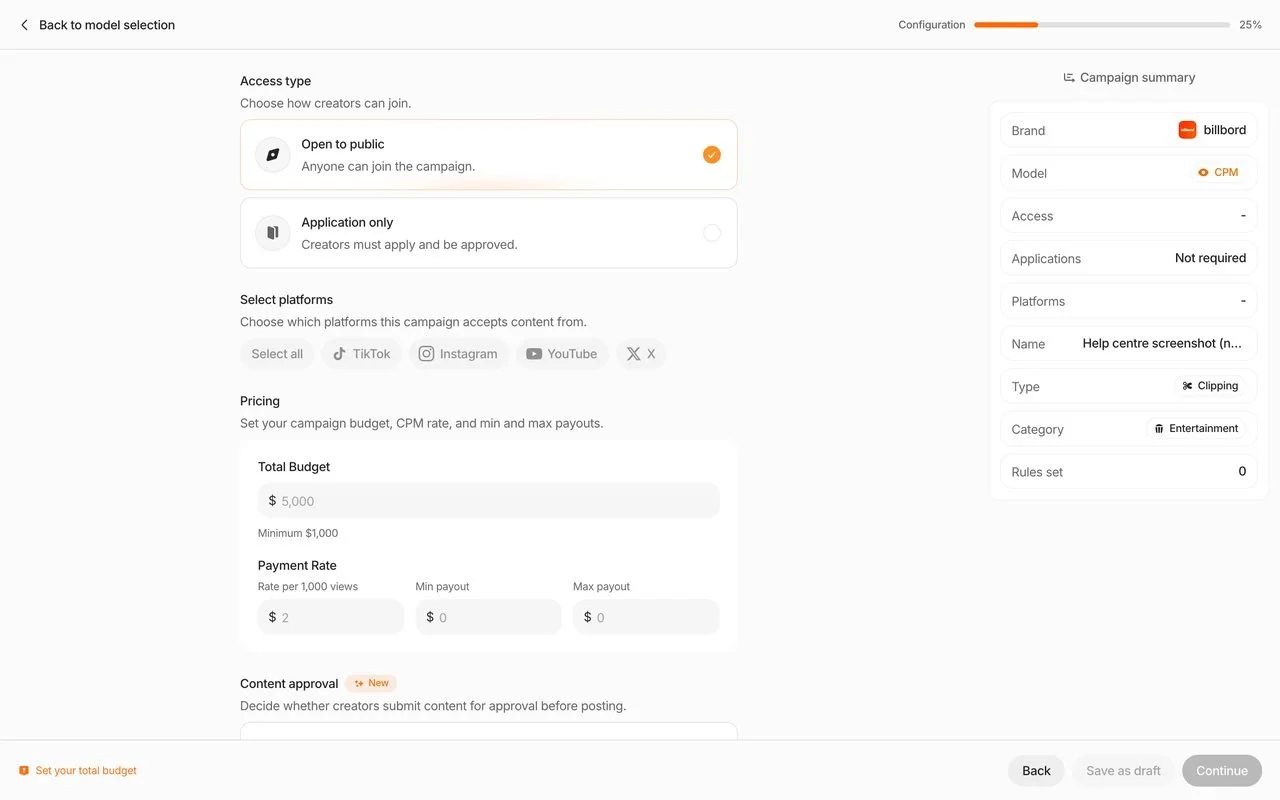
Content Rewards: the rate, minimum and cap are CPM campaign settings, and approved creators need an application-only or private campaign. No: its creator terms take 10% of every CPM payout. Not public: a flat amount on top of a CPM rate isn't described for the current app, and neither is deal testing.
What the creator is owed
Example month
Clip 1 · 250,000 views, paid to the 200,000 cap
$200
Clips 2 to 9 · 180,000 views in total
$180
Creator is owed
$380
viral.app: the creator receives
$380
viral.app: your 3% payout fee
$11.40
Content Rewards: the creator receives
$342
Content Rewards: drawn from your budget
$418
On viral.app you pay $380 plus $11.40 and your plan, and the creator gets the $380. On Content Rewards $418 leaves your budget, before Whop's processing fee on the deposit, and the creator gets $342 after the 10% creator fee.
On Content Rewards you set those numbers in the campaign wizard, per platform, and the model can't change once the campaign is live. On viral.app the payout rules stay editable while the campaign runs.
CContent Rewards
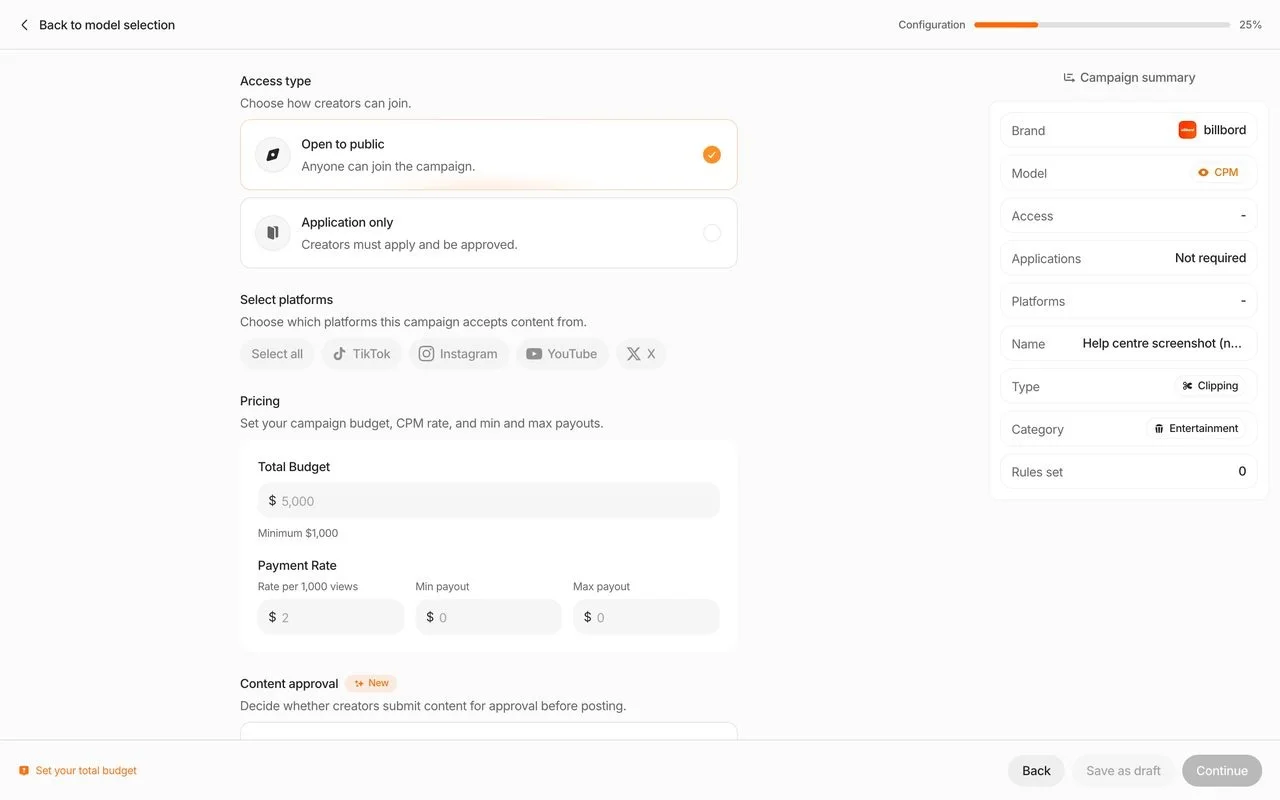
In Content Rewards: A CPM campaign in its wizard: who can join, which platforms, the budget, and a rate with a minimum and maximum payout.
Post a job on the Canvas UGC marketplace and get applicants and matches ranked by best fit to your job. Or add creators you already work with by URL.
In Content Rewards
Create a Whop, install the Content Rewards app, then fund and launch a campaign. It appears on Discover and creators join, apply or accept your invite.
Check each calculated payout, adjust it if needed, then pay up to 50 creators at once.
In Content Rewards
Approve or reject each clip by hand; approved CPM clips settle in rounds of about 10 days from your budget.
Where each one is better
C
Where Content Rewards is better
01
1. A crowd that comes to you
Public campaigns on its Discover page, which clippers browse and join.
02
2. A fraud score on every clip
A 0 to 100 Bot Score, with flagged payouts paused until a person decides.
03
3. Drafts and a default license
Optional pre-post review, and a license that covers paid ads once you approve a clip.
04
4. No monthly fee,and a hard stop
A fee on approved clips only, from a prepaid budget that pauses when it's spent.
Where viral.app is better
01
1. Nothing out of creator pay
A flat 3% on your side only. A creator at $1 per 1,000 views keeps $1, not $0.90.
02
2. Your creators,your roster
Hire from applicants and best-fit matches, or add anyone by URL, with no sign-up on their side.
03
3. No money locked up front
No $1,000 minimum and no refund request. You pay after each period you approve.
04
4. Deals beyond one model
Base pay, salary, CPM tiers, bonuses and caps in one campaign, tested first.
05
5. Track anyone,competitors included
Any public account on five platforms from a URL, next to every creator you work with.
06
6. Data you can pull,ads you can run
API, MCP server and webhooks, revenue next to views, and Create Ad on your own ad accounts.
What teams running creator programs say
David ParkJenni AI Founder
“viral.app has become core infrastructure for running organic marketing. It has helped us scale
to over a billion organic views.”
Zack HargettQuizlet/CoconoteCo-Founder
“viral.app feels like the first serious solution for managing high-volume UGC campaigns.”
Julian IvaldyWhoLiked Founder
“viral.app has solved our biggest pain points. It’s handling everything from global payouts to
invoicing and tax accounting.”
Running both, or moving over
You don't have to pick one for everything. Some teams keep an open Content Rewards campaign for reach on existing footage and run the creators they choose in viral.app, where any public account can be tracked from its URL, including the pages that clipped for them. Two things to check before you move people. Content Rewards' terms bar engaging a creator you met there for the same work off the platform for 6 months after a CPM campaign and 12 after a retainer, with damages of at least $1,000 (section 15). And unspent budget comes back only through a reviewed refund, less a possible hold. Creators you hire on viral.app, or bring yourself, can start today.
1
Day 1
Post a job or add your creators
Set countries, languages and pay, or paste the account URLs of creators you already work with.
2
Day 1
Write your deal as rules
The same rate, minimum and cap, plus base pay or bonuses if you want them, tested on recent videos.
3
First month
Run both side by side
Keep the Content Rewards campaign live and compare cost per 1,000 views, clips and sign-ups.
4
After that
Let the budget run out or ask for it back
Decide every pending clip first; a refund request pauses the campaign and takes 5 to 7 business days.
Questions about Content Rewards
Content Rewards (contentrewards.com) is a marketplace for short-video clipping and UGC campaigns, run by Content Rewards Inc. in Beverly Hills. A brand creates a Whop, installs the app, funds a campaign of at least $1,000 and sets a rate per 1,000 views with a minimum and a cap, or a flat amount per post, or a retainer. Creators find it on the Discover page, post on TikTok, Instagram, YouTube or X, and submit the link. The brand approves each clip by hand, and payouts settle from the budget (checked October 6, 2026).
No. They are two companies (checked October 6, 2026). Content Rewards is run by Content Rewards Inc.; Whop is the marketplace and payments company it launched on in March 2025. Since its rebuild on August 19, 2026, Content Rewards has its own terms, pricing and help center, but you still create a Whop, install the app and fund campaigns inside Whop, and Whop handles payment processing, withdrawals and identity checks. Whop's own terms page and 2025 guides still describe the first version. Our Whop comparison covers Whop's fees, Bounties and agencies.
Yes. Content Rewards' launch page says to make a Whop first: Content Rewards is an app inside your Whop, and your campaign runs in the app. Its help center adds that funding is only available inside Whop, so you open the app from your Whop dashboard to fund a campaign or top it up. Creators add a payout method on Whop and withdraw their earnings there.
A 10% platform fee on each creator payout, or 8% for a verified organization, taken from the budget as approved clips settle, so a $1,000 budget pays creators about $909. Creators then give up 10% of every CPM payout. Whop's payment processing fee is added to every deposit; Content Rewards doesn't publish the rate, and Whop's pricing page lists 2.7% + $0.30 for US cards. The minimum campaign budget is $1,000 and top-ups start at $100. There is no subscription, setup, seat or listing fee (checked October 6, 2026). viral.app charges a plan from $99 a month plus 3% on your side, and nothing from creators.
Yes. Its creator terms charge a flat 10% creator fee on every CPM and pool payout, and the creator tab of its pricing page shows it as keeping 90%. On per-post and retainer campaigns the creator fee is 10% when the campaign budget is under $5,000 and nothing at $5,000 or more. So at a $1 rate a clipper keeps $0.90 per 1,000 views while the brand pays $1.10. viral.app charges 3% on the brand's side and takes nothing from creator pay.
On a small program, on your side only. Content Rewards' 10% is the smaller fee below about $1,400 a month in creator pay against viral.app Pro (up to 10 creators), $4,300 against Ultra (up to 50) and $7,100 against Scale (up to 500); above those points viral.app's plan plus 3% costs less. Counting the 10% Content Rewards also takes from creators on CPM campaigns, viral.app takes less out of a program from about $600 a month on Pro. Whop's processing fee on each deposit comes on top of Content Rewards' fees.
Yes, from the budget the brand funded before launch. On a CPM campaign a clip earns for 7 days from approval and the payout is then held for 3 days, so about 10 days. Per-post and retainer payouts settle in about 15 minutes after approval, per its August 2026 release notes. Moving earnings to a Whop balance is free, with no minimum; Whop then charges for faster payouts to a bank. The creator fee is 10% on CPM campaigns.
Content Rewards Inc. is a real company with public terms, pricing and a help center, and it holds a campaign's budget until creators earn it. Its community on Whop showed 4.8 from about 4,200 reviews and 612,000 members on October 6, 2026; most of those are clippers, not brands. Every clip gets a Bot Score and flagged payouts pause, but its terms don't guarantee fraud-free results. This page cites only Content Rewards' and Whop's own pages, so it doesn't summarize third-party reviews. Read recent ones yourself and check their dates, because the app was rebuilt in August 2026.
V2 is the rebuilt Content Rewards, live since August 19, 2026. It added its own team roles, retainer campaigns, per-post campaigns for every brand, optional review of a draft before it's posted, flagging with a neutral reviewer, and a wallet for creators. The 10% platform fee stayed the same, and a payment processing fee was added on top of the budget. At release, bulk approve and reject was not yet available.
Partly. A campaign is open, application-only or private, and that choice is fixed at launch. On an open campaign any creator can join and submit. Application-only lets you approve creators before they can submit, and a private campaign is invite-only by email, Whop username or link. You can't browse the creator pool before you launch, and you can ban a creator from all your campaigns. On viral.app you hire every creator yourself, from applicants and matches ranked by best fit to your job, or add ones you already work with.
Each submission gets a Bot Score from 0 to 100, produced with a third-party fraud-detection provider. When the score meets a threshold, which you can adjust per campaign, the clip is flagged for human review and its payout pauses. Nothing is rejected automatically. If a flag is upheld, the unsettled part of the payout returns to your budget; settled payouts aren't reversed. Its terms don't guarantee fraud-free results. On viral.app you hire each creator yourself, paid ad views stay out of view-based pay, and nothing is paid until you approve it.
Once you approve a published clip, the creator grants you a perpetual, worldwide, royalty-free, non-exclusive license that includes paid advertising (Organization Terms, section 12.2). If you supplied the underlying content, such as long-form footage, you own the final clip, and retainer deliverables are work-for-hire. You may use the creator's name and likeness only for that campaign and clip. On viral.app, rights are what you agree with each creator, and viral.app claims none.
Yes, through a refund request. You must first approve or reject every pending clip; the campaign pauses and the request is reviewed in 5 to 7 business days. Content Rewards may keep an administrative hold of up to 20% of the unspent budget, which its help center says is usually 10%. The refund is credited to your Content Rewards balance in US dollars, not to the original payment method, and Whop's processing fee isn't returned. On viral.app no campaign budget is locked, so there is nothing to ask back.
Its help center lists TikTok, Instagram, YouTube and X as campaign platforms, each with its own rate, minimum and cap. Its creator terms also cover Facebook Pages, and a few live campaigns pay for Facebook. Snapchat isn't mentioned. viral.app tracks TikTok, Instagram, YouTube, Facebook and Snapchat.
No. Its help center lists country filters, audience demographics in the dashboard, conversion tracking and an API as not available today. It offers analytics with effective CPM, a spreadsheet export and a read-only report link, and suggests bio links, promo codes or a dedicated landing page to measure sales. viral.app includes an API and MCP server on Ultra and Scale, and shows RevenueCat revenue, trials and subscribers next to views.
Its Organization Terms bar engaging a creator you met there for the same work off the platform for 6 months after a CPM campaign and 12 months after a retainer, measured from your last campaign interaction, with damages of the greater of $1,000 or twice the platform fees (section 15). Wait out that period or ask Content Rewards in writing. Creators you bring to viral.app yourself are under no such rule, and they never need a viral.app account.
viral.app, if you want to pick your creators, pay 3% with nothing taken from their pay, and track any account. Whop, for a clipping agency or fixed-price Bounties. Noise, for views from a creator network with no monthly fee. SideShift, for a large creator marketplace with plans, tracking and payouts.
Yes. Some teams run an open clipping campaign for reach and keep the creators they pick in viral.app, where any public account can be tracked from its URL, including the pages that clipped for them. Creators you met on Content Rewards stay under its non-circumvention rule. Compare cost per 1,000 views and sign-ups side by side for a month before you move budget.











 viral.app