Upwork or viral.app? Hire a UGC creator for a set rate, or pay creators on the views they earn.
Upwork is a freelance marketplace for every skill: you hire by the hour or by the milestone, your money waits in escrow until you approve the work, and Upwork charges a fee on both sides. viral.app is built for UGC creators who post every week: it tracks each post on five platforms, pays on the views it earns, and pays out in 180+ countries for 3% on your side.
Companies from startups to enterprise choose viral.app
Mike SchneiderCo-Founder · · 13 min read
The short version: pick viral.app when creators post every week: you pay them on the views their posts earn, every post is tracked on five platforms, and you pay 3% on payouts where Upwork Basic adds up to 7.99%, with nothing taken from creator pay. Pick Upwork to hire a UGC creator, video editor or scriptwriter for a set rate, by the hour or by the project, with escrow and a review before anyone is paid.
Your fee on $1,000 of creator pay
$30 vs $79.90
viral.app's 3% against Upwork Basic's 7.99%, before its fee on each new contract. Upwork's own FAQ says 5%, and 3% for eligible US clients paying from a bank account.
Taken from the creator
0% vs 0 to 15%
Upwork sets a freelancer fee of 0 to 15% on each contract. viral.app takes nothing from creators; a payout method can charge its own fee.
Freelancers to hire from
18M+ on Upwork
In 180 countries and every kind of skill, by Upwork's count. viral.app's Canvas UGC marketplace is for UGC creators only, and newer.
We make viral.app, so read this with that in mind. Every Upwork fact below comes from Upwork's own site, pricing page, help center, terms and press releases, with links at the end. We re-read its help center on November 8, 2026, fees included; upwork.com itself blocks scripted visits, so facts from its pricing page, hiring guide and terms are from October 2, 2026. Where Upwork doesn't say something, we write "Not public". Where its own pages disagree, we show both.
Are you a creator? This page is for brands. For paid UGC work in any country, join the Canvas UGC marketplace; if you're weighing Upwork, the questions at the end cover its fees and payouts.
At a glance
Who wins each job
UpworkJobs won by Upwork
5
TieTies
0
viral.appJobs won by viral.app
6
Each of these 12 jobs goes to the tool that does it better. Where they work differently, the better pick depends on your program.
Hiring any kind of freelancer: Upwork does this better.
Upwork
18M+ freelancers in 180 countries by Upwork's count: UGC creators, video editors, scriptwriters and ad strategists on the same contracts. viral.app's marketplace is for creators only.
Upwork
Paying creators on views: viral.app does this better.
viral.app
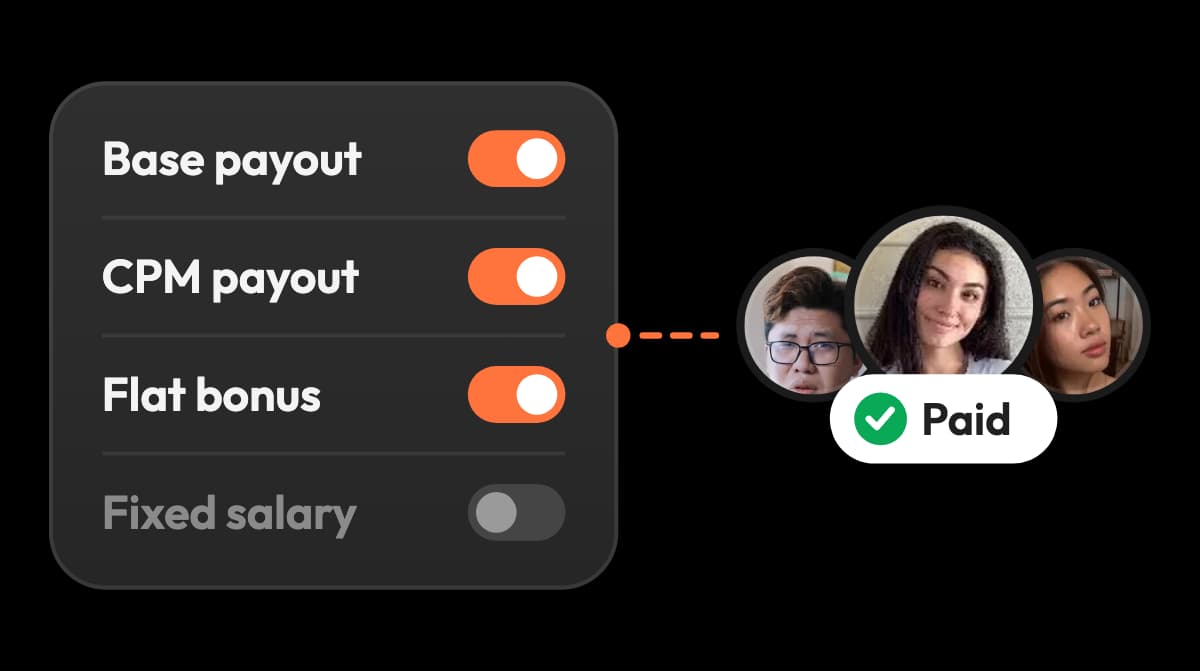
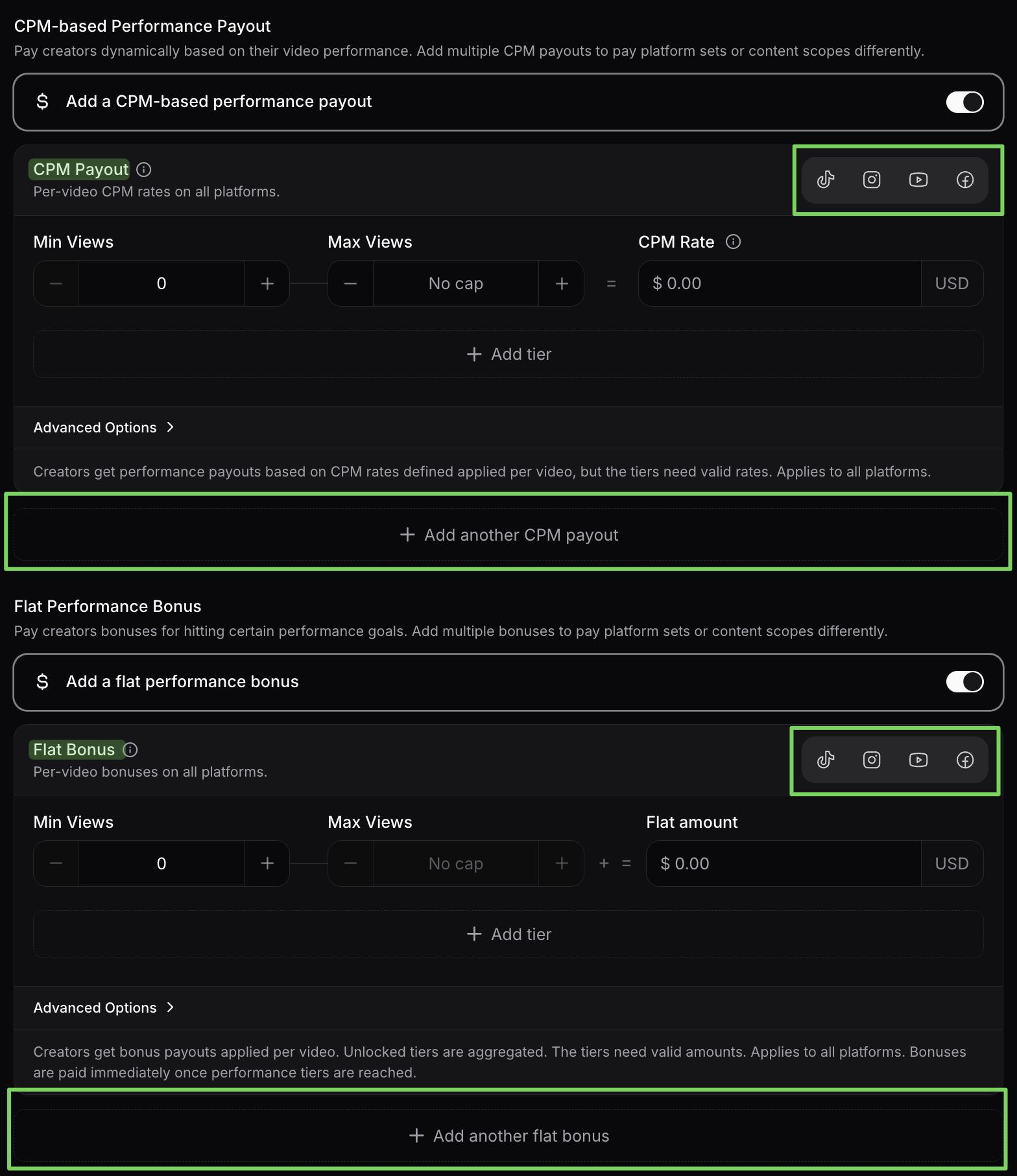
Base pay, CPM tiers, bonuses and caps, worked out from each post's views. Upwork pays by the hour, by fixed-price milestone, or as a bonus you type in.
viral.app
Tracking the posts: viral.app does this better.
viral.app
Any public account on five platforms, competitors included. Upwork's reports cover hours, work and spend; tracking social posts isn't described.
viral.app
Approving work before money moves: Upwork does this better.
Upwork
Funds wait in escrow until you approve a milestone, with 14 days to review or ask for changes, and a work diary on hourly contracts. viral.app has no draft review.
Upwork
What reaches the creator: viral.app does this better.
viral.app
All of it on viral.app, for 3% on your side. Upwork adds 3 to 10% for you, by plan and payment method, and takes 0 to 15% from the freelancer.
viral.app
Cost on a small budget: Upwork does this better.
Upwork
Neither Upwork plan has a subscription. Below about $4,000 a month in creator pay, its 7.99% costs less than viral.app Pro at $199 plus 3%.
Upwork
Cost as creator pay grows: viral.app does this better.
viral.app
Above that, viral.app's plan plus 3% costs less than 7.99% or 10% on every payment. Eligible US clients paying Upwork 3% from a bank account pay less on Upwork at any size.
viral.app
Creators you already work with: viral.app does this better.
viral.app
Tracked from a URL and paid by claim link, with no account and no monthly fee per creator. Upwork's direct contracts cost $49 a month each, plus its plan fee.
viral.app
Tax forms and who carries the risk: they work differently.
Different
Both take tax forms off your hands. Upwork files 1099‑Ks and handles DAC7, so you file no 1099s. viral.app's merchant of record invoices every payout in the creator's name and carries the liability for creators without a registered business.
Different
Help while you hire: Upwork does this better.
Upwork
Uma drafts the job post, interviews applicants and shortlists them in under 6 hours, and Business Plus adds premium support by email, chat or phone.
Upwork
Creator videos as ads: viral.app does this better.
viral.app
Create Ad turns any tracked post into a TikTok Spark Ad or a Meta partnership ad, with paid views kept out of creator pay. Upwork's pages cover agreeing ad usage, not launching ads.
viral.app
Getting started: Upwork does this better.
Upwork
Free to sign up and post a job, and you pay only when you hire. viral.app has a 14‑day free trial on monthly plans, then a plan from $199 a month.
Upwork
Hiring a freelancer, or running creators paid on views
Upwork's own UGC hiring guide describes the job well: a UGC creator films content your brand runs on its own channels, and you hire one by posting a job, picking from proposals and agreeing deliverables, revisions and usage rights. The rate is set before anyone films. On viral.app you hire creators who post every week, often on accounts you own, and their pay follows the views each post earns. So the question that decides it is whether you're buying videos or running a posting program.
UUpwork
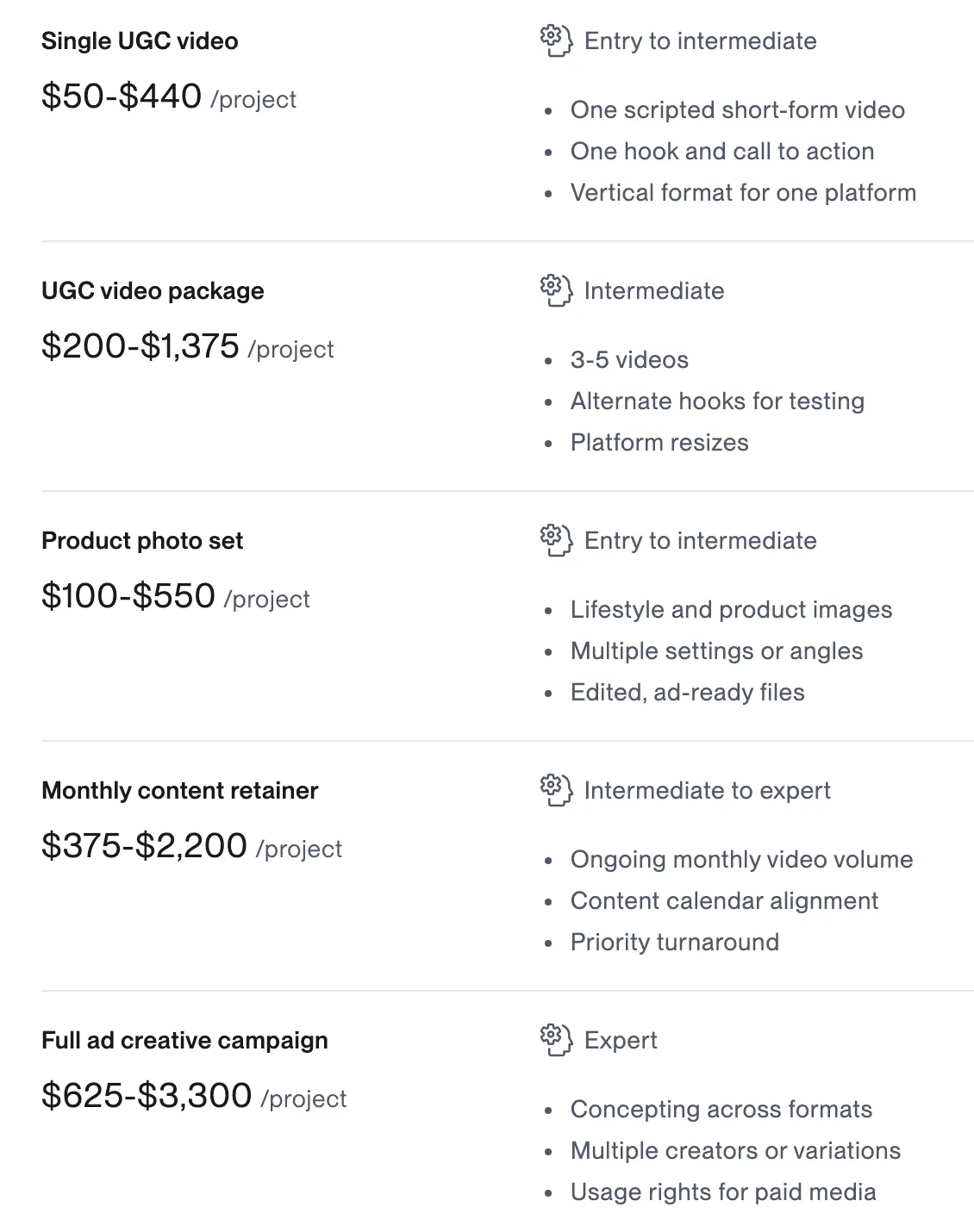
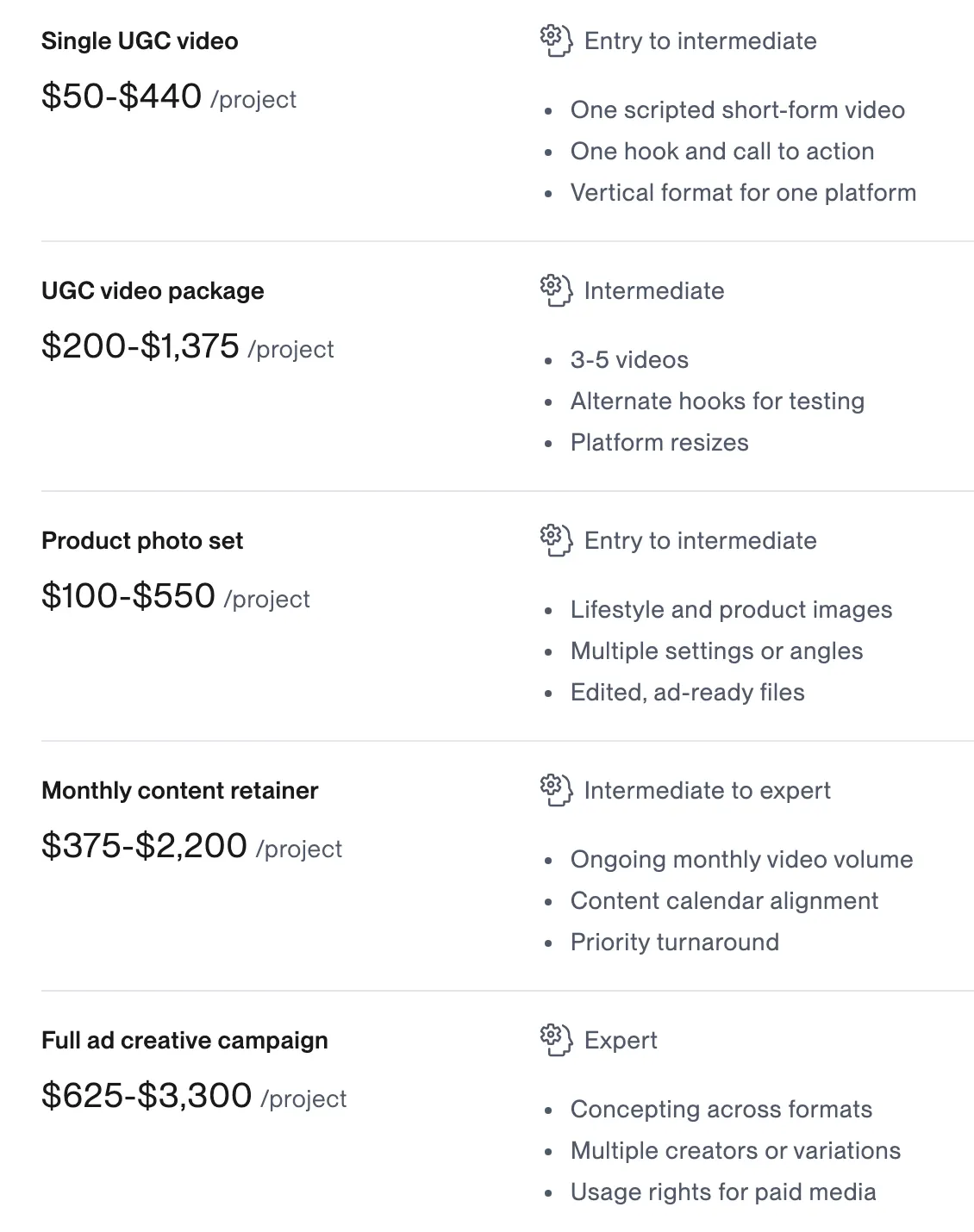
In Upwork: Upwork's hiring guide prices UGC at $25 to $55 an hour, or per project: $50 to $440 for one video. The price is agreed before anyone films and doesn't change with views.
In viral.app: viral.app works out what each creator is owed from the deal: base pay per video by platform plus pay on the views each post earns, with caps, before you approve it.
Who Upwork is great for
Upwork says 800,000 clients use it and more than $30 billion in transactions has gone through it since its founding. Its UGC creators average 4.8 out of 5 from 1,085 client reviews on its hiring page (4.9 on its homepage). It fits best when:
You need more than creators
UGC creators, video editors, scriptwriters and ad strategists, all hired, paid and reviewed the same way.
You buy deliverables and approve them first
Fixed-price milestones held in escrow until you approve, or hourly work with a time tracker and a work diary.
You want no subscription
Free to post a job on Basic or Business Plus. You pay a fee only on what you pay freelancers.
It also verifies every freelancer's identity and location, drafts job posts and runs instant video interviews with its AI agent Uma, takes cards, PayPal and US bank payments, files the US tax forms for you, and since August 2026 lets you hire from Claude, ChatGPT or Cursor through its MCP server. Business Plus adds Expert-Vetted freelancers, admin roles and premium support. For one-off UGC videos, Upwork fits well, as do gig and order marketplaces such as Fiverr and Collabstr. The rest of this page is about what changes when creators post every week and are paid on views.
Plans matched up
Neither Upwork plan has a subscription: Upwork earns a fee on every payment you make to a freelancer, plus a fee on each new contract. viral.app charges a monthly plan and 3% on payouts. So the fair match is by what each plan is for. viral.app prices are per month on monthly billing, with 30% off yearly.
Shaded side has the edge
Tie
Different: depends on your program
Starting outUUpworkBasic$0Ahead on 4 linesviral.appPro$199Ahead on 4 linesvs1 line depends on your program1 differs
Upwork Basicviral.app Pro
Plan price
Upwork Basic: None; free to post a job
viral.app Pro: $139 / month billed yearly
Edge: Upwork
Fee on your side
Upwork Basic: 7.99% on every payment (5% in its FAQ, 3% for eligible US bank payers), plus $0.99 to $14.99 per new contract
viral.app Pro: 3% on payouts
Edge: viral.app
Taken from creator pay
Upwork Basic: 0 to 15%, set per contract
viral.app Pro: Nothing
Edge: viral.app
Finding talent
Upwork Basic: Every skill; 30 invites per job, 5 messages a day, Uma shortlists limited
viral.app Pro: 1 live job, unlimited applicants, 30 invites a day
Different, depends on your program
Pay rises with views
Upwork Basic: No; hourly, milestones or a bonus you type in
viral.app Pro: CPM tiers and bonuses, with a cap
Edge: viral.app
Tracking posts
Upwork Basic: Not described; reports cover hours and spend
viral.app Pro: Any public account, 1,000 videos
Edge: viral.app
Approve before paying
Upwork Basic: Escrow per milestone, 14 days to review
viral.app Pro: Approve each payout; no draft review
Edge: Upwork
Paying
Upwork Basic: Card, PayPal, or ACH in the US
viral.app Pro: Creator pay by bank transfer; no cards
Edge: Upwork
Try it
Upwork Basic: Pay only when you hire
viral.app Pro: 14‑day free trial on monthly plans
Edge: Upwork
Growing teamsUUpworkBusiness Plus$0Ahead on 3 linesviral.appUltra$399Ahead on 3 linesvs3 lines depend on your program3 differ
Upwork Business Plusviral.app Ultra
Plan price
Upwork Business Plus: None; a 30‑day membership cycle
viral.app Ultra: $279 / month billed yearly
Edge: Upwork
Fee on your side
Upwork Business Plus: 10% on every payment (8% by US checking account)
viral.app Ultra: 3% on payouts
Edge: viral.app
Talent
Upwork Business Plus: Expert-Vetted top 1%, 60 invites per job, 15 messages a day, unlimited Uma shortlists
viral.app Ultra: 2 live jobs, 100 invites a day, AI Matches
Edge: Upwork
Creators you bring
Upwork Business Plus: Direct contracts at $49 a month each, plus the 10% fee
viral.app Ultra: Tracked from a URL, no account, no fee if you pay them
Edge: viral.app
Tracking posts
Upwork Business Plus: Not described
viral.app Ultra: Any public account, 5,000 videos, every 8 hours
Edge: viral.app
Team
Upwork Business Plus: Admin access for several users, teams and permissions
viral.app Ultra: 10 seats, then $15 a month each ($120 a year); scoped roles
Different, depends on your program
Support
Upwork Business Plus: Premium: email 24/7, chat and phone on weekdays
viral.app Ultra: Priority support and a private Slack channel
Different, depends on your program
Billing
Upwork Business Plus: Monthly invoicing with 30‑day terms for approved US clients
viral.app Ultra: Monthly plan; creator pay funded by bank transfer
Edge: Upwork
API and AI agents
Upwork Business Plus: API on both plans; free MCP server for hiring
viral.app Ultra: API and MCP server for your workspace data
Different, depends on your program
Around these: Upwork Enterprise, Any Hire and Upwork Payroll have their own fees, which aren't on the pricing page. viral.app Scale is $599 a month ($419 yearly) for unlimited creators and 20,000 tracked videos, with a custom Enterprise plan above it.
Which one should you pick?
Choose Upwork if…
You buy UGC videos, edits or scripts for a set rate, by the hour or by the project, and approve each delivery before paying.
You hire across skills, not only creators, and want one place to contract, pay and review them.
Your budget is small or one‑off, you pay by card or PayPal, or you qualify for Upwork's 3% US bank rate.
Our product
Choose viral.app if…
You want creators posting every week and paid on the views each post earns, not a set rate.
You want every post and account tracked on five platforms, your own creators and competitors included.
You want creators to keep all of their pay, for 3% on your side, with invoices and tax paperwork on every payout in 180+ countries.
A creator marketplace that pays on views? SideShift.
Who pays the fees on $100 of creator pay
Upwork charges on both sides of a payment: a fee added to what you pay, a one-time fee on each new contract, and a freelancer fee of 0 to 15% that comes out of the creator's side. viral.app charges 3% on your side only.
Upwork's own pages disagree on the Basic fee. Its pricing table and help center say 7.99% ("up to 7.99%" in the help article), while the FAQ on the same pricing page says 5%, and 3% for eligible US clients paying by checking account. Its fee terms say the rate can vary. Ask which applies to your account before you budget. On either tool, a creator can still pay their payout method's own fee: on Upwork, for example, $0.99 per local bank withdrawal outside the US or $50 for a US dollar wire.
When the views decide the pay
On Upwork, a video's views don't change what you owe, and Upwork's pages don't describe tracking them. On viral.app they set the pay, so how they're counted matters. This is what campaign reporting looks like in UGC analytics when the numbers also pay the creators:
Every post, every account
TikTok, Instagram, YouTube, Facebook and Snapchat, from a URL, refreshed every 12 or 8 hours by plan.
Deals tested before launch
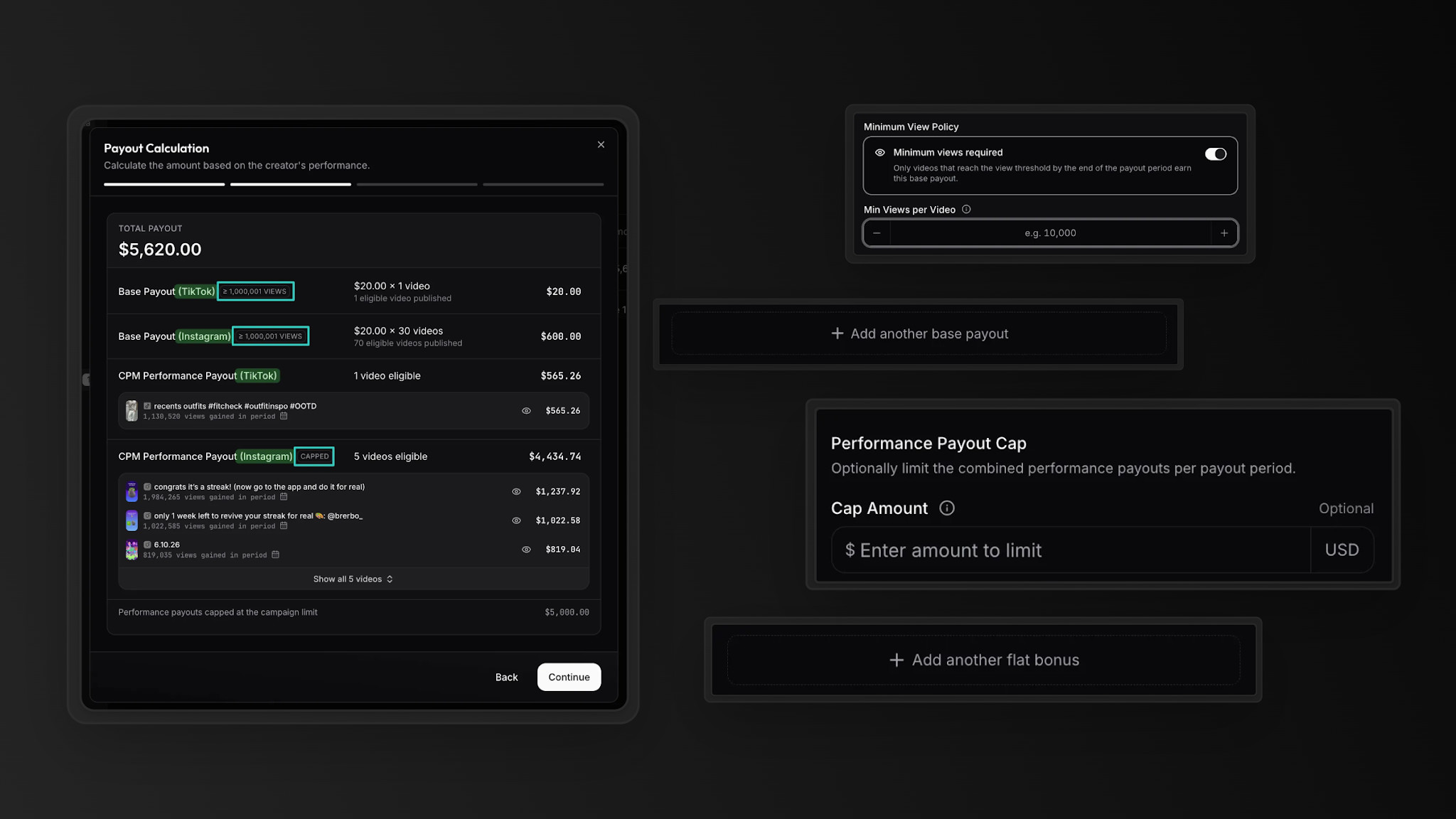
Run base pay, CPM tiers, bonuses and caps on one of your creators' recent videos and see what they would have earned.
Organic views only
With TikTok or Meta connected, views bought through ads never count toward creator pay, so boosting a post doesn't raise it.
Every difference, row by row
Thirty-five rows in five groups, starting with what you pay for. "Yes" means the product does it, "Partly" means it covers part of the job, and "Not public" means we couldn't find it on Upwork's public pages.
Plain fact
Not public
No
Partly
Yes
5 groups · 35 rows
Upwork
viral.app
At a glance · one mark per row, in table order
Every difference between Upwork and viral.app, by group
What you need
Upwork
viral.app
01What you pay for and what it costsWhere the two differ most
What you pay for
Upwork
Time or deliverables: an hourly rate logged in its time tracker, or fixed-price milestones from $5, plus bonuses. Its UGC guide puts creators at $25 to $55 an hour, or $50 to $440 for one video.
viral.app
Posts: base pay per video by platform, plus pay on the views each one earns, with caps.
Pay on views
UpworkNo
Not among its contract types (hourly, fixed-price and bonuses). A view-based amount is worked out outside Upwork and sent as a bonus or milestone.
viral.appYes
Base pay per video by platform, fixed salary, CPM tiers and milestone bonuses, with caps and view windows.
Fee on your side
Upwork
Basic: 7.99% on every payment, bonuses included, per its pricing table and help center; 5% per its pricing FAQ; 3% for eligible US clients paying from a bank account. Business Plus: 10%, or 8% by US checking account. Not refunded.
viral.app
3% on each payout, paid by you. None of it comes out of creator pay.
Fee taken from the creator
Upwork
0 to 15% per contract, shown on each proposal or offer and fixed for the contract.
viral.app
None. Creators can still pay a fee for the payout method they pick.
Fee on each new contract
Upwork
$0.99 to $14.99 on Basic, varying by contract type, account history and hiring activity, charged again when you rehire and on direct contracts. On Business Plus, up to $4.99 on fixed-price contracts up to $100 and none on hourly ones. Not refunded.
viral.app
None.
Plan price
Upwork
No subscription on Basic or Business Plus. Enterprise and other services have their own fees.
viral.app
Pro $199, Ultra $399, Scale $599 a month, or $139, $279 and $419 billed yearly.
How you fund it
UpworkYes
Card or PayPal worldwide and ACH in the US; monthly invoicing with 30‑day terms for approved US Business Plus clients.
viral.appPartly
Free bank transfer by SEPA, UK Faster Payments, US ACH, wire or SWIFT, with no conversion fee. Cards aren't accepted.
Folded rows: Fee taken from the creator; Fee on each new contract; Plan price; How you fund it.
02Finding creatorsUpwork's strongest area
Marketplace
UpworkYes
18M+ freelancers in 180 countries by its count, ID-verified, with portfolios, ratings, work history and hourly rates.
viral.appYes
Canvas UGC marketplace: post a job, creators apply with portfolio, accounts, languages and location. UGC creators only, and newer than Upwork.
Hiring beyond creators
UpworkYes
Editors, scriptwriters, ad strategists and social media managers, on the same contracts and payments.
viral.appNo
Not offered. The marketplace is for creators.
Creators you already work with
UpworkPartly
Direct contracts bring them onto Upwork to contract and pay them there: $49 a month per active contract, plus the plan fee (fee terms 3.3).
viral.appYes
Tracked from a URL without signing up, paid through us or by you, and never shown to other brands.
AI help with hiring
UpworkYes
Uma drafts the job post, runs instant video interviews and shortlists applicants in under 6 hours (limited on Basic); on Business Plus it also invites top candidates for you.
viral.appYes
AI Matches ranks the creators who best fit each live job, refreshed nightly.
Invites and messages
Upwork
30 invites per job and 5 direct messages a day on Basic; 60 and 15 on Business Plus, depending on account eligibility.
viral.app
30, 100 or 500 invites a day by plan; applicants are unlimited.
Vetting
UpworkYes
Identity and location verified for every freelancer; Expert-Vetted top 1% on Business Plus, after a 30‑minute interview.
viral.appYes
Location verified before a creator is matched, and an optional sample-video challenge with the application.
Countries and languages
UpworkYes
Browse by skill, experience level, location and availability, across 180 countries.
viral.appYes
Each job sets countries of residence, languages and a minimum age, and creators are paid in 180+ countries.
Folded rows: AI help with hiring; Invites and messages; Vetting; Countries and languages.
03Getting the workUpwork reviews before it pays; viral.app pays on results
Review the work before it posts
UpworkYes
Work is submitted for your approval, and you can ask for changes before releasing a milestone.
viral.appNo
Not built in. Posts are tracked once they're live.
Nobody paid until you approve
UpworkYes
Escrow on fixed-price work, released when you approve or after 14 days without a reply; disputes on last week's hours for hourly work.
viral.appYes
Payouts are calculated from tracked posts and paid only once you approve them.
Who owns the content
Upwork
Its default contract terms give you the work and its IP once you've paid in full, unless you agree otherwise (Optional Service Contract Terms 6.4). Its UGC guide says hiring doesn't automatically give you unlimited rights and the contract should spell them out.
viral.app
Only what you agree with the creator. viral.app claims no rights to campaign videos.
What you receive
UpworkYes
Files: edited videos, raw footage, hooks and variations, as your contract says.
viral.appPartly
Posts, tracked once they're live. You can download any tracked video for 3 credits.
Briefs, chat and contracts
UpworkYes
AI-drafted job posts, milestone contracts, messages, files, and voice or video calls, with a transcript and summary after interviews.
viral.appPartly
Briefs with sample videos, drafted with Copilot if you want, and chat with applicants. Contracts and usage rights are not built in.
Time tracking
UpworkYes
A time tracker and work diary on hourly contracts, with AI summaries of each week's work (limited on Basic).
viral.appNo
Not offered. Pay follows posts and views, not hours.
Folded rows: What you receive; Briefs, chat and contracts; Time tracking.
04Tracking and paying on resultsWhere viral.app goes further
Track creators' posts and views
UpworkNot public
Not described. Its reports cover work, time, earnings and spend.
viral.appYes
Posts from any public account on TikTok, Instagram, YouTube, Facebook and Snapchat, up to your plan's 1,000, 5,000 or 20,000 tracked videos.
Reports and exports
UpworkYes
Operational and financial reports to view and export; Talent Performance and Contract Audit reports on Business Plus.
viral.appYes
Every table to CSV, plus day-by-day gains per video, and API access on every plan.
Run creator posts as ads
UpworkNot public
Its UGC guide covers agreeing paid-ad usage and whitelisting in the contract; launching ads isn't described.
viral.appYes
Create Ad from any tracked post: Spark Ads on TikTok, partnership ads on Instagram and Facebook, on your own ad accounts, with paid views kept out of creator pay.
Caps, tiers and view windows
UpworkNo
Not among its contract settings; a bonus is an amount you enter.
viral.appYes
Set per campaign: tier ranges, payout caps and how many days views count.
Test a deal before launch
UpworkNot public
Not described.
viral.appYes
Simulate the payout for one of your creators on their recent videos.
Accounts beyond your contracts
UpworkNot public
Not described.
viral.appYes
Any public account from a URL, competitors included, plus a viral video library updated several times a day.
Folded rows: Caps, tiers and view windows; Test a deal before launch; Accounts beyond your contracts.
05Payouts, terms and teamBoth handle the paperwork, in different ways
Tax paperwork
UpworkYes
You file no 1099s: Upwork's escrow subsidiary is the payor, files 1099‑Ks for US freelancers and handles DAC7 for EU freelancers.
viral.appYes
Merchant of record: invoices for you and in each creator's name, KYC, AML and sanctions checks, and DAC7 reporting.
Working with a creator outside the platform
Upwork
Not for 24 months after you meet on Upwork, unless you pay a conversion fee: 13.5% of a year's estimated earnings, at least $1,000 and at most $50,000 (terms 7.3).
viral.app
Creators met on the Canvas UGC marketplace: 24 months, at least EUR 1,000. Creators you bring: never.
Worker classification
Upwork
Its terms leave the employee-or-contractor decision and its liability to you (4.1). Upwork Payroll can employ US freelancers instead.
viral.app
Our terms leave it to you too. The payout partner pays creators without a registered business as merchant of record and carries that liability, not your company.
How creators get paid
UpworkYes
Into an Upwork account with tax details and a withdrawal method; earnings clear 5 days after approval on fixed-price work.
viral.appYes
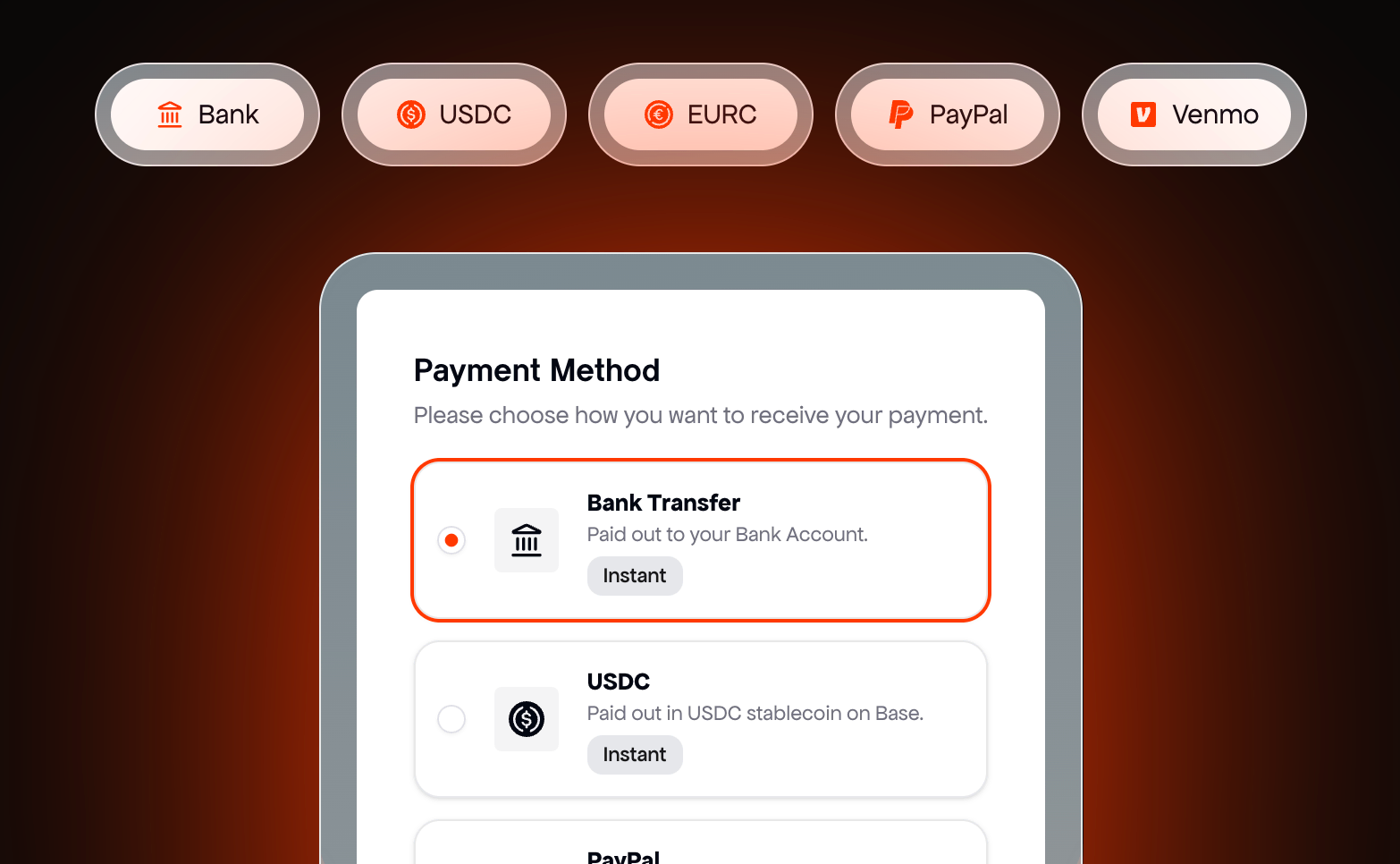
One claim link, no account needed. USDC and EURC arrive within minutes, PayPal and Venmo usually within the hour, bank transfers in 1 to 5 business days.
Payout methods
UpworkYes
US bank (free for US tax addresses, $2.99 for international ones), local bank in many countries ($0.99), US dollar wire ($50), Instant Pay ($2), PayPal, Payoneer and mobile wallets in five countries.
viral.appYes
Bank transfer, PayPal, Venmo, USDC or EURC, in 180+ countries, from campaigns in EUR, GBP, CHF or USD.
Contact before hiring
Upwork
Talk through Upwork only and share no contact details until a contract starts, on Basic and Business Plus (terms 7.2).
viral.app
A marketplace creator's contact details are released once they work with you or share them. Creators you bring: wherever you like.
Team seats and roles
Upwork
Admin access for several users, teams, permissions and sign-up by company email on Business Plus.
viral.app
3 on Pro, 10 on Ultra, unlimited on Scale, then $15 a month each on Pro and Ultra ($120 a year on yearly plans). Scoped roles, including view-only.
API and MCP
UpworkYes
API integration access on both plans, and since August 10, 2026 an MCP server, free for every client, to post jobs, find talent and draft offers from Claude, ChatGPT or Cursor.
viral.appYes
API and MCP server for your workspace, included on every plan.
Support
Upwork
Support on Basic. Business Plus adds premium support: email around the clock, chat and phone on weekdays from 8 am to 5 pm PT, per its help center; its pricing page says 24/7.
viral.app
Live support on every plan; priority support and a private Slack channel on Ultra and Scale, WhatsApp founder support on Scale. Account migration is done for you.
Folded rows: How creators get paid; Payout methods; Contact before hiring; Team seats and roles; API and MCP; Support.
20 more rows in 5 groups, folded to keep the page short. Nothing is left out.
What each one costs for your program
Set your team, your creators, live jobs, tracked videos and what you pay creators each month. The calculator picks the cheapest plan on each side, fees included. Upwork has no plan price, so its side is the fee on your payments: 7.99% on Basic and 10% on Business Plus, which makes Basic the cheaper of the two. It leaves out Upwork's fee on each new contract, and the freelancer fee that comes out of the creator's side. Upwork prices neither seats nor creators, so those sliders only move the viral.app plan. viral.app's 3% is charged on your side, none of it comes out of creator pay, and every payout comes with its invoices. Creator pay itself is the same with either tool and not in the totals.
Your program
Upwork$400viral.app$349
Cheapest plan that fits
Per month
$0
$100
$200
$300
Fee
$400all in
Pro
Fee
$349all in
UpworkBasicBusiness Plus
viral.appProUltraScale
Upwork Basic
Basic plan$0
7.99% marketplace fee$400
Total per month$400
viral.app Pro
Pro plan$199
3% payout fee$150
Total per month$349
From prices checked Nov 8, 2026. Illustrative, not a quote. viral.app's 3% payout fee is open to a custom deal: ask us.
With up to 15 creators, viral.app Pro plus 3% costs less than Upwork Basic's 7.99% once creator pay passes about $3,990 a month ($2,790 on yearly billing). From 16 to 100 creators, viral.app needs Ultra, and the break-even moves to about $8,000 ($5,590 yearly); past 100 it's Scale, at $12,000 ($8,400 yearly). At the default above, 10 creators and $5,000 a month, that's $349 on viral.app Pro against about $400 on Upwork Basic.
Two things move this. Against the 5% in Upwork's own FAQ, those break-evens rise to about $9,950, $19,950 and $29,950 a month. And if you're an eligible US client paying Upwork 3% from a bank account, Upwork costs less at any budget, apart from its fee on each new contract. What the totals can't show: viral.app's plan includes the tracking and the pay calculation, which on Upwork happen somewhere else.
One creator's month, paid two ways
Here is the kind of deal a Canvas UGC program runs: one creator posting about five videos a week, with a base per video and pay that grows with views. On Upwork you could pay the base as a $30 milestone per video; the view part has no setting to run on.
The deal's terms, and whether Upwork and viral.app can run each one
Deal term
Upwork
viral.app
01$30 base pay for each posted video
Partly
Yes
02$1 per 1,000 views
No
Yes
03$100 for each video past 100K views
Partly
Yes
04Views count for 30 days after posting
Not public
Yes
05You review each video and can ask for changes before paying
Yes
No
Partly: on Upwork, a $30 fixed-price milestone per video pays on your approval of the file, not on the post going live, and a bonus is an amount you work out and enter yourself. No: views aren't an input to Upwork's contracts. Not public: Upwork doesn't describe tracking views. The review row is the reverse: viral.app has no draft review.
What the creator is owed
Example month
20 videos · base pay
$600
300,000 views in 30‑day windows
$300
1 video past 100K views
$100
Creator receives
$1,000
Your 3% payout fee
$30
Upwork Basic's 7.99% on the same $1,000
$79.90
The creator's own Upwork fee, 0 to 15%
$0 to $150
Invoice and tax paperwork
handled
viral.app counts each video's views for 30 days after posting and shows this breakdown before you approve the payout. The Upwork lines are its Basic fee on your side and the freelancer fee on the creator's, before its fee on a new contract.
When a payout is approved, the creator gets one link and picks how to be paid. They don't need an account, and none of your 3% fee comes out of their pay. Want to see what creators earn on deals like this? Our live UGC rates and the guide to UGC pricing models break it down.
Creators claim by bank transfer, USDC, EURC, PayPal or Venmo.
A campaign, start to finish, in real screens
These are the actual viral.app screens, not illustrations. Under each step is what the same step looks like on Upwork.
Check each calculated payout, adjust it if needed, then pay up to 50 creators at once.
In Upwork
Approve each milestone within 14 days, or the week's hours, and Upwork releases escrow; any extra for views goes out as a bonus you enter.
Where each one is better
U
Where Upwork is better
01
1. Every skill in one marketplace
18M+ freelancers in 180 countries: creators, editors, scriptwriters and ad strategists on the same contracts.
02
2. Pay only for approved work
Escrow per milestone, 14 days to review or ask for changes, a work diary on hourly contracts, and dispute help.
03
3. No subscription
Free to post a job on Basic and Business Plus; you pay a fee only when you pay a freelancer.
04
4. AI that helps you hire
Uma drafts posts, interviews applicants and shortlists them in under 6 hours, and the MCP server is free for every client.
05
5. US tax forms handled
You file no 1099s: Upwork files 1099‑Ks for US freelancers and handles DAC7 in the EU.
06
6. Easy to pay
Card, PayPal or US bank, monthly invoicing with 30‑day terms for approved US companies, and premium support on Business Plus.
Where viral.app is better
01
1. Pay on views,tested first
Base pay, CPM tiers, bonuses and caps, run on a creator's recent videos before launch.
02
2. Every post tracked
Any public account on five platforms, competitors included, plus a viral video library updated several times a day.
03
3. Creators keep all of their pay
3% on your side and nothing from creators, where Upwork adds 3 to 10% and takes 0 to 15% from freelancers.
04
4. Your creators stay yours
Creators you bring are tracked from a URL, need no account, cost no monthly fee each, and are never shown to other brands.
05
5. Creator videos as ads
Spark Ads and Meta partnership ads from any tracked post, with paid views kept out of creator pay.
06
6. Compliant payouts in 180+ countries
A merchant of record, invoices in the creator's name, and pay in EUR, GBP, CHF or USD.
What teams running creator programs say
David ParkJenni AI Founder
“viral.app has become core infrastructure for running organic marketing. It has helped us scale
to over a billion organic views.”
Zack HargettQuizlet/CoconoteCo-Founder
“viral.app feels like the first serious solution for managing high-volume UGC campaigns.”
Julian IvaldyWhoLiked Founder
“viral.app has solved our biggest pain points. It’s handling everything from global payouts to
invoicing and tax accounting.”
Running both, or moving creators over
You don't have to pick one for everything. Upwork is built to hire freelancers for a set rate; viral.app to run creators who post every week and get paid on views. Some teams hire editors and one-off UGC videos on Upwork and run their posting creators in viral.app, where any public account is tracked from its URL.
Before you move anyone: Upwork's terms ask you to keep paying a freelancer you met there through Upwork for 24 months from when you met, unless you pay its conversion fee of 13.5% of a year's estimated earnings, at least $1,000 (section 7). Creators you worked with before meeting them on Upwork aren't under that clause, and can start in viral.app today.
1
Day 1
Add your creators' accounts
Paste the URLs of creators you already work with, or send us the list and we add them. Nobody has to sign up.
2
Day 1
Write your deals as rules
Base pay per video, CPM tiers and bonuses, tested on recent videos before anyone posts.
3
First week
Hire where you need more
Post a Canvas UGC or Influencer job and invite the matches that fit it best.
4
After that
Keep Upwork for editors and one‑off work
Keep paying freelancers you met on Upwork through Upwork for 24 months, or pay its conversion fee to move them.
Questions about Upwork
Upwork is a freelance marketplace for every skill: you hire by the hour or by fixed-price milestone, Upwork holds the money in escrow until you approve the work, and it charges a fee on both sides. viral.app is built for UGC creators who post every week: it tracks their posts on five platforms, pays them on the views each post earns, and pays out through a merchant of record for 3% on your side.
For UGC creators, yes. viral.app has its own Canvas UGC marketplace, where creators apply to your job, and it tracks and pays them on views for 3% on your side, against up to 7.99% on Upwork Basic, with nothing taken from creator pay. Pro is $199 a month, or $139 billed yearly, with 3 seats and a 14-day free trial on monthly plans. For editors, scriptwriters or other freelancers, it isn't: keep Upwork for those. Some teams use both.
Yes. Post a job, and marketplace creators apply with full profiles: portfolio videos, connected social accounts, languages and location. Review applications, chat with applicants, hire, and pay through the integrated payout system. Every plan includes unlimited applicants, and your plan sets how many jobs stay live at once. A 3% payout fee, paid by your team, covers the payout stack; none of it comes out of creator pay, though creators may pay a fee for some payout methods, such as PayPal or international bank transfers.
When you buy videos, edits or scripts for a set rate and want to approve each delivery before paying, when you hire across skills and not only creators, or when your budget is small or one-off. Upwork has no subscription, takes cards and PayPal, and eligible US clients paying from a bank account pay a 3% fee on its Basic plan.
There's no subscription. On Basic, Upwork adds 7.99% to every payment you make to a freelancer, bonuses included, per its pricing table and help center; the FAQ on its pricing page says 5%, and both say 3% for eligible US clients paying from a bank account. Business Plus charges 10%, or 8% by US checking account. Each new contract also costs $0.99 to $14.99 on Basic, and up to $4.99 on Business Plus fixed-price contracts up to $100. Direct contracts with freelancers you bring cost $49 a month each, plus the plan fee. The help center fees were checked on November 8, 2026, the pricing page on October 2.
Upwork's hiring guide puts UGC creators at $25 to $55 an hour, or per project: $50 to $440 for one video, $200 to $1,375 for 3 to 5 videos, and $375 to $2,200 for a monthly retainer. Upwork's fee comes on top. On viral.app you set base pay per video plus pay on views; our live UGC rates show what creators get paid on current jobs.
Not as a rule. Upwork's contracts are hourly or fixed-price, plus bonuses, and its pages don't describe tracking views. You'd count the views somewhere else, work out the amount and send it as a bonus, which carries Upwork's fee too. viral.app calculates view-based pay from base pay, CPM tiers, bonuses and caps, and you can test the deal on a creator's recent videos first.
Joining is free, but Upwork charges freelancers a service fee of 0 to 15% per contract, shown on each proposal or offer, and proposals cost Connects, sold in its app. Creators are paid into their Upwork account after you approve the work, and withdraw by US or local bank, wire, PayPal, Payoneer or a mobile wallet in five countries, some with a fee. For paid UGC work in any country, with no cut taken from your pay, join the Canvas UGC marketplace.
Yes. Upwork Inc. is listed on Nasdaq (UPWK) and based in Palo Alto. It says 800,000 clients use it and more than $30 billion in transactions has gone through it since its founding; those are its own figures. On November 8, 2026 its claimed Trustpilot profile rated 4.2 from 16,987 reviews, and its app 4.6 from about 71,700 US App Store ratings. Trustpilot's review summary says reviewers are frustrated with pricing, and the recent reviews we read came mostly from freelancers, some about the cost of Connects.
By default, you do once you've paid in full: Upwork's Optional Service Contract Terms, which apply unless you and the freelancer agree otherwise, assign the work and its intellectual property to the client (section 6.4). Its UGC hiring guide still says hiring doesn't automatically give you unlimited rights, and that the contract should spell out where, how long and whether paid ads are included. On viral.app, rights are what you agree with the creator, and viral.app claims none.
Not for 24 months from when you met on Upwork, unless you pay a conversion fee: 13.5% of the freelancer's estimated earnings over a year, at least $1,000 and at most $50,000, or $1 once you've worked together on Upwork for two years (terms, section 7.3). Before a contract starts, you also may not share contact details. Freelancers you worked with before Upwork aren't covered. viral.app's clause covers only creators met on its marketplace: 24 months, at least EUR 1,000.
Yes. Both client plans include API integration access, and since August 10, 2026 Upwork's MCP server lets every client post jobs, find talent, prepare offers and summarize proposals from Claude, ChatGPT or Cursor, at no extra cost. It's built for hiring. viral.app's API and MCP server, included on every plan, work on your own workspace: tracked accounts, campaigns and payouts.
Yes. Campaigns pay base pay per video by platform, a fixed salary, CPM tiers and milestone bonuses, with caps and view windows, all calculated from tracked posts. You approve each payout, and creators claim it with one link through a merchant of record that handles the invoices, KYC and DAC7 reporting. See creator payments.
No. viral.app's terms say it doesn't use a customer's non-public data, such as tracked accounts, campaigns, prompts and search queries, to generate results for other customers. Personal data is handled under the viral.app privacy policy.
Yes, and Facebook and Snapchat too. viral.app tracks TikTok videos and photo carousels, Instagram Reels, YouTube Shorts, Facebook Reels and Snapchat Spotlight from any public account's URL, with no creator login, refreshed every 12 or 8 hours by plan. It doesn't track Stories or long YouTube videos.
viral.app, if you want creators paid on the views their posts earn, with every post tracked. Fiverr, for UGC videos as fixed-price gigs. Collabstr, to buy influencer posts at each creator's listed price. Billo, for finished UGC ad videos at a set price per video. JoinBrands, for e-commerce UGC at prices fixed up front.
The public pages behind the facts on this page, and the date we last checked each one.
Checked Oct 2 to Nov 8, 2026
Pages on other sites23
LinkChecked
Upwork client pricing: Basic and Business Plus fees, feature table, contract initiation fees, direct contracts, FAQ (5% and 3% Basic fee), talent fee 0 to 15%, 18M+ freelancers









 viral.app