Social Status or viral.app? Report on your social channels, or run and pay the creators who post for you.
Social Status is a reporting tool: it pulls the pages you run, your competitors and your influencers on six networks into white-label PDF, PowerPoint and Google Slides reports, with plans from free. viral.app runs short-form creator programs: every creator's posts tracked on five platforms from a URL, pay on the views they earn, and new creators from the Canvas UGC marketplace.
Companies from startups to enterprise choose viral.app
Mike SchneiderCo-Founder · · 12 min read
The short version: pick Social Status if your job is reporting on your own brand pages, competitors and influencers across six networks, LinkedIn and X included, and handing clients or leadership a polished deck. Pick viral.app if you pay creators to post short-form video: it tracks every creator's posts from a URL without asking them to connect, pays them on the views they earn and finds new ones. Social Status does none of the three, and viral.app's API comes with every plan from $199.
Cheapest paid plan
$9 vs $199
Social Status Micro covers 3 profiles on Facebook, Instagram and YouTube, and there's a free plan. viral.app starts at Pro.
Networks covered
6 vs 5
Social Status adds LinkedIn Company Pages and X. viral.app adds Snapchat. Both cover TikTok, Instagram, YouTube and Facebook.
Paying creators
None vs built in
Social Status says it focuses purely on analytics and reporting. viral.app pays creators on views in 180+ countries, with its 3% fee on your side.
We make viral.app, so read this with that in mind. Every Social Status fact below comes from Social Status's own site, plans page, terms and privacy policy, checked on November 8, 2026, with links at the end. Where Social Status doesn't say something publicly, we write "Not public". Where its own pages disagree, we show both.
This page is about Social Status at socialstatus.io, the social media analytics tool from Brisbane, Australia. Are you a creator? Social Status has no creator sign-up; for paid UGC work in any country, join the Canvas UGC marketplace.
At a glance
Who wins each job
Social StatusJobs won by Social Status
5
TieTies
0
viral.appJobs won by viral.app
5
Each of these 12 jobs goes to the tool that does it better. Where they work differently, the better pick depends on your program.
Client-ready social reports: Social Status does this better.
Social Status
Exports to CSV, Excel, PDF, PowerPoint and Google Slides, white-label from Essential at $49, and custom templates its team builds from Silver. viral.app exports CSV.
Social Status
Reporting on the pages you run: Social Status does this better.
Social Status
Reach, impressions, link clicks, Instagram Stories, Facebook inbox metrics and audience demographics for the pages you run. viral.app reads public short-form video only.
Social Status
Meta ads reporting: Social Status does this better.
Social Status
Every Meta ad objective and placement, by campaign, ad set and ad. viral.app reports only the ads that boost posts.
Social Status
Cheapest way to start: Social Status does this better.
Social Status
A free plan, then $9, $29 and $49 a month, billed monthly with no contract. viral.app starts at $199.
Social Status
History in your reports: Social Status does this better.
Social Status
Past posts as far back as the plan allows: up to 6 months on small plans, 1 to 3 years on professional plans. viral.app starts from each account's latest videos, and Ultra and Scale keep older ones available after they leave active tracking.
Social Status
Views on every creator post: viral.app does this better.
viral.app
Any public account on five platforms, from a URL, with no creator login. Social Status's full influencer stats need each creator to connect their profile.
viral.app
Paying creators on views: viral.app does this better.
viral.app
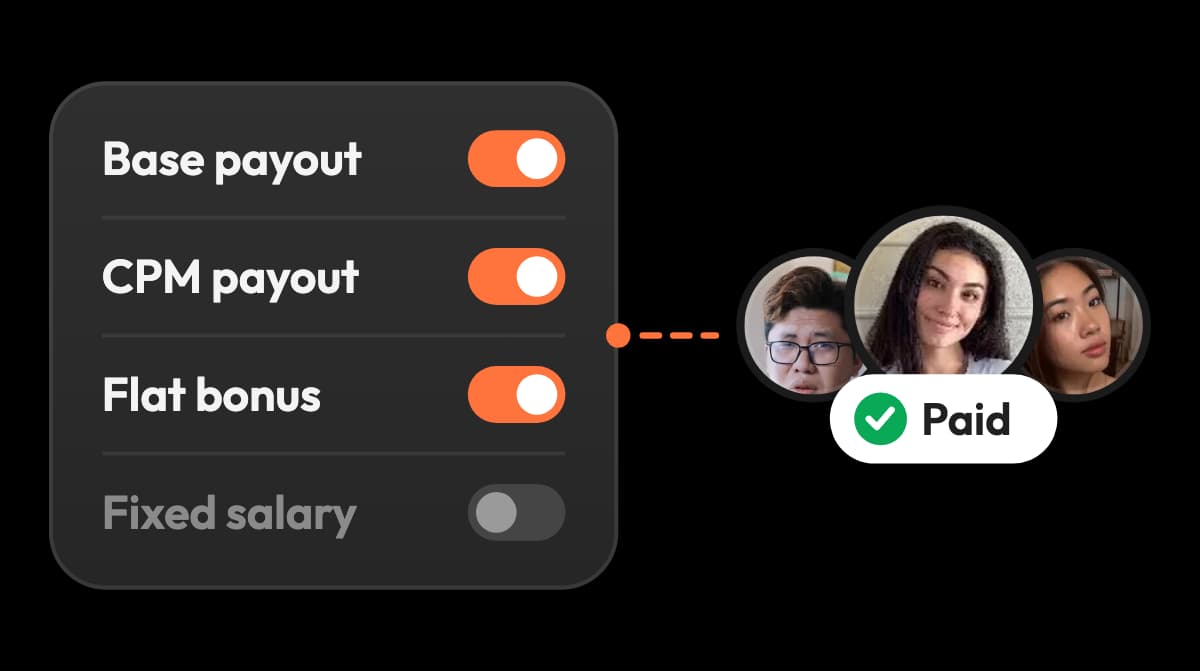
Base pay, CPM tiers, bonuses and caps, paid through a merchant of record. Social Status doesn't pay creators.
viral.app
Finding new creators: viral.app does this better.
viral.app
Post a job on the Canvas UGC marketplace and creators apply. Social Status audits influencers you already have in mind.
viral.app
API access: viral.app does this better.
viral.app
REST API, MCP server and webhooks included from Pro at $199. Social Status sells its API from Gold, at the plan's own price on top.
viral.app
App revenue next to views: viral.app does this better.
viral.app
RevenueCat revenue, trials and subscribers per project. Social Status says it supports social media channels only.
viral.app
Platforms: they work differently.
Different
Social Status covers LinkedIn Company Pages and X; viral.app covers Snapchat. Both cover TikTok, Instagram, YouTube and Facebook.
Different
Team access: they work differently.
Different
Social Status includes more users (10 on its $99 plan) but every user sees everything. viral.app has 3 seats on Pro, 10 on Ultra and unlimited on Scale, scoped roles including view-only, and from Ultra, read-only links for clients.
Different
Social reports, or a creator program
Social Status was built for the person who writes the monthly social report. You connect the Facebook Pages, Instagram, TikTok, YouTube, LinkedIn and X profiles you run, add competitors and influencers, and export a report your client or boss can read. Its features page says it focuses purely on analytics and reporting.
viral.app starts where creators are part of the plan. You track every creator's account from a URL, write their deal as pay rules, and pay them on the views their posts earn. The campaign report then comes out of the same data that set the pay.
SSocial Status
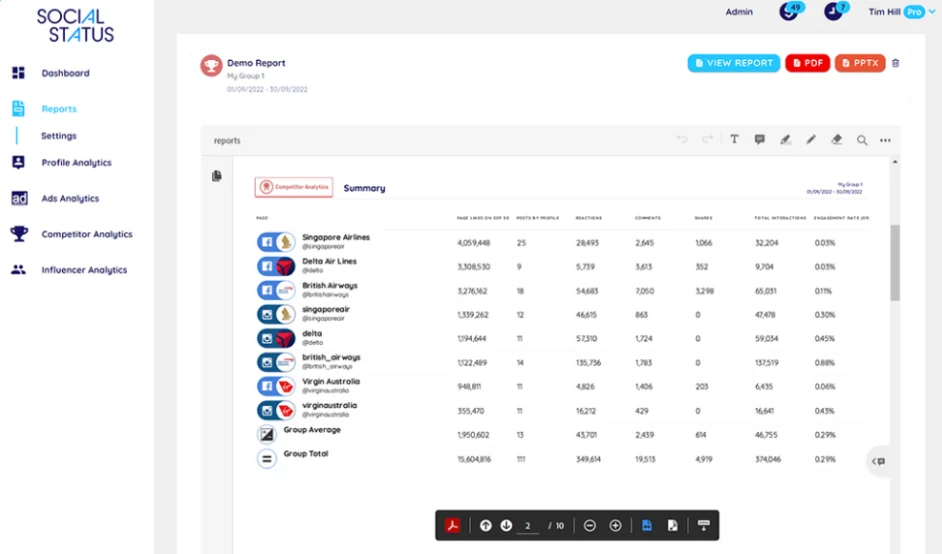
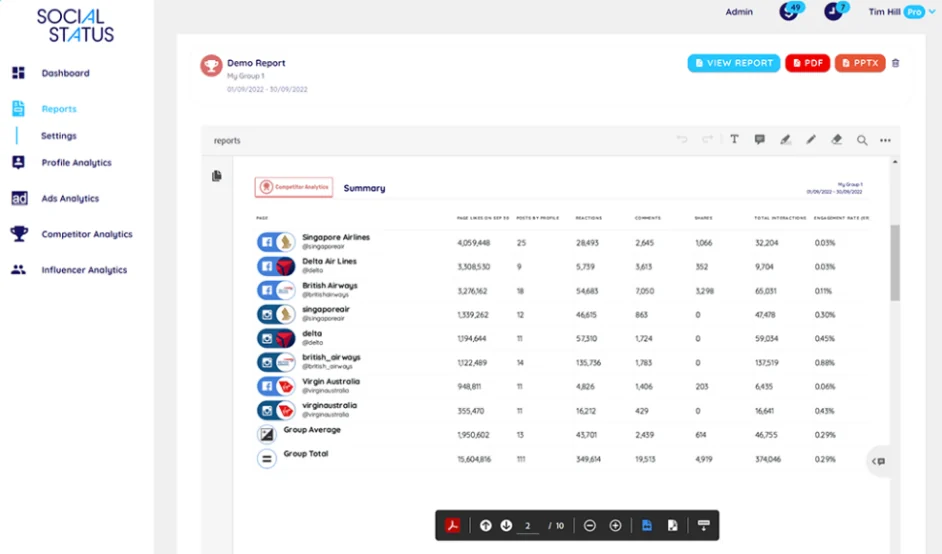
In Social Status: Social Status ends in a report: a competitor summary across Facebook and Instagram pages, ready to download as PDF or PowerPoint.
In viral.app: viral.app reports on every tracked creator account, filterable by creator, campaign, platform and tag, and the same numbers drive creator pay.
Who Social Status is great for
Social Status is a focused reporting tool with a low entry price, and for many social teams it's the better pick. It fits best when:
You deliver reports to clients
White-label PDF and PowerPoint reports from $49, and from $199 custom templates built by its team, run weekly, monthly or quarterly.
You run brand pages on six networks
Facebook, Instagram, TikTok, YouTube, LinkedIn Company Pages and X, with Stories, inbox metrics and audience demographics.
Your budget is small
A free plan, Micro at $9 a month, monthly billing by default, no contract, and 25% off yearly.
It also benchmarks any public competitor page on five networks, down to Facebook reactions, posting times and media types, and reports on every Meta ad objective and placement. From Silver at $199, an account manager sets up your report templates, and Enterprise adds a data analyst who runs custom reports and can present them for you. If that's your job, Social Status is a sound choice. Other reporting tools we've compared are Socialinsider, with cross-network benchmarks, and InsTrack, for Instagram reports alone. The rest of this page is about creators you pay to post.
Tracking creators: connected profiles or any public account
Both tools put creator posts in one dashboard, in different ways. Social Status's Influencer Analytics works best when each creator connects their profile read-only: then you see their impressions, video views, link clicks, Instagram Stories and follower demographics. Without that connection, you can add any public profile and see its engagement rate and interactions; on Instagram, only Business or Creator profiles.
viral.app needs no connection. You paste each creator's account URL, and every post in its supported formats is tracked with its views, refreshed every 12 or 8 hours by plan. It doesn't track Stories, because Instagram and Snapchat keep those numbers private to the account owner.
SSocial Status
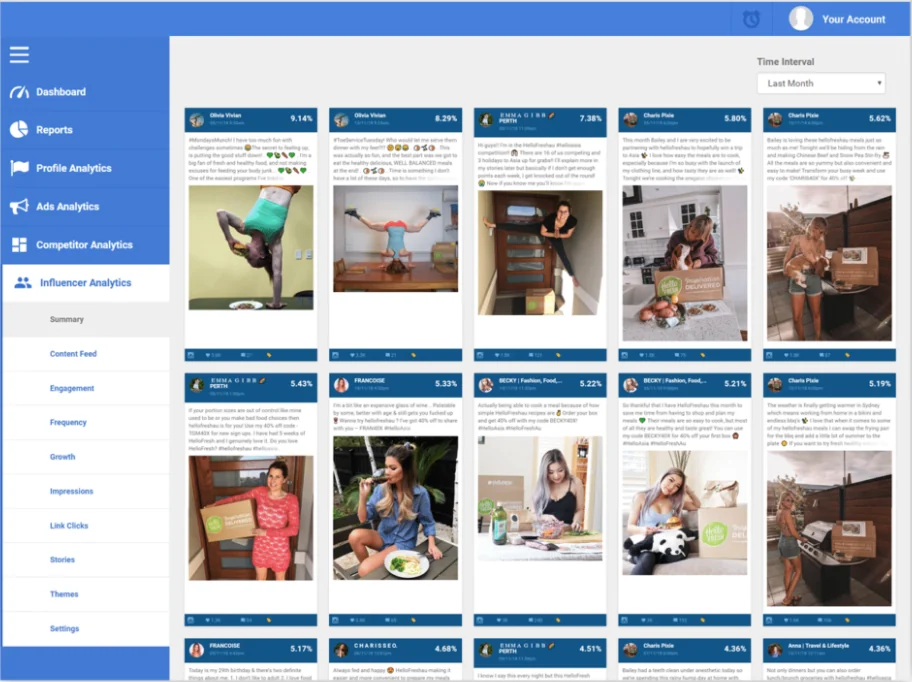
In Social Status: Social Status Influencer Analytics: campaign posts from your influencers in one feed, ranked by engagement rate, with impressions, clicks and Stories for creators who connect.
In viral.app: viral.app tracks each creator's account from a URL: posting activity, videos, views and likes per creator, with no login from them.
Once creator pay depends on those numbers, three more things matter:
Every post, every account
TikTok, Instagram, YouTube, Facebook and Snapchat, any public account from a URL, competitors included.
Views counted the way you pay
Instagram-only views on reels shared to Facebook, and with TikTok or Meta ads connected, paid views kept out of creator pay.
Deals tested before launch
Run base pay, CPM tiers, bonuses and caps on one of your creators' recent videos and see what they would have earned.
What each one costs
Social Status prices by plan quota, the number of pages, profiles, ad accounts, competitors and influencers you add, and by how far back your data goes. Prices are per month on monthly billing, with the yearly price per month in brackets; yearly billing takes 25% off.
Micro, Basic and Essential come with a 14-day free trial and Bronze with 7 days; Silver and above list no trial. viral.app has no free plan: Pro is $199, Ultra $399 and Scale $599 a month, or $139, $279 and $419 billed yearly, with a 14-day free trial on every monthly plan.
Social Status's own pages disagree on the API. Its Gold, Platinum and Enterprise plan cards list API and Data Warehouse, while its plan FAQ calls both optional add-ons, each "charged at the same equivalent monthly cost as your selected plan". Read that way, Gold with the API costs $798 a month. Ask which applies before you sign. viral.app includes its API, MCP server and webhooks on every plan from Pro.
What tracking your creators costs
There's no cost calculator on this page: ours compares seats, tracked videos, creators and creator pay, while Social Status meters profiles and doesn't pay creators, so its totals would mislead. Here is the plan each tool needs for a given number of creator accounts, on monthly billing. Social Status needs Essential or above for TikTok. viral.app meters videos, so its plan depends on how many of each account's latest videos you keep tracked.
For tracking alone, Social Status costs the same or less up to about 500 accounts, and includes more users. At 1,000 accounts, viral.app costs less if you keep about 10 videos per account tracked. Two things the prices don't show: on public profiles Social Status reports engagement, while views, impressions and Stories need each creator to connect; and viral.app's plans also pay and hire creators, which Social Status doesn't do at any price.
Shaded side has the edge
Tie
Different: depends on your program
$99 to $199 a monthSSocial StatusBronze$99Ahead on 4 linesviral.appPro$199Ahead on 4 linesvs2 lines depend on your program2 differ
Social Status Bronzeviral.app Pro
Billed yearly
Social Status Bronze: $891 a year, $74.25 / month
viral.app Pro: $139 / month
Edge: Social Status
What the plan meters
Social Status Bronze: 100 profiles: pages, ad accounts, competitors, influencers
Social Status Gold: 20, and every user sees everything
viral.app Ultra: 10, then $15 each; scoped roles, including view-only
Different, depends on your program
Custom reports
Social Status Gold: 5 templates built by its team, an account manager
viral.app Ultra: Not offered
Edge: Social Status
Data warehouse exports
Social Status Gold: S3, Azure or SFTP, as an add-on
viral.app Ultra: Not offered; pull data through the API
Edge: Social Status
Data history
Social Status Gold: 2 years
viral.app Ultra: Latest videos per account; older ones stay, with historical data included
Edge: Social Status
Refresh
Social Status Gold: Not public
viral.app Ultra: Every 8 hours, plus on demand with credits
Edge: viral.app
Pay and hire creators
Social Status Gold: Not offered
viral.app Ultra: Up to 100 creators, 2 live jobs, 3% fee
Edge: viral.app
Free trial
Social Status Gold: None listed
viral.app Ultra: 14 days
Edge: viral.app
Around these: Social Status Silver is $199 a month for 200 profiles and 15 users, Platinum $799 for 1,000 profiles and 3 years of history, and Enterprise $1,499 with unlimited profiles up to a fair-use cap of 10,000 and a data analyst. viral.app Scale is $599 a month ($419 yearly) with 20,000 tracked videos, unlimited seats, unlimited active creators and custom sync times, and Enterprise is custom. Any viral.app plan can add sync slots through support, up to one sync an hour.
Which one should you pick?
Choose Social Status if…
You report on brand pages across Facebook, Instagram, TikTok, YouTube, LinkedIn and X, Stories and Meta ads included.
You hand clients or leadership white-label PDF, PowerPoint or Google Slides reports every week or month.
You want a free or low-cost start, and you pay creators, if at all, outside the tool.
Our product
Choose viral.app if…
You pay creators to post short-form video and want their pay to follow their views.
You track dozens to hundreds of creator accounts from a URL, without asking each creator to connect.
You hire new creators, need Snapchat, or want the API included from $199 a month.
Neither fits?
Look at these instead
Social reports with cross-network benchmarks? Socialinsider.
Twenty-eight rows in five groups, starting with creator programs. "Yes" means the product does it, "Partly" means it covers part of the job, and "Not public" means we couldn't find it on Social Status's public pages.
Plain fact
Not public
No
Partly
Yes
5 groups · 28 rows
Social Status
viral.app
At a glance · one mark per row, in table order
Every difference between Social Status and viral.app, by group
What you need
Social Status
viral.app
01Creator programsviral.app's side; Social Status reports on influencers
Pay creators
Social StatusNo
Not offered. Its features page says it focuses purely on analytics and reporting.
viral.appYes
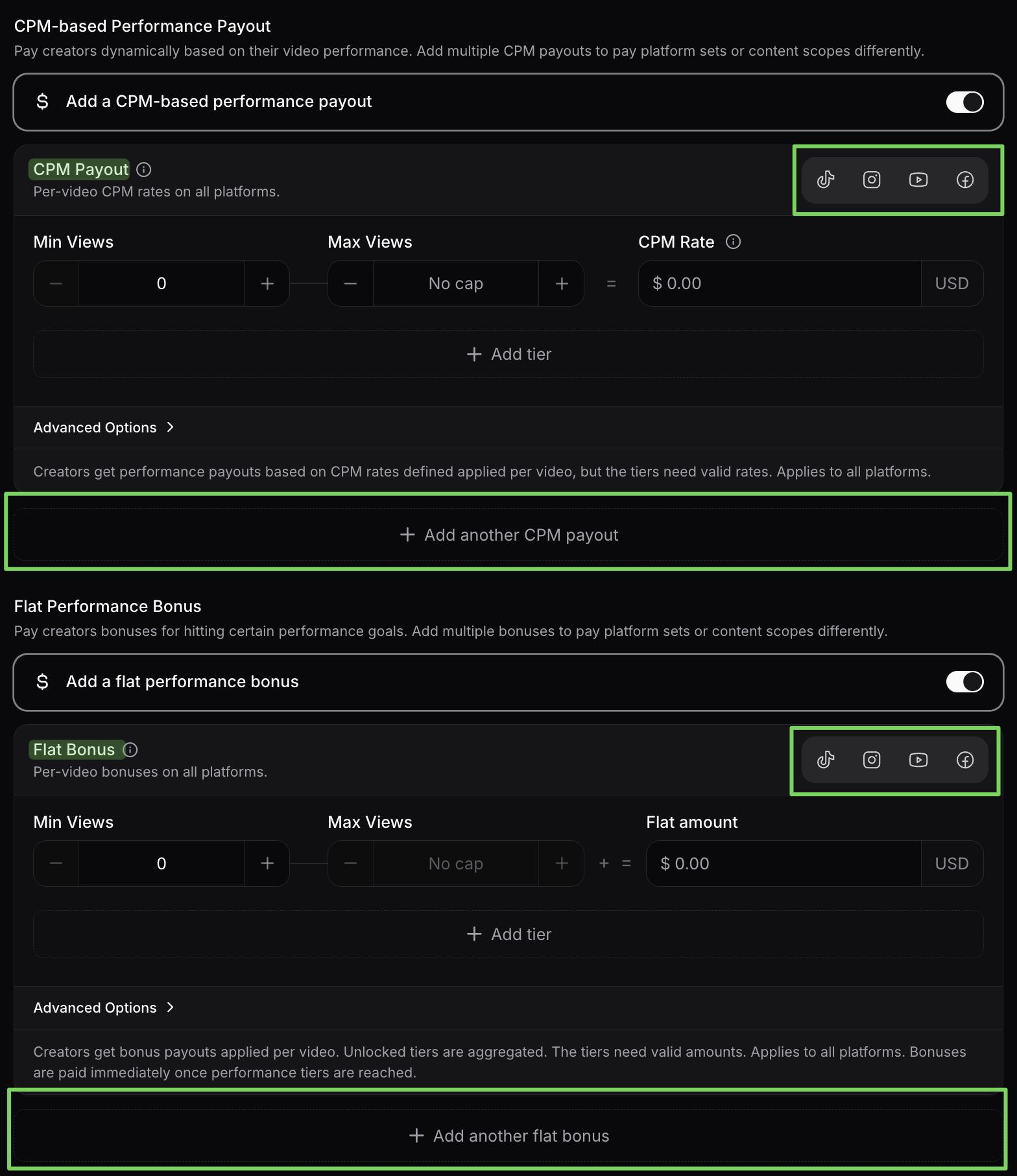
Base pay per video, fixed salary, CPM tiers and bonuses, with caps and view windows, through a merchant of record that invoices every payout.
Creator stats without a login
Social StatusPartly
Public profiles show engagement rate and interactions. Impressions, video views, clicks and Stories need the creator to connect read-only. Instagram must be a Business or Creator profile.
viral.appYes
Any public account from a URL, with views on every post. No creator login. Stories aren't tracked.
Campaign view of creator posts
Social StatusYes
Influencer Analytics groups campaign posts and Instagram Stories in one dashboard and compares campaign with non-campaign posts.
viral.appYes
Campaigns with an eligibility window, each creator's eligible posts, their views and the payout they earn.
Find new creators
Social StatusPartly
Audit a public influencer you name before a campaign. A creator search or marketplace isn't described.
viral.appYes
Canvas UGC marketplace: post a job, creators apply with portfolio, accounts, languages and location.
02Tracking and analyticsDifferent strengths
Networks
Social Status
Facebook Pages, Instagram Professional profiles, TikTok, YouTube, LinkedIn Company Pages and X. Below Essential, only Facebook, Instagram and YouTube. Pinterest, Snapchat, Twitch, Tumblr and Reddit are listed as coming.
viral.app
TikTok, Instagram, YouTube, Facebook and Snapchat.
Post types
Social StatusYes
On profiles you admin: photos, albums, videos, carousels, events, status updates and Stories; all YouTube videos and Shorts.
viral.appPartly
Short-form video: Reels, TikTok videos and photo carousels, Shorts, Facebook Reels and Snapchat Spotlight. No Stories, feed photos or long YouTube videos.
Views on creators' posts
Social StatusPartly
For creators who connect. For public profiles, its pages describe engagement and interactions, not views.
viral.appYes
On every tracked post. Instagram-only counts on reels shared to Facebook.
Competitor benchmarking
Social StatusYes
Any public Facebook Page, Instagram Business or Creator profile, TikTok, X or YouTube account: reactions, posting frequency, media types and content pillars. Not LinkedIn.
viral.appYes
Mark any tracked account as a competitor and see its top videos next to your own.
Audience demographics
Social StatusYes
Gender, age, country and city for profiles you admin and influencers who connect.
viral.appPartly
Views by country per account and video. No audience demographics.
Reach, impressions and link clicks
Social StatusYes
For profiles you admin and influencers who connect, plus Facebook inbox response metrics.
viral.appNo
Not offered. viral.app reads public post data: views, likes, comments and shares.
Data history
Social StatusYes
Fetches past posts when you connect: 1 to 6 months on small plans, 1 to 3 years on professional plans, unlimited on Enterprise.
viral.appPartly
Each account's latest videos up to the limit you set. Ultra and Scale include historical data, which keeps older videos available after they leave active tracking.
Refresh
Social StatusNot public
Not stated. Its ads page says Instagram ad data updates in real time.
viral.appYes
Every 12 hours on Pro and every 8 hours on Ultra and Scale, custom times on Scale, extra sync slots up to hourly through support, and on demand from Ultra for 3 credits per video.
App revenue next to views
Social StatusNo
Its plan FAQ says it supports social media channels only.
viral.appYes
RevenueCat revenue, trials and subscribers per project.
Viral video library
Social StatusNot public
Not described. It publishes monthly social benchmarks.
viral.appYes
New viral UGC found several times a day, on every plan.
Folded rows: Competitor benchmarking; Audience demographics; Reach, impressions and link clicks; Data history; Refresh; App revenue next to views; Viral video library.
03Reports and exportsSocial Status's strongest area
Report formats
Social StatusYes
CSV, Excel and PDF from Basic, PowerPoint from Essential. Its homepage and reports page add Google Slides; its plans page lists four formats.
viral.appPartly
Every table to CSV with your filters, plus day-by-day gains per video. No PDF or slide reports.
White-label reports
Social StatusYes
Your logo and cover page on PDF and PowerPoint reports, from Essential. The app itself can't be white-labelled.
viral.appNo
Not offered.
Custom report templates
Social StatusYes
Edit a PowerPoint and its team builds the template: 1, 5, 10 or 50 from Silver, per its plans page. Its reports page says agencies get unlimited templates.
viral.appNo
Not offered.
Scheduled reports
Social StatusYes
Custom reports run weekly, monthly or quarterly.
viral.appNo
Not built in. Copilot, the API and MCP can report on demand.
Data warehouse
Social StatusYes
Daily to quarterly exports to AWS S3, Azure Data Lake Storage or SFTP, from Gold, as an add-on at the plan's price.
viral.appPartly
No warehouse export. The API, MCP server and webhooks on Pro and up.
Folded rows: Scheduled reports; Data warehouse.
04Ads
Paid ads reporting
Social StatusYes
Every Meta ad objective and placement, by campaign, ad set and ad, with an Ads Feed. Its homepage also names TikTok and LinkedIn; its features page lists X Ads and LinkedIn Campaign Manager as launching soon.
viral.appPartly
Every Spark Ad and Meta ad that boosts a post on your connected accounts, with spend, paid views and impressions.
Launch creator videos as ads
Social StatusNot public
Not described.
viral.appYes
Create Ad from any tracked post: Spark Ads on TikTok, partnership ads on Instagram and Facebook, on your own ad accounts.
05Team, API and terms
Users and permissions
Social Status
3 to 10 users on small plans, 10 to 30 on professional plans. A flat structure: every user sees everything, so each client needs its own account and plan.
viral.app
3 on Pro, 10 on Ultra, unlimited on Scale; an extra seat is $15 on Pro and Ultra. Scoped roles, including view-only, and from Ultra, shared links that show people outside the team a live, read-only dashboard.
API
Social StatusYes
JSON endpoints for data and reports, and for adding competitor and influencer profiles, from Gold. Its plan cards list it; its FAQ calls it an add-on at the plan's monthly price. We found no public docs.
viral.appYes
REST API, MCP server and signed webhooks on Pro and up.
AI in the app
Social StatusNot public
None described on its pages.
viral.appYes
Copilot answers analytics questions and builds campaigns and briefs, with your approval.
Help from people
Social StatusYes
An account manager from Silver for onboarding and templates; a data analyst on Enterprise who runs reports and can join your pitches.
viral.appYes
Account migration done for you and a personalized onboarding call.
Trial, billing and refunds
Social Status
A free plan; 14‑day trial on Micro to Essential, 7 days on Bronze. Monthly by default, 25% off yearly, cancel any time. Payments aren't refunded, except at its discretion (terms 4).
viral.app
14‑day free trial on every monthly plan, then monthly billing. Annual plans have no trial and a 14‑day money-back guarantee. Cancel any time, effective at the end of the billing period; fees already paid aren't refunded.
Company and data
Social Status
Social Media Status Pty Ltd in Brisbane, owned by Social Status, Inc. in Delaware. Data may be stored or transferred in the US, Brazil and the Philippines.
viral.app
Built in Germany, under GDPR; databases on Hetzner in Germany and Finland, the web app on Vercel.
Selling or reusing your data
Social StatusYes
Its 2020 data privacy pledge says it will never sell data.
viral.appYes
Your non-public data is never used to produce results for other customers.
Folded rows: Help from people; Trial, billing and refunds; Company and data; Selling or reusing your data.
13 more rows in 3 groups, folded to keep the page short. Nothing is left out.
A creator campaign, start to finish, in real screens
These are viral.app's real screens. Under each step is what the same step looks like with Social Status.
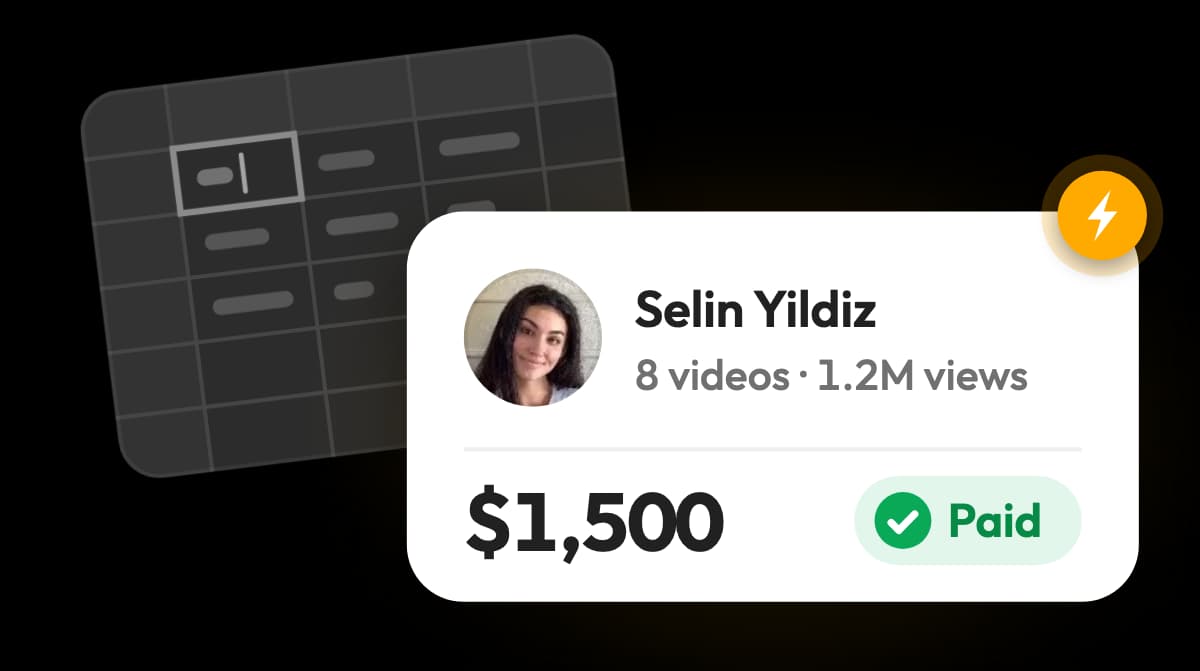
Check each calculated payout, adjust it if needed, then pay up to 50 creators at once.
In Social Status
Not offered. Work out each amount from the report and pay creators in another tool.
Where each one is better
S
Where Social Status is better
01
1. Reports clients can read
CSV, Excel, PDF, PowerPoint and Google Slides, white-label from $49.
02
2. Templates built for you
Send an edited PowerPoint and its team builds your template, with an account manager from Silver.
03
3. Six networks for brand pages
LinkedIn Company Pages and X next to Facebook, Instagram, TikTok and YouTube, with Stories and inbox metrics.
04
4. Meta ads in the same report
Every ad objective and placement, by campaign, ad set and ad.
05
5. Long history
Past posts fetched as far back as the plan allows: 1 to 3 years on professional plans.
06
6. A low,flexible start
A free plan, Micro at $9, monthly billing, no contract, and plan changes billed pro rata.
Where viral.app is better
01
1. Every creator,no login
Any public account on five platforms from a URL, with views on every post.
02
2. Pay on views,tested first
Base pay, CPM tiers, bonuses and caps, run on a creator's recent videos before launch.
03
3. Paid without paperwork
A merchant of record invoices every payout, and creators claim with one link in 180+ countries.
04
4. Creators who apply to you
Post a job on the Canvas UGC marketplace and invite the best-ranked matches.
05
5. API and scoped roles included
REST API, MCP server and webhooks from $199, view-only roles, and read-only client links from Ultra.
06
6. Creator videos as ads
Spark Ads and Meta partnership ads from any tracked post, with paid views kept out of creator pay.
What teams running creator programs say
David ParkJenni AI Founder
“viral.app has become core infrastructure for running organic marketing. It has helped us scale
to over a billion organic views.”
Zack HargettQuizlet/CoconoteCo-Founder
“viral.app feels like the first serious solution for managing high-volume UGC campaigns.”
Julian IvaldyWhoLiked Founder
“viral.app has solved our biggest pain points. It’s handling everything from global payouts to
invoicing and tax accounting.”
Running both, or moving your creators over
The two tools do different jobs, so many teams run both: Social Status for brand pages, competitors and client decks, viral.app for the creator program itself. Moving creators is light work because viral.app needs only each account's URL, and nobody has to connect or sign up. Once creators are out of Social Status, you may fit a smaller plan there: it lets you change plans any time, billed pro rata, and cancel without notice.
1
Day 1
Add your creators' accounts
Paste the account URLs, or send us the list and we add them. Nobody has to connect a profile.
2
Day 1
Write your deals as rules
Base pay per video, CPM tiers and bonuses, tested on recent videos before anyone posts.
3
First week
Hire where you need more
Post a Canvas UGC or Influencer job and invite the highest-ranked matches.
4
After that
Keep Social Status for brand reports
Use it for your own pages, competitors and client decks, or move to a plan with fewer profiles.
Questions about Social Status
Social Status is a social media analytics and reporting tool from Social Media Status Pty Ltd in Brisbane, Australia, started in 2013. Brands and agencies connect the Facebook Pages, Instagram Professional profiles, TikTok, YouTube, LinkedIn Company Pages and X profiles they run, add competitors and influencers, and export reports in CSV, Excel, PDF, PowerPoint or Google Slides. It has four tools: Profile, Ads, Competitor and Influencer Analytics. Its features page says it focuses purely on analytics and reporting.
Social Status is a social analytics and reporting suite: it reports on the pages you run, your competitors, your influencers and your Meta ads. viral.app is built for running performance UGC programs: it tracks every creator's posts from a URL on five platforms, pays creators on views through a merchant of record, and finds new creators on the Canvas UGC marketplace.
Small Business plans are Free, Micro at $9, Basic at $29 and Essential at $49 a month. Professional plans are Bronze at $99, Silver at $199, Gold at $399, Platinum at $799 and Enterprise at $1,499 a month. Yearly billing takes 25% off, for example $891 a year for Bronze. Plans differ by plan quota (the profiles you add), data history, users and report features. The API and data warehouse exports come from Gold, and its FAQ prices each at the plan's own monthly price (checked November 8, 2026).
Yes, it has a free plan: 1 profile on Facebook, Instagram or YouTube, 1 month of data history and 3 users, without report exports. Micro, Basic and Essential come with a 14-day free trial and Bronze with 7 days; Silver and above list no trial. viral.app has no free plan, and every monthly plan has a 14-day free trial.
Yes. Social Status is run by Social Media Status Pty Ltd in Brisbane, wholly owned by Social Status, Inc., a Delaware company, and backed by Right Side Capital. It has been around since 2013. Its plans page says over 70,000 marketers, brands and organizations trust it and shows logos such as FCB, TBWA, PwC and the United Nations; those are its own figures. Its site shows G2 badges, including High Performer. On Trustpilot, its claimed profile has a single review, from January 2022.
Yes, if the reports you build are about creators you pay. viral.app tracks any public creator account on TikTok, Instagram, YouTube, Facebook and Snapchat from a URL, with views on every post and no login from the creator, then pays creators on those views for a 3% fee on your side, with the API included from $199 a month. It can replace Social Status for creator tracking and sit beside it for brand pages. For LinkedIn, X, Stories and Meta ads reporting, Social Status stays the better tool.
Choose Social Status if you need affordable social analytics for the pages you run, competitor benchmarks, Meta ads reporting and white-label decks for clients, including LinkedIn and X, which viral.app doesn't cover. The two can run side by side, with viral.app handling the creator program.
Yes, with Influencer Analytics from the $29 Basic plan, with TikTok and X from Essential. Creators who connect their profile read-only share impressions, video views, clicks, Instagram Stories and follower demographics. Without a connection you can add any public profile on Facebook, Instagram (Business or Creator profiles only), TikTok, X or YouTube and see its engagement rate and interactions. Every creator profile counts toward your plan quota. viral.app tracks any public account from a URL, with views on every post and no login from the creator.
No. Social Status reports on influencer campaigns but doesn't calculate or send creator pay; its features page says it focuses purely on analytics and reporting. viral.app pays creators on views, with base pay, CPM tiers, bonuses and caps, through a merchant of record that invoices every payout. Its 3% fee is on your side, and none of it comes out of creator pay.
Yes. Post a job from Creator Hub on the Canvas UGC marketplace, review applications that carry each creator's full profile with portfolio videos, connected accounts, languages and location, then chat with applicants and hire. Payouts run through the integrated payout system for a 3% payout management fee on your side, and none of it comes out of creator pay, though creators may pay a fee for some payout methods, such as PayPal or international bank transfers.
Yes. viral.app is built for performance UGC programs where creator pay follows tracked campaign data: base pay per video, CPM tiers, milestone bonuses, caps and view windows, tested on a creator's recent videos before launch. Each payout waits for your approval, and creators claim it with one link.
Facebook Pages, Instagram Professional profiles connected to a Facebook Page, TikTok, YouTube (videos and Shorts), LinkedIn Company Pages and X. Free, Micro and Basic cover only Facebook, Instagram and YouTube. LinkedIn pages can't be added as competitors. Pinterest, Snapchat, Twitch, Tumblr and Reddit are listed as coming. viral.app tracks TikTok, Instagram, YouTube, Facebook and Snapchat.
Yes. viral.app tracks TikTok videos and photo carousels, Instagram Reels, YouTube Shorts, Facebook Reels and Snapchat Spotlight from any public account's URL, refreshed every 12 or 8 hours by plan. It doesn't track Stories, Instagram feed photos or long YouTube videos. See UGC analytics for how the data feeds reports and payouts.
Yes, from Gold. Its JSON endpoints fetch data and reports and add or remove competitor and influencer profiles and groups. Its Gold, Platinum and Enterprise plan cards list the API, while its plan FAQ calls it an optional add-on charged at the plan's own monthly price, $399 on Gold. A Data Warehouse add-on exports to AWS S3, Azure Data Lake Storage or SFTP on the same terms. We found no public API docs. viral.app includes a REST API, an MCP server and webhooks on every plan from Pro.
No. Social Status has a flat user structure, so every user you invite sees everything in the account, and its own FAQ advises against inviting clients unless the account is only for their project. Each client account needs its own plan. viral.app has scoped roles, including view-only, and from Ultra, shared links that give a client a live, read-only dashboard without an account, behind a password or an invite list if you want.
Its plans FAQ says you can cancel any time with no notice or penalties, and switch plans whenever you want, billed pro rata. Its terms (last updated March 31, 2021) bill each month in advance and say payments aren't refunded, except at its discretion.
No. viral.app keeps customer environments separated and does not use one customer's tracked accounts, tracked videos, prompts, queries or other non-public data to generate results, insights or AI content for other customers. See the viral.app privacy policy.
For social media reporting like Social Status: Socialinsider, Rival IQ or Iconosquare, or Hootsuite if you also publish posts. viral.app if your reports are about creators you pay to post short-form video: it tracks them on five platforms, pays them on views and finds new ones. Shortimize if you mainly track short-form accounts.
The public pages behind the facts on this page, and the date we last checked each one.
Checked Oct 2 to Nov 8, 2026
Pages on other sites14
LinkChecked
Social Status plans: monthly and yearly prices, plan quota, channels by plan, data history, exports, white label, custom report templates, users, flat user structure, account manager, data analyst, API and Data Warehouse add-ons, trials, FAQ
Social Status features: analytics and reporting only, inbox and Stories metrics, Meta ads, X and LinkedIn ads launching soon, influencer connections and groups











 viral.app